What Are Project Management Tools and Why You Need Them
Project management tools are software platforms that help teams plan, organize, and track work from start to finish. They simplify task assignment, improve team communication, and keep deadlines visible for everyone. Whether you manage a small team or a large organization, the right tool can save you hours of confusion and missed updates. This guide breaks down exactly what these tools do, how to choose the best one, and why they are essential for modern work.
Have you ever felt like your team is spinning its wheels? Tasks fall through the cracks. Deadlines sneak up on everyone. Files get lost in endless email threads. If this sounds familiar, you are not alone. The good news is that project management tools exist to fix exactly this kind of chaos.
Project management tools are software applications designed to help individuals and teams plan, organize, track, and complete work. They act as a central hub where everyone can see what needs to get done, who is responsible for each task, and when things are due. Think of them as a digital command center for your entire project.
These tools have become essential in today’s work world. Remote teams, hybrid offices, and freelancers all rely on them to stay connected and productive. Whether you are running a small startup or managing a large corporate project, the right project management software can transform how your team works together.
Key Takeaways
- Project management tools centralize all your tasks, files, and communication in one place, reducing chaos and confusion.
- They improve team collaboration by giving everyone a clear view of who is doing what and by when.
- Choosing the right tool depends on your team size, budget, and the type of projects you manage.
- Features like Gantt charts, kanban boards, and time tracking make planning and progress monitoring much easier.
- Even small teams and solo workers benefit greatly from using basic project management software.
- The best tools integrate with other apps you already use, creating a seamless workflow.
📑 Table of Contents
- What Exactly Are Project Management Tools?
- Why Project Management Tools Matter for Every Team
- Key Features to Look For in Project Management Tools
- Types of Project Management Tools
- How to Choose the Right Project Management Tool
- Common Mistakes to Avoid When Using Project Management Tools
- Final Thoughts on Project Management Tools
What Exactly Are Project Management Tools?
At their core, project management tools are digital platforms that help you manage every part of a project’s lifecycle. They replace messy spreadsheets, scattered email chains, and sticky notes with a single organized system. But they are so much more than just to-do lists.
Modern project management software comes packed with features that cover the full spectrum of work management. Let us break down what these tools actually do.
Task Management and Assignment
Every project is made up of smaller tasks. Project management tools let you create, assign, and track each task individually. You can set deadlines, add descriptions, attach files, and label tasks by priority. Everyone on the team knows exactly what they need to do and when it is due.
Team Collaboration and Communication
One of the biggest benefits of project management tools is that they bring communication into the same space as the work. Instead of texting about a task in one app and tracking it in another, everything lives in one place. Team members can leave comments, tag colleagues, and share updates directly on tasks.
Project Timeline and Scheduling
Most project management tools offer visual timeline views. These let you see the big picture of your project from start to finish. You can map out milestones, set dependencies between tasks, and spot potential bottlenecks before they become problems.
File Sharing and Document Management
Gone are the days of emailing files back and forth. Project management software usually includes built-in file storage. You can upload documents, images, and other files right next to the tasks they relate to. This keeps everything organized and easy to find.
Reporting and Dashboards
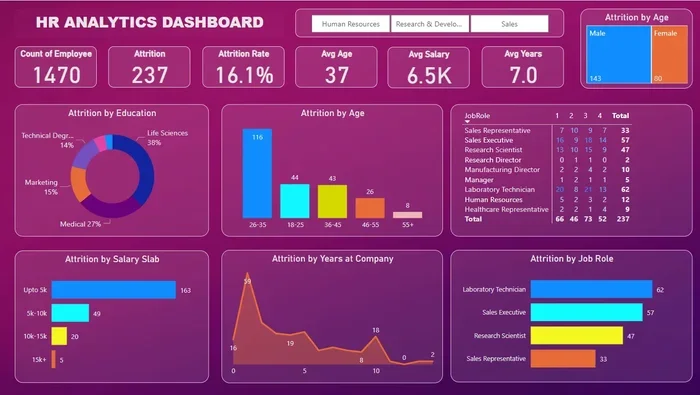
Good project management tools give you real-time insights into how your project is progressing. Dashboards show key metrics at a glance, like completed tasks, overdue items, and overall team velocity. These reports help managers make smart decisions quickly.
Why Project Management Tools Matter for Every Team
You might wonder if your team really needs another piece of software. The answer is almost always yes. Here is why project management tools have become non-negotiable for teams of all sizes.
They Keep Everyone on the Same Page
Miscommunication is one of the top reasons projects fail. When everyone has access to the same project management platform, there is no confusion about what needs to be done. Updates are visible to the whole team in real time. This single source of truth eliminates the guesswork.
They Improve Productivity and Efficiency
When tasks are clearly organized and deadlines are visible, people waste less time figuring out what to do next. Project management tools automate many routine processes, like sending reminders or updating status reports. This frees up your team to focus on actual work that matters.
They Help You Meet Deadlines
Missing deadlines hurts your reputation and your bottom line. Project tracking tools give you early warning signs when a project is falling behind schedule. You can adjust resources, reprioritize tasks, and realign your team before it is too late.
They Make Remote Work Possible
Remote and hybrid teams face unique challenges. Project management software bridges the distance gap by keeping everyone connected. Team members in different time zones can see what is happening, leave updates, and collaborate without needing to be in the same room.
Of course, remote work also means dealing with things like reliable internet and power. If your team works from home or in areas prone to outages, having a backup plan for connectivity is important. Understanding your power options, such as the differences between a generator and an inverter, can help you stay productive even during unexpected disruptions.
Key Features to Look For in Project Management Tools
Not all project management tools are created equal. Different teams need different features. Here is what you should look for when evaluating options for your team.
Task and Subtask Management
The foundation of any good project management software is strong task management. You should be able to create tasks, break them into subtasks, assign owners, set priorities, and track progress. This level of detail keeps even complex projects manageable.
Multiple Project Views
Different people prefer different ways of seeing their work. Look for tools that offer multiple views, such as:
- Kanban boards for visual task flow
- List views for detailed task breakdowns
- Calendar views for date-based planning
- Gantt charts for timeline and dependency mapping
Time Tracking and Reporting
Understanding how your team spends its time is invaluable. The best project management tools include built-in time tracking and detailed reporting. These features help you estimate future projects more accurately and identify where your team is spending too much or too little time.
Integrations with Other Apps
Your project management platform should play nicely with the other tools your team uses. Look for integrations with communication apps, cloud storage, email, and CRM systems. This creates a seamless ecosystem where information flows freely between tools.
Mobile Access
Modern teams are rarely tied to a desk. Make sure your chosen project management software has a solid mobile app. This lets team members update tasks, check notifications, and stay connected while on the go.
Scalability
As your team grows, your tools need to grow with you. Choose project management tools that can handle increasing numbers of users, projects, and tasks without slowing down or becoming too complex to manage.
Types of Project Management Tools
The world of project management software is diverse. Different types serve different needs. Understanding the main categories helps you choose the right fit.
Traditional or Waterfall Tools
These tools follow a linear, sequential approach to project management. They are great for projects with well-defined phases and clear deliverables. Gantt charts are a hallmark of this style. They work well for construction projects, manufacturing, and other fields where changes are costly.
Agile and Scrum Tools
Agile project management tools are built for teams that work in short, iterative cycles called sprints. They emphasize flexibility, continuous feedback, and rapid delivery. These tools are popular with software development teams but are useful for any project that benefits from an adaptive approach.
Kanban Tools
Kanban-style tools focus on visualizing work as it moves through different stages. A kanban board uses columns to represent workflow stages, and cards represent individual tasks. This approach is simple, visual, and incredibly effective for managing ongoing work.
All-in-One and Hybrid Tools
Many modern project management platforms combine elements of different methodologies. They offer the flexibility to switch between kanban boards, Gantt charts, and list views. These all-in-one solutions appeal to teams that want one tool to handle everything.
Specialized Tools
Some project management tools are built for specific industries or use cases. For example, there are tools designed specifically for marketing campaigns, construction projects, or event planning. These specialized options come with features tailored to those unique needs.
How to Choose the Right Project Management Tool
With so many options available, picking the right project management tool can feel overwhelming. Here is a straightforward approach to making the decision.
Step 1: Identify Your Team’s Needs
Start by asking yourself what your team actually needs. Do you need simple task tracking or full-scale project planning capabilities? How many people will use the tool? What type of projects do you manage most often? Answering these questions narrows your options significantly.
Step 2: Set a Budget
Project management software ranges from free plans with basic features to enterprise-level pricing. Determine your budget early and focus on tools that offer the best value within that range. Remember that the most expensive option is not always the best fit.
Step 3: Test Drive Top Contenders
Most reputable project management tools offer free trials. Take advantage of these to test the interface, features, and ease of use with your actual team. A tool that looks great on paper might not work well in practice.
Step 4: Check for Ease of Use
If the tool is too complicated, your team will resist using it. Look for project management software with an intuitive interface and a gentle learning curve. The best tools are easy enough that anyone on your team can start using them quickly.
Step 5: Evaluate Support and Training
Consider the level of support offered by the tool provider. Do they have helpful documentation? Is there a knowledge base or community forum? Good support makes a big difference when you run into issues or need to train new team members.
Common Mistakes to Avoid When Using Project Management Tools
Even the best project management tools can fail if they are not used correctly. Here are common mistakes teams make and how to avoid them.
Overcomplicating Your Setup
It is tempting to set up every feature and customization available. Resist this urge. Start simple and add complexity only as your team needs it. A clean, straightforward setup leads to better adoption and fewer headaches.
Not Training Your Team Properly
Giving your team access to a new project management platform without proper training is a recipe for confusion. Take the time to walk everyone through the basics. Offer tips, create short guides, and be available to answer questions during the first few weeks.
Ignoring Updates and Maintenance
Your project management tool is only as useful as the data inside it. Encourage your team to update task statuses regularly, close out completed items, and keep information current. A stale project board gives you a false sense of progress.
Using Too Many Tools at Once
It is easy to end up with five different apps for five different needs. This creates fragmentation and confusion. Try to consolidate your workflow into as few tools as possible. The best project management software can handle multiple needs in one place.
Final Thoughts on Project Management Tools
Project management tools have fundamentally changed how teams work together. They bring order to chaos, clarity to confusion, and efficiency to even the most complex projects. Whether you are a solo freelancer or leading a large organization, the right project management software can make a dramatic difference in your results.
The key is to choose a tool that fits your team’s specific needs, keep your setup simple and organized, and encourage consistent use. When your team embraces a good project management platform, you will wonder how you ever managed without it.
Remember that technology is only one piece of the puzzle. The best project management tools work best when combined with clear communication, strong leadership, and a team that is committed to staying organized. Start small, learn as you go, and watch your team’s productivity soar.
And if you are managing a remote team or working from home, do not overlook the basics that keep your workspace running smoothly. Reliable power and connectivity are just as important as your software setup. For those exploring backup power options, understanding what size whole house generator you need can ensure your home office stays powered through any situation, keeping your projects on track no matter what.
Ultimately, investing time in finding and mastering the right project management tools pays off in spades. You will save time, reduce stress, and deliver better results. That is a win for everyone on your team.
Frequently Asked Questions
What are project management tools used for?
Project management tools are used to plan, organize, track, and manage work within a team or organization. They help with task assignment, scheduling, collaboration, file sharing, and reporting. These tools give teams a central place to manage everything from simple to-do lists to complex, multi-phase projects.
Are project management tools only for large teams?
Not at all. Project management software is valuable for teams of all sizes, including solo workers and small businesses. Even if you are the only person on your team, a good tool helps you stay organized, track deadlines, and manage your workload effectively. Many tools offer free plans designed specifically for small teams.
What is the difference between task management and project management tools?
Task management focuses on individual tasks and to-do lists, while project management tools handle the bigger picture. They include task management as one feature but also offer timeline views, resource allocation, team collaboration, and reporting. Think of task management as a single tool and project management as the entire workshop.
Can project management tools work for remote teams?
Yes, they are actually essential for remote teams. Project management tools bridge the gap created by distance by keeping everyone connected and informed. Team members can see updates, share files, and communicate about tasks from anywhere in the world. This makes remote collaboration feel almost as seamless as working in the same office.
How much do project management tools cost?
The cost varies widely depending on the tool and the plan you choose. Many project management platforms offer free plans with basic features for individuals or small teams. Paid plans typically range from around $5 to $30 per user per month. Enterprise solutions with advanced features can cost more, but there is a great option for nearly every budget.
What features should I prioritize when choosing a project management tool?
Start with the features your team will use most often. Most teams benefit from task assignment, deadline tracking, file sharing, and team communication features. If your team works in sprints, look for agile project management features like sprint planning and backlog management. Choose a tool that grows with your needs and integrates well with your existing workflow.