Name Tracing Generator for Fun Learning Activities
A name tracing generator is a simple digital tool that creates customized worksheets for kids to practice writing their names. It makes learning fun, personalized, and effortless for parents and teachers. These generators save time, boost early literacy skills, and turn handwriting practice into an engaging activity children actually enjoy.
Every child loves seeing their own name on a page. There is something magical about watching a little one trace the letters of their name for the very first time. A name tracing generator turns that magic into a simple, everyday learning tool that parents and teachers can use with ease.
If you have ever tried to create handwriting worksheets by hand, you know how tedious it can be. Drawing dotted lines, spacing letters evenly, and making everything look neat takes forever. A digital tracing tool solves all of that in seconds. You type in a name, pick a style, and download a ready-to-print worksheet.
This guide walks you through everything you need to know about name tracing generators. We will cover how they work, why they matter, and how to pick the right one for your needs. Whether you are a parent helping a preschooler or a teacher managing a classroom, you will find practical tips and ideas here.
Key Takeaways
- Personalized Learning: A name tracing generator creates custom worksheets with any child’s name, making practice feel special and meaningful.
- Saves Time and Effort: Instead of hand-drawing worksheets, you can generate printable tracing pages in seconds.
- Builds Early Literacy Skills: Regular name tracing strengthens letter recognition, fine motor skills, and phonemic awareness.
- Great for Multiple Settings: These tools work perfectly for home schooling, classroom activities, and tutoring sessions.
- Kid-Friendly and Engaging: Many generators offer fun fonts, colors, and themes that keep children motivated.
- No Special Skills Needed: Anyone can use a name tracing generator with just a few clicks.
📑 Table of Contents
- What Is a Name Tracing Generator?
- Benefits of Using a Name Tracing Generator
- How to Choose the Right Name Tracing Generator
- Fun Ways to Use a Name Tracing Generator
- Common Mistakes to Avoid When Using Name Tracing Worksheets
- Expert Insights on Name Tracing and Early Learning
- Comparing Name Tracing Generators
- Quick Tips for Getting the Most Out of Your Name Tracing Generator
- Final Thoughts
What Is a Name Tracing Generator?
A name tracing generator is a simple software tool that creates printable worksheets for children to practice writing names. You enter a name, choose a font or style, and the tool generates a tracing page automatically.
These tools are designed for early learners. They are most commonly used with preschoolers, kindergarteners, and first graders who are just starting to develop their writing skills. But they can also help older children who need extra practice with letter formation and spacing.
How Does a Name Tracing Generator Work?
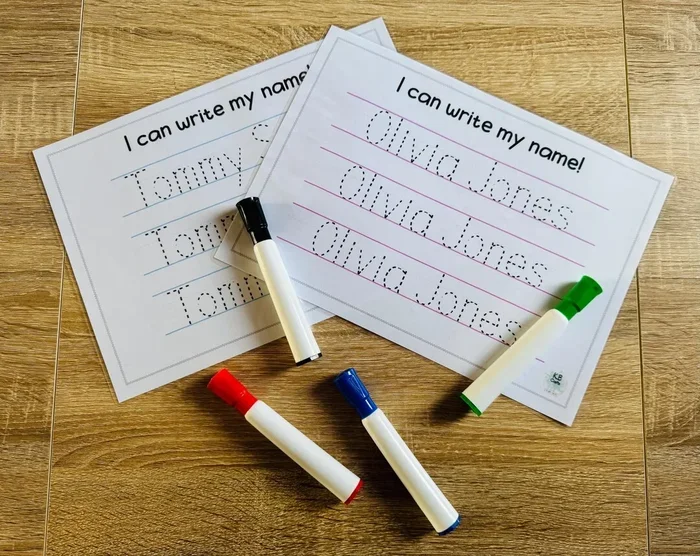
Most generators follow a simple process. You type the child’s name into a text field. The tool then creates dotted or dashed lines in the shape of each letter. The child traces over the lines with a pencil, crayon, or marker.
Many generators let you customize the output. You can choose from different fonts, adjust line sizes, add guiding arrows, and include starting dots. Some tools even let you add pictures or themed borders to make the worksheet more fun.
Interestingly, the basic idea behind how a generator works is the same whether it produces power or produces worksheets. Both take an input and transform it into a useful output automatically. A name tracing generator takes a name as input and produces a learning worksheet as output.
Why Are Name Tracing Activities Important for Kids?
Name tracing is one of the first steps in a child’s writing journey. It is personal, familiar, and motivating. When a child sees their own name on a page, they feel a sense of ownership and pride. That emotional connection makes them more willing to sit down and practice.
Here are some key reasons why name tracing matters:
- Letter Recognition: Children learn to identify each letter in their name before they recognize letters in other words.
- Fine Motor Skills: Tracing strengthens hand muscles and improves pencil grip and control.
- Letter Formation: Kids learn the correct shape and size of each letter through repetition.
- Spelling Awareness: Repeated tracing helps children memorize the sequence of letters in their name.
- Confidence Building: Mastering their own name gives children a sense of accomplishment that encourages further learning.
These benefits make name tracing one of the most valuable early learning activities. And a name tracing generator makes it easier than ever to provide consistent, high-quality practice.
Benefits of Using a Name Tracing Generator
Using a digital tool for name tracing offers advantages that hand-made worksheets simply cannot match. Let us look at the biggest benefits.
Speed and Convenience
Creating a tracing worksheet by hand can take 15 to 30 minutes. A generator does it in under a minute. You type the name, click a button, and download the PDF. This speed is especially helpful when you need multiple worksheets for an entire class.
Consistency and Quality
Hand-drawn worksheets often have uneven spacing and inconsistent line thickness. A generator produces clean, professional-looking pages every time. The dotted lines are evenly spaced, the letters are properly sized, and the overall layout is neat.
Customization Options
Most generators let you adjust several settings. You can change the font style, line color, dot size, and spacing. Some tools offer themed backgrounds like animals, seasons, or holidays. This level of customization keeps children engaged and excited about practice.
Reusability and Variety
With a generator, you can create unlimited worksheets. You can make tracing pages for every student in a class, every child in a family, or for seasonal themes throughout the year. The variety prevents boredom and keeps practice fresh.
Cost Effective
Many name tracing generators are free or very affordable. Compared to buying workbooks or hiring a tutor, a free digital tool is a budget-friendly option. You can print as many copies as you need without worrying about running out of materials.
How to Choose the Right Name Tracing Generator
Not all tracing generators are created equal. Some are simple and free, while others offer premium features. Here is what to look for when choosing a tool.
Ease of Use
The best generators are simple enough that anyone can use them. You should be able to type a name and generate a worksheet in just a few clicks. If the tool requires complicated setup or technical skills, it is probably not the right choice for most parents or teachers.
Font Options
Different children learn differently. Some do best with dotted lines, while others prefer dashed lines or arrow-guided paths. Look for a generator that offers multiple font styles and tracing formats. This flexibility lets you match the worksheet to each child’s learning needs.
Printable Output
Make sure the generator produces clean, print-ready PDFs. The worksheets should look good on standard paper sizes like A4 or Letter. Poor-quality prints can be frustrating for young learners who are trying to follow the lines.
Customization Features
The more you can customize, the better. Look for tools that let you add the child’s name, choose colors, adjust line thickness, and include extra practice lines. Some generators also allow you to add the child’s age or a fun title at the top of the page.
Cost and Accessibility
Free tools are great for getting started. But if you need advanced features like multiple name lists, batch generation, or no ads, a paid option might be worth it. Compare the features against your needs before committing to a subscription.
Fun Ways to Use a Name Tracing Generator
A name tracing generator is not just for boring worksheets. You can get creative with how you use it to make learning feel like play. Here are some fun ideas.
Create Themed Tracing Pages
Match the tracing worksheet to the current season or holiday. Generate pages with pumpkin borders in the fall, snowflakes in winter, or flowers in spring. Children love themed activities that feel special and timely.
Make Name Books
Generate tracing pages for each letter of a child’s name. Staple them together to create a mini name book. The child can work through one page per day and build their own personalized learning book.
Use for Sight Words
Once a child masters their name, use the same generator to create tracing pages for sight words or vocabulary words. This extends the learning beyond just names and builds a broader set of literacy skills.
Create Gifts for Family
Generate personalized tracing cards for grandparents, siblings, or friends. The child can trace a loved one’s name and give it as a gift. This adds an emotional connection that makes the activity even more meaningful.
Classroom Name Charts
Teachers can generate tracing pages for every student in the class. Use them to create a name wall or daily sign-in sheet. Seeing their name on display gives children a sense of belonging and pride.
Common Mistakes to Avoid When Using Name Tracing Worksheets
Even with a great generator, there are some common pitfalls to watch out for. Avoiding these mistakes will help you get the best results.
Using Worksheets That Are Too Advanced
Do not give a preschooler a worksheet designed for first graders. Match the difficulty level to the child’s current skill. Start with large, simple letters and gradually reduce the size as their skills improve.
Overloading With Too Much Practice
Tracing should be fun, not a chore. Keep sessions short, about 10 to 15 minutes. If a child loses interest, it is okay to stop and try again later. Quality practice matters more than quantity.
Ignoring Proper Pencil Grip
Make sure the child holds the pencil correctly from the start. Bad habits formed early are hard to break. If you notice poor grip, gently correct it before it becomes a habit.
Skipping Feedback and Encouragement
Children thrive on positive reinforcement. Praise their effort, not just their results. Point out specific things they did well, like “I love how you stayed on the lines” or “Your letters are getting so neat.”
Not Varying the Activities
Doing the same tracing worksheet every day can get boring. Mix things up with different fonts, colors, and themes. You can also alternate tracing with other activities like letter puzzles, magnetic letters, or writing in sand.
Expert Insights on Name Tracing and Early Learning
Early childhood educators agree that name tracing is one of the most effective entry points for writing instruction. Because a child’s name is the first word they learn to recognize and write, it creates a natural bridge between letter knowledge and written expression.
Experts recommend starting name tracing activities around age three or four, when children begin showing interest in letters. At this stage, the focus should be on fun and exploration, not perfection. Let the child trace in their own way, even if the results are messy.
By kindergarten, most children should be able to trace their name with reasonable accuracy. A name tracing generator makes it easy to provide daily practice without any prep work. Teachers can generate a week’s worth of worksheets in just a few minutes.
One important tip from educators: always pair tracing with verbal practice. As the child traces each letter, have them say the letter name and sound. This multi-sensory approach strengthens the connection between written symbols and spoken language.
Comparing Name Tracing Generators
Not sure which generator to choose? Here is a quick comparison of popular options to help you decide.
| Feature | Tool A | Tool B | Tool C |
|---|---|---|---|
| Free Version Available | Yes | Yes | No |
| Custom Fonts | Yes | Yes | Yes |
| Batch Generation | No | Yes | Yes |
| Themed Borders | No | Yes | Yes |
| Arrow Guidance | Yes | Yes | No |
| Mobile Friendly | Yes | Yes | No |
| Cost | Free | Free + Premium | Paid |
As you can see, there are options for every budget and need. Free tools work great for casual use, while premium options offer more features for teachers and serious homeschoolers.
Quick Tips for Getting the Most Out of Your Name Tracing Generator
- Keep it short: Limit sessions to 10-15 minutes to maintain your child’s attention and interest.
- Use thick lines for beginners: Larger dotted lines are easier for small hands to follow.
- Let the child choose: Allow them to pick the font color or theme. Ownership increases engagement.
- Print on cardstock: Thicker paper prevents ink from bleeding through and feels more substantial for little hands.
- Pair with a reward: A sticker or small treat after completing a worksheet can boost motivation.
- Make it routine: Consistent daily practice, even if brief, produces better results than occasional long sessions.
- Celebrate progress: Keep old worksheets to show the child how much they have improved over time.
Remember, the goal is to build a positive association with learning. A name tracing generator is just a tool. The real magic happens when a caring adult sits alongside the child, offers encouragement, and celebrates every small victory.
Another thing to keep in mind is that some tracing tools can be used alongside other learning activities. For instance, you might pair name tracing with reading aloud or phonics games. This creates a well-rounded learning experience that addresses multiple skills at once. The more senses a child engages during practice, the stronger the learning connection becomes.
Finally, do not worry if progress seems slow. Every child learns at their own pace. Some kids pick up tracing quickly, while others need more time and repetition. The important thing is to keep practice positive and pressure-free. A fun name tracing generator removes the stress of preparation and lets you focus on what really matters: supporting your child’s growth.
Final Thoughts
A name tracing generator is one of the simplest yet most powerful tools you can use to support a child’s early learning journey. It saves you time, delivers professional-quality worksheets, and makes practice feel personal and fun. Whether you are a parent, a teacher, or a tutor, this tool belongs in your learning toolkit.
The beauty of a name tracing generator lies in its simplicity. You do not need special training, expensive materials, or a teaching degree. Just type a name, print a page, and watch a child discover the joy of writing. That moment when a child traces their own name for the first time is something you will never forget.
So go ahead and give it a try. Find a generator that fits your needs, create your first worksheet, and start building those early literacy skills today. The results will speak for themselves.
Frequently Asked Questions
What age is a name tracing generator best for?
Name tracing generators work best for children ages three to seven. Preschoolers and kindergarteners benefit the most, but older children who need extra handwriting practice can also use them effectively.
Are free name tracing generators good enough?
Yes, many free generators produce high-quality worksheets. They may have fewer customization options than paid versions, but they are perfect for everyday use at home or in a classroom setting.
Can I use a name tracing generator for last names too?
Absolutely. Most generators let you type any name, including first names, last names, or full names. This is great for families who want children to practice both names.
How often should children practice name tracing?
Short daily sessions of 10 to 15 minutes work best. Consistency matters more than duration. A few minutes every day produces much better results than a long session once a week.
Do name tracing generators work for children with special needs?
Yes, many generators offer adjustable line sizes, simplified fonts, and other features that make them suitable for children with different learning needs. The customizable nature of digital tools is especially helpful in these situations.
Can I use a name tracing generator on a tablet or phone?
Many modern generators are mobile-friendly and work on tablets and phones. However, for the best tracing experience, printing the worksheets and using a pencil or crayon is recommended for young children.