Cursive Alphabet Generator Make Stunning Handwriting
A cursive alphabet generator is a powerful digital tool that lets you create beautiful, flowing handwritten letters in seconds. Whether you are designing wedding invitations, classroom materials, or personalized gifts, this tool transforms plain text into elegant cursive script. It saves time, boosts creativity, and delivers professional-quality results without any artistic skill. In this guide, we will walk you through everything you need to know about using a cursive alphabet generator.
A cursive alphabet generator is one of the most exciting digital tools available today. It takes your regular text and turns it into flowing, elegant cursive letters. Whether you are a hobbyist, a teacher, or a designer, this tool opens up a world of creative possibilities.
You might be wondering why anyone would need a tool like this. The answer is simple. Hand lettering takes years to master. But with a cursive alphabet generator, you can create stunning results in minutes. It is perfect for people who want beautiful writing without the hours of practice.
The beauty of these tools lies in their simplicity. You type a word or phrase, pick a style, and the generator does the rest. The output looks like it was written by a professional calligrapher. And the best part? You can use it for personal projects, business needs, or just for fun.
In this article, we will explore everything about cursive alphabet generators. We will cover how they work, what makes them great, and how you can get started today. By the end, you will understand exactly why this tool has become so popular among creatives everywhere.
Key Takeaways
- Easy to Use: A cursive alphabet generator makes creating beautiful lettering simple and fast for anyone.
- Versatile Applications: Use it for invitations, wall art, crafts, educational materials, and more.
- Saves Time and Effort: Skip the hours of practice and get stunning results instantly.
- Customizable Options: Adjust fonts, sizes, colors, and styles to match your unique vision.
- Great for Beginners: No artistic talent or handwriting skills required to produce gorgeous cursive designs.
- Cost-Effective: Many free and affordable options exist, making it accessible to everyone.
📑 Table of Contents
- What Is a Cursive Alphabet Generator?
- Why Use a Cursive Alphabet Generator?
- Top Uses for a Cursive Alphabet Generator
- How to Choose the Right Cursive Alphabet Generator
- Tips for Getting the Best Results
- Common Mistakes to Avoid
- Cursive Alphabet Generator vs. Hand Lettering
- Frequently Asked Questions
- Final Thoughts
What Is a Cursive Alphabet Generator?
A cursive alphabet generator is a software tool that converts standard text into cursive or script-style lettering. It uses digital fonts and algorithms to mimic the look of handwritten cursive. The result is a polished, flowing alphabet that looks like it was written with a pen or brush.
These generators come in many forms. Some are web-based tools you can use for free. Others are downloadable software programs. And some are features built into larger design platforms. No matter the format, they all share one goal. They make cursive lettering accessible to everyone.
The technology behind these tools has improved dramatically. Early versions looked stiff and artificial. Modern generators produce smooth, natural-looking curves and connections between letters. Many now include features like ligatures, swashes, and decorative elements that make the output truly stunning.
How Does a Cursive Alphabet Generator Work?
At its core, a cursive alphabet generator works by mapping each letter of the alphabet to a pre-designed cursive template. When you type your text, the tool stitches these templates together. It adjusts spacing, slant, and flow so the letters connect naturally.
Think of it like this. Each letter has a starting point and an ending point. The generator draws a line between them, just like your hand would when writing. Advanced tools even simulate pen pressure and stroke variation. This creates a more authentic, handmade feel.
Some generators also let you customize the output. You can change the slant angle, the thickness of strokes, and the overall style. This level of control means you are not stuck with one look. You can tailor the design to fit your specific needs.
Why Use a Cursive Alphabet Generator?
There are many reasons to use a cursive alphabet generator. Let us look at the biggest benefits that make these tools so valuable.
Saves Time and Effort
Hand-lettering takes a lot of time. Even experienced calligraphers spend hours on a single piece. With a generator, you can create the same quality in seconds. This is a huge advantage when you are working on a tight deadline.
Imagine you need 50 wedding invitations with beautiful cursive names. Doing that by hand would take days. A generator can produce all of them in minutes. That is a massive time savings.
No Artistic Skill Required
Not everyone can draw beautiful letters. That is perfectly okay. A cursive alphabet generator removes the skill barrier. Anyone can type text and get gorgeous cursive output. This makes it perfect for beginners who want to try lettering for the first time.
You do not need to know how to form each letter perfectly. The generator handles all the technical details. You just focus on the creative side. Pick your text, choose a style, and enjoy the results.
Consistent Quality
When you write by hand, every letter looks a little different. That is part of the charm, but it can also look inconsistent. A generator produces uniform, clean lettering every time. Each letter is perfectly shaped and evenly spaced.
This consistency matters a lot for professional projects. If you are creating materials for a business or event, you want everything to look polished. A generator delivers that level of quality reliably.
Wide Range of Styles
Most generators offer dozens or even hundreds of cursive styles. You can choose from elegant script, playful handwriting, bold calligraphy, and more. Some tools even let you mix and match styles within the same project.
This variety means you can find the perfect look for any occasion. Formal events call for elegant script. Fun parties might need a bubbly, playful style. The options are practically endless.
Top Uses for a Cursive Alphabet Generator
A cursive alphabet generator is incredibly versatile. People use it for all kinds of projects. Here are some of the most popular applications.
Wedding and Event Invitations
Wedding invitations are one of the most popular uses. Couples love the elegant, romantic look of cursive script. A generator lets them create beautiful invitations without hiring a calligrapher. You can add names, dates, and personal messages in stunning lettering.
The same applies to other events. Birthday parties, baby showers, anniversaries, and graduations all benefit from beautiful cursive text. It adds a personal, heartfelt touch that printed fonts simply cannot match.
Home Decor and Wall Art
Many people use cursive generators to create wall art. A beautifully lettered quote or family name looks amazing in a frame. You can design custom pieces that match your home decor perfectly.
This is also great for small business owners. A coffee shop might display a cursive menu board. A boutique could hang a sign with the shop name in elegant script. The possibilities for home and business decor are vast.
Crafts and DIY Projects
If you enjoy crafting, a cursive alphabet generator is a must-have. Use it to create labels for jars, tags for gifts, or designs for t-shirts. The possibilities are limited only by your imagination.
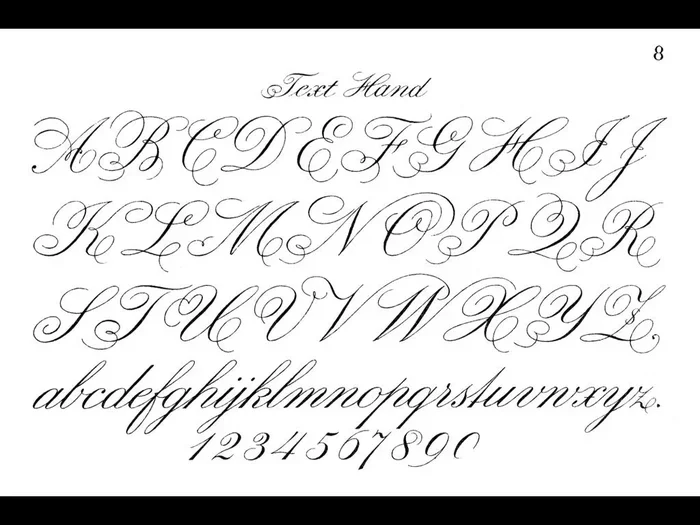
Teachers also love this tool. They use it to create colorful classroom materials. Cursive alphabet charts, motivational posters, and name tags all look fantastic when generated with the right tool.
Social Media and Digital Content
Social media posts with cursive text stand out. They grab attention and look more personal than standard fonts. Influencers and brands use cursive generators to create eye-catching graphics for Instagram, Pinterest, and Facebook.
You can also use these tools for digital invitations, email headers, and blog graphics. A well-designed cursive header makes any digital content look more professional and polished.
How to Choose the Right Cursive Alphabet Generator
Not all generators are created equal. With so many options available, it can be tricky to pick the right one. Here are the key factors to consider.
Ease of Use
The best generator is one you can use without a learning curve. Look for a tool with a simple, intuitive interface. You should be able to type your text, pick a style, and download the result within minutes.
Avoid tools that require complicated setups or technical knowledge. If you find yourself struggling to figure out how to use it, that is a red flag. The tool should make your life easier, not harder.
Style Variety
Check how many cursive styles the generator offers. More options mean more flexibility. Look for tools that include different font weights, slants, and decorative elements.
Some generators also allow you to create custom styles. This is a great feature if you want something truly unique. You can adjust every detail until the lettering looks exactly how you want it.
Output Quality
The quality of the output matters a lot. Look for generators that produce high-resolution images. You want your cursive text to look crisp and clear, whether it is printed on a small invitation or a large poster.
Vector formats are ideal because they can be scaled to any size without losing quality. If the tool only offers low-resolution images, the results may look blurry or pixelated when printed.
Cost and Accessibility
Many cursive alphabet generators are free to use. Others offer free basic features with paid upgrades. Consider your budget and how often you will use the tool before committing to a paid plan.
For occasional use, a free tool is usually sufficient. If you need it regularly for business projects, a paid subscription with more features might be worth the investment. Compare different options to find the best value.
Compatibility and Export Options
Make sure the generator can export files in formats you need. Common formats include PNG, JPG, SVG, and PDF. SVG is especially useful for scaling without quality loss.
Check if the tool works on different devices. A web-based generator lets you use it from any computer or tablet. A downloadable tool might offer more features but limits you to one device.
Tips for Getting the Best Results
Using a cursive alphabet generator is easy, but a few tips can help you get even better results. Here is what works best.
- Start with simple text. Short phrases look cleaner than long paragraphs. Keep your text concise for the best visual impact.
- Experiment with different styles. Do not settle on the first style you see. Try several options to find the perfect look.
- Pay attention to spacing. Adjust letter and word spacing to make the design more readable and balanced.
- Use high contrast colors. Dark text on a light background is easiest to read. But do not be afraid to try bold color combinations for creative projects.
- Save your favorites. Most generators let you save custom settings. This saves time when you create similar designs in the future.
- Proofread before downloading. Double-check spelling and names before generating the final output. A small typo can ruin an otherwise perfect design.
Quick Tips for Better Cursive Designs
Here are some quick tips to elevate your cursive designs. First, always choose a style that matches the tone of your project. Elegant script works for formal events. Fun, bubbly fonts suit casual celebrations.
Second, consider the background. A clean background makes cursive text pop. Busy backgrounds can distract from the lettering. Keep it simple for the best results.
Third, download your design in the highest quality available. This gives you flexibility for both digital and print use. You can always compress the file later if needed, but you cannot improve a low-resolution image.
Common Mistakes to Avoid
Even with a great tool, mistakes can happen. Here are some common pitfalls to watch out for.
- Using too many styles in one design. Stick to one or two cursive styles per project. Mixing too many fonts creates visual clutter.
- Ignoring readability. Fancy cursive looks beautiful but can be hard to read. Make sure your text is legible, especially for invitations and signs.
- Choosing low-resolution output. Always download the highest resolution available. Low-quality images look blurry and unprofessional.
- Forgetting to check spelling. A typo in cursive stands out even more than in regular text. Always proofread carefully before finalizing.
- Not testing the design in context. Preview your design on the actual product. A design that looks great on screen might not work on a printed invitation or a t-shirt.
Avoiding these mistakes will help you produce professional-quality cursive designs every time. A little extra care goes a long way toward great results.
Cursive Alphabet Generator vs. Hand Lettering
You might wonder whether a generator can really replace hand lettering. The honest answer is that each has its place. Let us compare the two approaches.
Hand lettering is an art form. It requires skill, practice, and patience. The results are unique and personal. Every piece reflects the artist’s individual style and technique. For those who love the craft, hand lettering is deeply rewarding.
A cursive alphabet generator, on the other hand, prioritizes speed and convenience. It produces consistent, high-quality results without any artistic training. For most practical purposes, a generator delivers what you need quickly and reliably.
Many professionals use both methods. They might hand-letter a special piece and use a generator for everyday projects. The best approach depends on your goals, timeline, and skill level. There is no wrong choice here.
Frequently Asked Questions
Can I use a cursive alphabet generator for commercial projects?
Yes, many generators allow commercial use of their outputs. However, always check the licensing terms of the specific tool you are using. Some free tools restrict commercial use. Paid plans usually offer full commercial rights. Read the terms carefully before using generated designs for business purposes.
Do I need any special software to use a cursive alphabet generator?
Most cursive alphabet generators are web-based and work directly in your browser. You do not need to install any software. Just visit the website, type your text, and generate your design. Some advanced tools may offer downloadable software with extra features, but the free online versions work perfectly for most users.
Can I customize the colors and sizes of the generated cursive text?
Absolutely. Most modern generators let you change colors, sizes, and even add backgrounds. You can adjust every aspect of the design to fit your project. This customization is one of the biggest advantages of using a digital tool over traditional hand lettering.
Is a cursive alphabet generator free to use?
Many generators offer free basic features that are more than enough for personal use. Some tools charge for premium styles or higher resolution downloads. The free options are perfect for beginners and casual users. You can always upgrade later if you need more advanced features.
Can I print designs made with a cursive alphabet generator?
Yes, you can print designs from most generators. Just make sure to download the highest resolution available, preferably in PNG or SVG format. Vector formats like SVG are best for printing because they scale perfectly to any size. Always check your printer settings for the best quality output.
How is a cursive alphabet generator different from a regular font?
A regular font is a standard set of characters used in digital text. A cursive alphabet generator creates connected, flowing lettering that mimics real handwriting. The output often includes decorative swashes and natural letter connections that standard fonts lack. This makes generator output look much more personal and artistic than typical digital fonts.
While you can install cursive fonts on your computer, a generator goes a step further. It creates fully connected, customized designs that look like they were written by hand. This is the key difference that makes generators so valuable for creative projects.
Final Thoughts
A cursive alphabet generator is a game-changer for anyone who loves beautiful lettering. It removes barriers and makes stunning cursive designs accessible to everyone. Whether you are creating wedding invitations, home decor, or social media graphics, this tool delivers professional results with minimal effort.
The technology behind these tools continues to improve every year. Modern generators produce incredibly natural-looking cursive that rivals hand lettering. With so many free and affordable options available, there has never been a better time to try one.
We hope this guide has given you everything you need to get started. Remember to experiment with different styles, keep your designs clean, and always proofread before finalizing. The world of cursive lettering is at your fingertips. Start creating something beautiful today and see what a cursive alphabet generator can do for your projects.