How to Use an AI Comic Generator to Create Stunning Comics
An AI comic generator lets you create professional comics in minutes without drawing skills. This guide walks you through everything from choosing the right tool to polishing your final panels. You will learn how AI comic generators work, which platforms to try, and proven tips to make your comics look amazing.
Have you ever wanted to create your own comics but thought you needed to be a talented artist? Think again. AI comic generators have changed the game completely. These powerful tools let anyone — from complete beginners to seasoned creators — design eye-catching comics in minutes. You do not need pencils, paper, or years of practice. All you need is a great idea and the right AI comic generator.
Whether you want to make webcomics, graphic novels, social media content, or just have fun, AI comic generators give you the power to bring your stories to life. In this guide, we will show you exactly how to use them. We will cover what they are, how they work, which tools to try, and the best tips for getting amazing results. Let us dive in.
Key Takeaways
- AI comic generators make comic creation fast, easy, and affordable for everyone.
- You do not need artistic skills to create professional-looking comics with AI tools.
- The best tools offer customization options for characters, panels, and dialogue.
- Following a simple step-by-step process ensures polished and engaging results.
- Avoiding common mistakes like over-reliance on AI saves time and improves quality.
- The future of comic creation is AI-powered, and now is the time to start.
📑 Table of Contents
What Is an AI Comic Generator?
An AI comic generator is a software tool that uses artificial intelligence to create comic strips, panels, and full comic pages. These tools use advanced algorithms and machine learning models to generate images, design layouts, and even write dialogue. The result? A finished comic that looks like it was made by a professional artist.
Some AI comic generators focus on specific styles. Others let you choose from many genres. You can create superhero comics, funny cartoons, manga-style stories, or realistic graphic novels. The flexibility is huge. You type in your ideas, and the AI does the heavy lifting.
Think of it like this. Just as a generator converts fuel into electricity, an AI comic generator converts your ideas into visual stories. You feed it prompts, and it produces complete comic panels ready for publishing.
Who Can Benefit from AI Comic Generators?
Almost anyone can use an AI comic generator. Here are some examples:
- Hobbyists who want to create comics for fun.
- Writers who want to visualize their stories.
- Content creators looking for unique social media material.
- Educators who want to make learning more visual.
- Small business owners needing engaging marketing comics.
- Aspiring comic artists who want to prototype ideas quickly.
The beauty of these tools is that they remove the technical barrier. You do not need to know how to draw. The AI handles the illustration part while you focus on storytelling.
How Does an AI Comic Generator Work?
Understanding how an AI comic generator works helps you use it better. The process is simpler than you might think. Most tools follow a similar workflow that turns text into finished comics.
The Technology Behind AI Comic Generators
Most AI comic generators rely on deep learning models, especially generative adversarial networks (GANs) and diffusion models. These models have been trained on thousands of comic images, art styles, and panel layouts. When you give the tool a prompt, it uses this training to generate images that match your description.
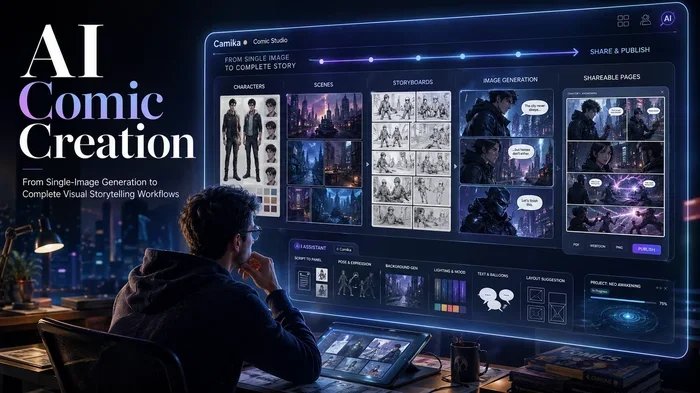
Here is a basic breakdown of the process:
- You enter a text prompt describing your scene, characters, or story.
- The AI analyzes the prompt and breaks it down into visual elements.
- The model generates images that match your description.
- The tool arranges the images into comic panels with dialogue and effects.
- You review and edit the final comic to make it your own.
Some advanced AI comic generators also handle text bubbles, sound effects, and page layouts automatically. This makes the entire process feel almost magical. You go from a blank page to a finished comic in a matter of minutes.
How to Get Started with an AI Comic Generator
Getting started is easy. You do not need technical skills. Just follow these simple steps:
- Choose an AI comic generator platform.
- Create an account and explore the dashboard.
- Enter your story idea or character description.
- Select a comic style or art direction.
- Let the AI generate your first panels.
- Review the output and make adjustments.
- Export your comic and share it with the world.
Much like you would start a generator by following simple steps, starting with an AI comic generator is straightforward and beginner-friendly. You do not need to read a manual to get going.
Benefits of Using an AI Comic Generator
There are many reasons to try an AI comic generator. Let us look at the biggest advantages.
Speed and Efficiency
Creating a comic the traditional way takes weeks or even months. Drawing, inking, coloring, and lettering each panel requires serious time and effort. An AI comic generator can produce a complete comic page in minutes. This speed lets you experiment with more ideas and publish more content.
No Artistic Skills Required
This is a game-changer. You do not need to know how to draw a straight line. The AI does all the artwork for you. You just need a clear idea of what you want. Write your story, describe your characters, and let the tool create the visuals.
Cost Savings
Hiring an artist or buying expensive software can cost a lot. Many AI comic generators offer free plans or affordable monthly subscriptions. Compare this to the cost of traditional comic production, and the savings are huge. Some tools cost less than a home generator costs for a full month of use, and they produce incredible results.
Endless Creativity and Customization
AI tools give you access to thousands of styles, characters, and settings. You can create a sci-fi epic, a romantic comedy, or a horror anthology — all with the same tool. The variety is nearly unlimited. You can also tweak every detail to match your vision.
Consistent Quality
When you work with human artists, quality can vary. With an AI comic generator, the output stays consistently good. The AI maintains style, proportion, and detail across all panels. This consistency makes your comics look professional and polished.
Step-by-Step: Creating Comics with AI
Now that you understand the benefits, let us walk through the actual process of creating a comic with an AI comic generator. Follow along with this practical guide.
Step 1: Define Your Story and Characters
Before you open any tool, take some time to plan your comic. Write a short summary of your story. Describe your main characters in detail. Note the setting, tone, and genre. The more specific you are, the better the AI output will be.
For example, instead of writing “a superhero story,” try “a young female superhero with glowing blue powers who fights crime in a futuristic city at night.” The second prompt gives the AI much more to work with.
Step 2: Choose Your AI Comic Generator
There are many AI comic generators available today. Some popular options include:
- ComicAI — great for manga and anime-style comics.
- Midjourney + layout tools — ideal for highly artistic comics.
- Storyboard That — perfect for simple, structured comic strips.
- DALL·E-based tools — offer flexibility in art styles.
- Canva AI features — good for beginners who want an all-in-one solution.
Pick the tool that best matches your style and goals. Many of them offer free trials so you can test them before committing.
Step 3: Generate Your Panels
Now it is time to create. Enter your prompts for each panel one at a time. Be descriptive about characters, expressions, actions, and backgrounds. Generate each panel separately, then arrange them into a sequence that tells your story.
Think of each panel as a frame in a movie. You want the reader to follow the action smoothly from one panel to the next. Use prompts that describe movement and emotion to keep the story flowing.
Step 4: Add Text and Dialogue
Most AI comic generators let you add speech bubbles, captions, and sound effects. Keep the text short and punchy. Comics rely on visual storytelling, so let the images do most of the heavy lifting. Use dialogue to reveal character personality and move the plot forward.
Step 5: Review, Edit, and Refine
Once your comic is assembled, go through it carefully. Check for consistency in character appearance, panel flow, and text placement. Make any edits needed. Some tools let you regenerate specific panels if they do not look right. Take your time with this step — it makes a big difference.
Step 6: Export and Share
When you are happy with your comic, export it in high resolution. You can share it on social media, publish it on a webcomic platform, or print it as a physical comic. The flexibility of AI comic generators means you can go from digital to print with ease.
Tips and Best Practices for AI Comics
Want your AI comics to look even better? Follow these practical tips.
Write Detailed Prompts
The more specific your prompt, the better the result. Include details about character appearance, setting, lighting, mood, and action. Vague prompts lead to generic images. Detailed prompts give the AI clear direction.
Maintain Character Consistency
One challenge with AI-generated comics is keeping characters looking the same across panels. To fix this, use consistent descriptions in your prompts. Reference the same character traits, clothing, and features in every panel prompt. Some tools also allow you to upload reference images to maintain consistency.
Use Simple Panel Layouts
Keep your comic layouts clean and easy to follow. A standard grid of three to four panels per page works great for most stories. Avoid overly complex layouts until you gain more experience with the tool.
Experiment with Different Styles
Do not be afraid to try different art styles. Generate the same scene in a few different styles and pick the one that best fits your story. AI comic generators give you the freedom to experiment without extra cost.
Add Your Personal Touch
AI tools are powerful, but they work best when you add your own creative input. Edit dialogue, adjust expressions, and refine compositions. Think of the AI as your assistant, not your replacement. Your unique voice and vision make the comic truly yours.
Keep Learning and Iterating
The more you use an AI comic generator, the better your results will be. Study comics you admire and try to replicate their style with your prompts. Over time, you will develop a feel for what works best with your chosen tool.
Common Mistakes to Avoid
Even with a great tool, it is easy to make mistakes. Here are some common pitfalls and how to avoid them.
Using Vague Prompts
Generic prompts produce generic comics. Be specific about every detail. Name your characters, describe their outfits, and set the scene clearly.
Ignoring Panel Flow
Good comics guide the reader’s eye naturally from one panel to the next. If your panels feel random or disconnected, the story loses its impact. Plan your page layout before generating images.
Over-Reliance on AI
AI is a tool, not a replacement for your creativity. Do not just accept every output without review. Edit, refine, and add your personal touch to make your comics stand out.
Neglecting Text and Dialogue
Strong visuals need strong words. Do not skip the dialogue and captions. They add depth to your characters and move your story forward. Keep the text concise and impactful.
Skipping the Editing Phase
rushing through the editing phase leads to sloppy comics. Always review your work carefully. Fix inconsistencies, adjust layouts, and polish the final product before publishing.
The Future of AI Comic Generation
The world of AI comic generators is evolving fast. New tools and features appear regularly, making comic creation even more accessible and powerful. Here is what the future looks like.
Soon, AI tools will offer even better character consistency across long comic series. You will be able to create entire graphic novels with recurring characters that look exactly the same in every scene. Voice-to-comic features may let you speak your story aloud and have the AI draw it for you.
Collaboration features are also on the horizon. Multiple creators could work on the same AI-generated comic in real time, each contributing their strengths. Writers could focus on storytelling, while artists refine the visuals — all powered by AI.
The cost of creating professional-quality comics will continue to drop. What once required a team of artists and months of work can now be done by one person in a few hours. This democratization of comic creation is exciting for storytellers everywhere.
As AI comic generators become more sophisticated, the line between human-made and AI-assisted comics will blur. The focus will shift from technical skill to storytelling quality. And that is a wonderful thing for the comic industry.
If you have ever dreamed of creating your own comics, there has never been a better time to start. Pick up an AI comic generator, follow the steps in this guide, and start bringing your stories to life today.
Final Thoughts
AI comic generators have opened up a world of creative possibility for everyone. You do not need to be an artist, a tech expert, or a professional writer. You just need an idea and the willingness to experiment. These tools handle the technical side so you can focus on what matters most — telling a great story.
From speed and affordability to creative freedom and consistent quality, the benefits are clear. Follow the step-by-step process outlined in this guide, avoid common mistakes, and keep improving your skills. With practice, you will create comics that amaze and inspire your audience.
The world of comics is changing, and AI comic generators are leading the way. Join the movement and start creating your own stunning comics today. Your story deserves to be told.
Frequently Asked Questions
What is the best AI comic generator for beginners?
Canva AI and Storyboard That are excellent choices for beginners. They offer simple interfaces, free plans, and plenty of templates. You can start creating comics right away without any prior experience. Both tools make it easy to learn the basics of AI comic creation.
Can I use AI comic generators for commercial projects?
Yes, many AI comic generators allow commercial use, but you should check each tool’s terms of service. Some platforms reserve certain rights, while others give you full ownership of your creations. Always read the licensing agreement before using AI-generated comics for profit.
Do I need any drawing skills to use an AI comic generator?
Not at all. That is the whole point of these tools. You only need to describe what you want in words. The AI handles all the drawing and illustration. This makes comic creation accessible to everyone, regardless of artistic ability.
How long does it take to create a comic with AI?
A simple comic can be created in under an hour. More complex projects with many panels and detailed prompts may take several hours. The speed depends on your tool, your prompt complexity, and how much editing you do. But overall, AI makes the process much faster than traditional methods.
Are AI-generated comics considered original content?
This depends on the tool and its licensing terms. In most cases, the comics you create are considered your original work. However, the AI model itself was trained on existing artwork. Always review the terms of your chosen platform to understand ownership rights and attribution requirements.
Can AI comic generators handle different comic styles?
Yes, most modern AI comic generators support a wide range of styles. You can create manga, superhero comics, cartoons, realistic art, and more. The key is to specify the style clearly in your prompts and experiment with different settings to find what works best for your story.