Try This Check Generator for Quick and Easy Results
A check generator lets you create checks online in minutes without visiting a bank or printer. Whether you need personalized checks for home or business checks for your company, a check maker tool gives you full control over your check design and layout.
Key Takeaways
- Saves Time and Money: A check generator eliminates the need for expensive pre-printed checks and long wait times.
- Full Customization: You can design every detail, from your check layout to logos and fonts.
- Easy to Use: No design skills needed. Most check software tools are simple and beginner-friendly.
- Secure and Reliable: Modern check printing tools include fraud protection and verification features.
- Works for Home and Business: Whether you need a single check template or hundreds of business checks, it scales with your needs.
- Instant Preview: You can see your digital check before printing, so there are no surprises.
📑 Table of Contents
- What Is a Check Generator and Why You Need One
- How a Check Generator Works
- Benefits of Using a Check Generator
- Features to Look for in a Check Generator
- Step-by-Step Guide to Creating Your Own Checks
- Common Mistakes to Avoid When Using a Check Generator
- How to Choose the Right Check Generator for Your Needs
- Final Thoughts on Using a Check Generator
What Is a Check Generator and Why You Need One
A check generator is a tool that helps you create checks digitally. Instead of ordering pre-printed checks from a store or bank, you design and print them yourself. It is like having a check maker right on your computer or phone.
The process is simple. You pick a check template, add your details, and print. That is it. No more waiting for checks to arrive in the mail. No more paying high prices for a box of personalized checks you barely use.
People use a check generator for many reasons. Some want to save money. Others want more control over how their checks look. And some just need a few checks fast. Whatever your reason, a check design tool makes it easy.
If you have ever wondered how to create checks at home, you are in the right place. This guide walks you through everything you need to know. From choosing the right check software to avoiding common mistakes, we cover it all.
Who Can Benefit from a Check Generator?
Almost anyone can use a check generator. Here are some examples of people who benefit the most:
- Small business owners who need business checks with their company logo.
- Freelancers who want to pay contractors with a professional-looking digital check.
- Families who want personalized checks with their own photos or designs.
- Bookkeepers who handle check printing for multiple clients.
- Anyone who ran out of checks and needs a quick solution.
The beauty of a check writer tool is that it works for everyone. You do not need to be a tech expert or a designer. The tools are built to be simple and fast.
How a Check Generator Works
Understanding how a check generator works helps you get the best results. The process is straightforward, but knowing the steps keeps you from making mistakes.
Step 1: Choose a Template
Most check software platforms offer a library of check templates. You can browse through different styles, colors, and layouts. Some tools even let you upload your own images or logos. This is where check customization really shines.
Step 2: Enter Your Details
Next, you fill in your information. This includes your name, address, routing number, and account number. A good check generator will save these details so you do not have to type them every time.
Step 3: Preview Your Check
Before you print, you get a check preview. This lets you see exactly what the final check layout will look like. You can make changes to the font, spacing, or placement of text. Think of it like a check format test run.
Step 4: Print and Use
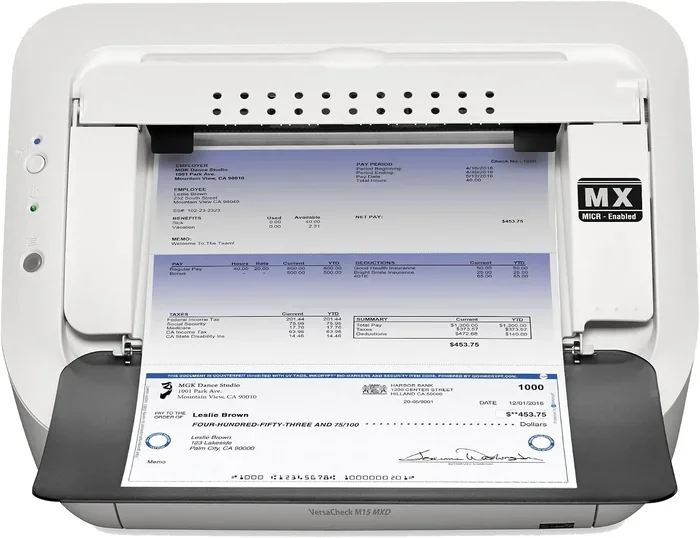
Once you are happy with the design, you print it on special check paper. The paper usually has a magnetic ink strip at the bottom for the routing number and account number. This ensures your secure checks work properly at banks and stores.
Benefits of Using a Check Generator
There are many reasons to use a check generator instead of buying pre-printed checks. Here are the top benefits:
Cost Savings
Pre-printed checks from the bank can cost a lot. A box of personalized checks might set you back thirty to fifty dollars or more. With a check generator, you buy check paper once and print as many as you need. Over time, this saves a significant amount of money.
Speed and Convenience
Need a check right now? A check maker tool lets you create checks in minutes. You do not have to wait for shipping or visit a store. This is especially helpful for business checks when a payment is due quickly.
Full Design Control
When you use a check design tool, you control every detail. Want your company logo on the check? Done. Want a specific check layout or font? You choose. This level of check customization is hard to find with store-bought checks.
Security Features
Many check software tools include built-in security features. These can include watermarks, microprint, and heat-sensitive ink patterns. These features help protect against check fraud and keep your account number safe.
Professional Appearance
For business owners, a well-designed digital check looks professional. It shows clients and vendors that you take your payments seriously. A check generator helps you create secure checks that look polished and clean.
Features to Look for in a Check Generator
Not all check generators are the same. Here are the features you should look for when choosing a tool:
Template Variety
A good check maker offers many check templates. Look for options that include different sizes, colors, and styles. The more choices you have, the easier it is to find something that fits your needs.
Easy Data Entry
The tool should make it simple to enter your routing number and account number. Some check software even lets you import data from a spreadsheet. This saves a lot of time, especially if you print business checks in bulk.
Preview and Edit Options
Always choose a check generator that offers a preview before printing. This feature lets you catch errors early. You can adjust the check format, fix typos, and move elements around until everything looks right.
Security Options
Look for tools that offer security features like holograms, microprint, and background patterns. These make your secure checks harder to counterfeit. If you are printing business checks, this is especially important.
Compatibility with Check Paper
Make sure the check design tool works with standard check paper sizes. Some tools are designed for specific paper types, so check the requirements before you start. Using the right paper ensures your printable checks work correctly at banks.
Customer Support
A reliable check generator should have good customer support. If something goes wrong or you have questions, you want help available. Look for tools that offer live chat, email support, or a detailed help center.
Step-by-Step Guide to Creating Your Own Checks
Ready to try a check generator? Here is a simple step-by-step guide to get you started.
Step 1: Pick Your Tool
Start by choosing a check software platform. There are many options available online. Some are free, while others charge a small fee. Look for one that matches your needs and budget. If you want a creative tool that helps with design ideas, you might explore a story AI generator for inspiration on layouts and themes.
Step 2: Select a Template
Browse the template library and pick a check template you like. Consider the purpose. If you need business checks, choose a clean and professional design. For personal use, you might want something more fun and colorful.
Step 3: Add Your Information
Enter your name, address, routing number, and account number. Double-check everything. A small mistake in the routing number can cause payment problems. Take your time and make sure every number is correct.
Step 4: Customize the Design
This is the fun part. Add your logo, choose your fonts, and adjust the check layout. You can also add a background pattern or image. The goal is to make your personalized checks unique and professional.
If you need help organizing your content or writing descriptions for your check designs, a free essay generator can help you draft clear and concise text for any labels or instructions.
Step 5: Preview Your Check
Use the preview feature to review your digital check. Look at every detail. Check the spelling, the placement of numbers, and the overall check format. Make any changes you need before printing.
Step 6: Print on Check Paper
Load your check paper into your printer. Make sure the paper is aligned correctly. Print a test page first to check the alignment. Once you are happy with the result, print your final checks.
Step 7: Let the Checks Dry
If you use inkjet printers, let the ink dry for a few minutes before handling the checks. This prevents smudging. Once dry, your printable checks are ready to use.
Common Mistakes to Avoid When Using a Check Generator
Using a check generator is easy, but mistakes can happen. Here are some common errors to avoid:
Skipping the Preview Step
Never skip the preview. It is the easiest way to catch errors before you print. A wrong routing number or misaligned logo can cause big problems.
Using the Wrong Paper
Not all paper works for check printing. Use the right check paper to ensure your checks are accepted by banks. Regular paper will not have the magnetic ink strip needed for the account number and routing number.
Forgetting to Save Your Design
Always save your check template after you create it. This way, you can reuse it later without starting from scratch. Saving also protects your work if your computer crashes or the tool logs you out.
Ignoring Security Features
Do not ignore the security options. If you are printing business checks, fraud protection is essential. Use watermarks, microprint, and other security features to keep your secure checks safe.
Printing Without Testing
Always print a test check first. Use it to verify that the check layout looks correct and that the numbers are aligned properly. A test print can save you from wasting an entire sheet of check paper.
How to Choose the Right Check Generator for Your Needs
With so many check maker tools available, choosing the right one can feel overwhelming. Here are some tips to help you decide.
Consider Your Volume
How many checks do you need? If you only need a few personalized checks for personal use, a free or low-cost tool will work fine. If you run a business and need hundreds of business checks, look for a tool that supports bulk printing and data import.
Think About Your Budget
Check software prices vary widely. Some tools are completely free. Others charge a monthly subscription. Set a budget before you start shopping. Remember that the cheapest option is not always the best. Look for a balance between price and features.
Check for Compatibility
Make sure the check generator works with your printer and operating system. Some tools are web-based and work on any device. Others require software installation. Choose the option that fits your setup.
Read Reviews and Testimonials
Before you commit to a tool, read reviews from other users. Look for feedback on ease of use, print quality, and customer support. A well-reviewed check design tool will save you time and frustration.
Test Before You Commit
Many check software platforms offer free trials. Take advantage of these. Test the tool, print a sample digital check, and see if it meets your needs. This is the best way to find the right check generator for you.
For broader ideas on creative tools and design inspiration, you might also explore a object generator to spark new design ideas for your check layouts.
Final Thoughts on Using a Check Generator
A check generator is a powerful tool for anyone who needs to create checks quickly and affordably. Whether you are a small business owner, a freelancer, or just someone who wants personalized checks at home, a check maker tool gives you exactly what you need.
The process is simple. Choose a template, enter your details, customize the design, preview, and print. With the right check software, you can create secure checks that look professional and work perfectly at any bank.
Remember to avoid common mistakes like skipping the preview or using the wrong paper. Take your time, and your printable checks will turn out great every time. Investing a little time in learning how to use a check generator pays off in savings, convenience, and peace of mind.
Start exploring your options today. Find a check generator that fits your needs and start creating checks the easy way. Your wallet and your time will thank you.
Frequently Asked Questions
What is a check generator?
A check generator is a digital tool that lets you design and print checks from your computer or phone. It replaces the need to buy pre-printed checks from a store or bank. You choose a template, add your details, and print your own personalized checks at home.
Is using a check generator safe?
Yes, most modern check software tools include security features like watermarks, microprint, and background patterns. These help protect your secure checks from fraud. Always choose a reputable check maker and avoid sharing your account number or routing number with untrusted sources.
Can I use a check generator for business checks?
Absolutely. Many check generators are designed specifically for business checks. They support bulk printing, logo uploads, and data import features. This makes it easy to create professional business checks for paying vendors, contractors, or employees.
Do I need special paper to print checks?
Yes, you need check paper that is compatible with your printer. Check paper has a special magnetic ink strip at the bottom for the routing number and account number. Using regular paper will not work with bank processing systems. Always check the paper requirements of your check design tool before printing.
How much does a check generator cost?
The cost varies. Some check generators are completely free. Others charge a one-time fee or a monthly subscription. Free tools usually have fewer templates and features. Paid tools offer more check customization options and better security features. Choose one that fits your budget and needs.
Can I preview my check before printing?
Yes, almost all check generators offer a preview feature. This lets you see your digital check before you print it. You can check the check layout, font placement, and number alignment. Using the preview helps you avoid mistakes and wasted check paper.