Must Have PC Repair Tool Kit for Beginners and Pros
Every computer owner needs a reliable pc repair tool kit to handle fixes and upgrades with confidence. This guide covers the essential computer repair toolkit items every beginner and professional should own. You will learn about must-have hardware repair kit tools, how to choose the right set, and common fixes you can do yourself.
Every computer owner should own a pc repair tool kit. Whether you are a beginner or a seasoned professional, having the right tools makes all the difference. A good computer repair toolkit helps you fix problems fast and keep your system running smoothly. Without the proper tools, even simple repairs can turn into frustrating experiences.
Many people spend hundreds of dollars on repair shops for fixes that take just minutes. Most of those jobs only need basic pc maintenance tools and a little know-how. With the right hardware repair kit on hand, you can handle dozens of repairs yourself. This guide walks you through everything you need to know about building or buying the perfect setup.
We will cover the essential tools, how to choose the best kit for your needs, and common problems you can solve at home. By the end, you will feel confident tackling your own repairs. Let us get started.
Key Takeaways
- A quality pc repair tool kit saves you money: Most common fixes cost nothing when you have the right tools and a little patience.
- Start with the essentials: A screwdriver set, anti-static wrist strap, compressed air, and thermal paste cover about 80 percent of repair jobs.
- Match your kit to your skill level: Beginners do well with a basic set, while pros need advanced diagnostic tools and specialty drivers.
- Safety comes first: Always use an anti-static wrist strap and power down your system before starting any repair work.
- Read reviews before buying: Not all kits are created equal. Look for durable materials, organized cases, and positive user feedback.
- Keep your kit organized: A good case with compartments makes it easy to find the right tool fast, whether you are at home or on the go.
- You can fix most problems yourself: From dust buildup to loose cables, the right pc troubleshooting tools put you in control of your computer’s health.
📑 Table of Contents
- Why Every PC User Needs a Repair Tool Kit
- Essential Tools Every PC Repair Tool Kit Should Include
- How to Choose the Best PC Repair Tool Kit for Your Needs
- Top PC Repair Tool Kits Worth Your Money
- Tips for Using Your PC Repair Tool Kit Safely
- Common PC Problems You Can Fix With the Right Tools
- Building Your Own PC Repair Tool Kit
- Final Thoughts
Why Every PC User Needs a Repair Tool Kit
A pc repair tool kit is one of the smartest investments you can make. Computers break down, slow down, and need upgrades over time. Having your own set of tools means you are always ready. You do not have to wait for a repair shop or pay expensive labor fees.
The Cost of Not Having the Right Tools
Think about how much a simple repair costs at a shop. Often, it is just a screwdriver job or a cable swap. Yet you might pay $50 to $150 for something you could do in ten minutes. Over time, those costs add up fast. A quality computer repair toolkit pays for itself after just one or two repairs.
Beyond money, there is the cost of downtime. When your computer goes down, your work stops. Having your own pc maintenance tools means you can fix things immediately. You do not have to wait days for an appointment or ship your computer away.
How a Tool Kit Saves You Time and Money
Time is valuable. When you have the right tools ready, repairs happen in minutes instead of hours. You do not waste time searching for a missing screwdriver or driving to a repair shop. A well-organized hardware repair kit keeps everything in one place.
Here are some quick numbers to think about:
- A basic pc repair tool kit costs between $20 and $80.
- A single repair shop visit costs $50 to $150 on average.
- Most common fixes take less than 30 minutes with the right tools.
- Over one year, DIY repairs can save you $200 or more.
The math is clear. Investing in a good set of electronic repair tools pays off quickly. You also gain the freedom to work on your own schedule.
Essential Tools Every PC Repair Tool Kit Should Include
Not all tool kits are the same. Some come packed with extras you will never use. Others miss the tools you actually need. Here is a breakdown of the must-have items for any solid pc repair tool kit.
Screwdrivers and Drivers
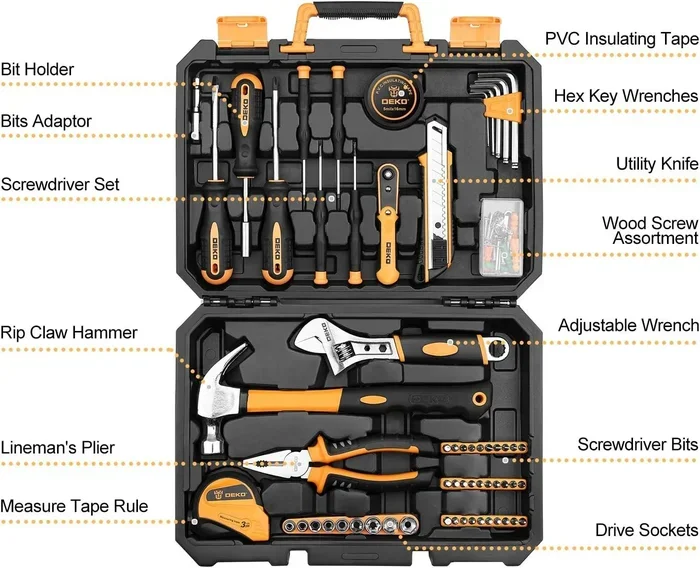
Screwdrivers are the backbone of any computer repair toolkit. You need a quality screwdriver set for pc that includes both Phillips and flathead sizes. Most PC screws use Phillips head drivers, but you will also encounter flathead screws in older machines.
Here are the screwdriver types you should have:
- Phillips head drivers in sizes PH0, PH1, and PH2
- Flathead drivers in small and medium sizes
- Hex driver bits for M2.5 and M3 screws
- Torx drivers (T5, T6, T8) for laptop and specialty screws
- Pentalobe drivers for certain Apple products
A precision screwdriver set with a magnetic tip is a game changer. Magnetic tips hold screws in place so they do not fall into your computer. Look for kits that include a rotating handle for comfort during longer jobs.
Cleaning and Maintenance Tools
Dust is the enemy of every computer. It builds up over time and causes overheating, which leads to performance problems. A good cleaning kit for pc should include several key items.
Start with a compressed air duster. This is one of the most important pc maintenance tools you can own. A can of compressed air or an electric air blower blows dust out of fans, heatsinks, and hard-to-reach spots. Use it regularly to keep your system cool.
Other cleaning essentials include:
- Microfiber cloths for wiping surfaces gently
- Isopropyl alcohol (90% or higher) for cleaning thermal paste and contacts
- Cotton swabs for detail cleaning in tight spaces
- Thermal paste for reapplying between the CPU and heatsink
- Anti-static brush for gently removing dust from delicate components
Replacing old thermal paste is one of the simplest ways to improve cooling performance. Over time, thermal paste dries out and loses its effectiveness. A small tube of quality paste costs just a few dollars and can make your PC run significantly cooler.
Diagnostic and Testing Equipment
For more advanced repairs, you need diagnostic tools. These help you identify problems quickly and accurately. A multimeter for electronics is essential for checking voltage, continuity, and resistance on cables and components.
A cable tester is another valuable addition to your pc repair tool kit. It quickly checks if Ethernet cables, power cables, or data cables are working properly. This saves you from guessing whether a bad cable is causing your problem.
Consider adding these diagnostic tools:
- USB flash drive with diagnostic software for boot-time testing
- POST card for motherboard troubleshooting
- LED flashlight or headlamp for seeing inside dark cases
- Magnifying glass or loupe for inspecting small components and solder joints
- Cable management ties and clips for organizing internal wiring
These tools might seem like extras, but they become invaluable when you are dealing with tricky pc troubleshooting situations. A flashlight alone can save you hours of squinting and guessing.
How to Choose the Best PC Repair Tool Kit for Your Needs
Shopping for a pc repair tool kit can be overwhelming. There are hundreds of options online, and the prices vary wildly. How do you know which one is right for you? It comes down to understanding your needs and knowing what to look for.
Beginner vs Pro Needs
If you are just starting out, you do not need an expensive pro-grade kit. A basic computer repair toolkit with the essential screwdrivers, cleaning supplies, and an anti-static wrist strap is all you need. Focus on quality over quantity. Five or six good tools beat a set of twenty cheap ones.
For professionals and advanced users, the needs are different. You want a comprehensive hardware repair kit with specialty drivers, precision tools, and diagnostic equipment. Look for kits with modular cases so you can organize tools exactly how you need them.
Here is a simple comparison to help you decide:
| Feature | Beginner Kit | Professional Kit |
|---|---|---|
| Price Range | $20 – $60 | $60 – $200+ |
| Number of Tools | 10 – 25 | 50 – 150+ |
| Screwdriver Types | Basic Phillips and flathead | Full set including Torx, hex, and pentalobe |
| Case Quality | Basic pouch or box | Hard case with foam inserts |
| Diagnostic Tools | None or basic multimeter | Full multimeter, cable tester, POST card |
| Best For | Home users and casual repairs | Technicians and frequent repair work |
What to Look for in a Quality Kit
Not all kits are created equal. When shopping for a pc repair tool kit, keep these factors in mind:
Material quality matters. Look for tools made from S2 steel or chrome vanadium steel. These materials stay sharp longer and resist bending. Cheap tools made from weak steel strip screws and break easily.
Organization is key. A good kit comes with a case that has compartments for every tool. When you are in the middle of a repair, you do not want to dig through a messy bag looking for the right driver. A well-designed case saves you time and frustration.
Ergonomics count. Tools with comfortable handles reduce hand fatigue during longer jobs. Look for knurled grips or rubber-coated handles. Your hands will thank you after an hour of work.
Compatibility is important. Make sure the kit includes drivers for the screws used in your specific computer brand. Different manufacturers use different screw types, so having a versatile set is crucial.
Top PC Repair Tool Kits Worth Your Money
The market is full of options, and choosing the right one can be tricky. Here are some recommendations based on different budgets and needs. These picks cover everything from budget-friendly options to premium professional-grade kits.
Best Budget Options
You do not need to spend a lot to get a solid pc repair tool kit. Several affordable options deliver great value for beginners. Look for kits in the $20 to $40 range that include a basic screwdriver set, anti-static wrist strap, and compressed air can.
Budget kits are perfect for people who only need to do simple maintenance. Cleaning dust from fans, swapping RAM, or replacing a hard drive are all jobs a basic kit handles easily. You can always upgrade later as your skills grow.
Best Premium Kits for Professionals
For serious technicians and pros, investing in a premium computer repair toolkit makes sense. These kits include high-quality tools, durable cases, and advanced diagnostic equipment. Expect to pay $80 to $200 for a top-tier set.
Premium kits often come with lifetime warranties and replacement bits. The tools are built to withstand daily professional use. If you repair computers for a living or do it as a serious hobby, a premium kit is worth every penny.
Specialty Kits Worth Considering
Beyond general-purpose kits, there are specialty options worth mentioning. A laptop repair kit focuses on the small screws and precision tools needed for laptops. These kits often include spudgers and prying tools designed for opening thin laptop shells without damage.
An electronic repair tools kit focuses on delicate work like soldering and micro-soldering. These are for advanced users who need to repair circuit boards or replace tiny components on motherboards.
Tips for Using Your PC Repair Tool Kit Safely
Using your pc maintenance tools safely is just as important as having them. Electricity and delicate components do not forgive mistakes. Follow these safety tips every time you open up your computer.
Anti-Static Safety
Static electricity is one of the biggest dangers when working inside a computer. A single spark can fry sensitive components like the motherboard or RAM. Always wear an anti-static wrist strap when working inside your PC.
Here is how to use one properly:
- Clip the wrist strap to your bare wrist.
- Connect the other end to a grounded surface, like the metal part of your computer case.
- Work on a hard, non-carpeted surface whenever possible.
- Touch the metal case before touching any internal components.
- Never work on your computer while wearing socks on carpet.
Following these simple steps dramatically reduces the risk of static damage. It takes just a few seconds and could save you hundreds of dollars in replacement parts.
Common Mistakes to Avoid
Even experienced people make mistakes when working on computers. Here are some common errors to watch out for:
Forgetting to unplug your computer. Always disconnect the power cable and all peripherals before opening the case. Working on a powered computer is dangerous and can damage components.
Using the wrong size screwdriver. A too-large or too-small driver will strip screws. Once a screw is stripped, it becomes much harder to remove. Always match your driver to the screw head exactly.
Applying too much force. If a component does not come loose easily, stop and reassess. You might be missing a screw or overlooking a clip. Forcing things can break plastic clips and crack circuit boards.
Skipping the anti-static precautions. Even if you have never had a static problem before, it only takes one time. Protect your investment by always grounding yourself.
Not keeping track of screws. Different screws go in different places. Use a muffin tin or a screw organizer to keep them separated. Mixing up screws can lead to stripping threads or damaging components.
Common PC Problems You Can Fix With the Right Tools
The best part of owning a pc repair tool kit is the confidence to tackle real problems. Many common computer issues are easy to fix when you have the right tools and a little guidance. Here are some of the most frequent problems and how to solve them.
Dust Buildup and Overheating
Overheating is one of the most common computer problems. Dust accumulates inside the case over months and blocks airflow. Fans work harder but cool less effectively. Your computer slows down, shuts off unexpectedly, or makes loud fan noise.
Fixing this is straightforward with your pc repair tool kit:
- Open your computer case using the appropriate screwdriver.
- Use your compressed air duster to blow dust out of fans, heatsinks, and vents.
- Hold fans still while blowing air to prevent them from spinning too fast.
- Wipe down surfaces with a microfiber cloth.
- Reapply thermal paste to the CPU if it has been more than two years.
This simple cleaning can dramatically improve temperatures and performance. Most people notice quieter operation and better speeds after a thorough cleaning.
Loose Connections and Hardware Issues
Sometimes the problem is as simple as a loose cable. Over time, vibrations and movement can cause cables to shift. A loose RAM stick, a disconnected power cable, or a shifted GPU can cause all sorts of strange behavior.
Here is how to diagnose and fix loose connections:
- Check that all power cables are firmly seated on the motherboard and GPU.
- Reseat your RAM by pressing the clips and removing the sticks, then firmly pushing them back in.
- Make sure your SATA cables are connected properly to both the drive and the motherboard.
- Use your cable tester to verify that cables are working correctly.
- Inspect all connections with a flashlight to spot anything that looks loose or damaged.
Many “mysterious” computer problems turn out to be loose connections. A little investigation with your pc troubleshooting tools often reveals the culprit quickly.
Slow Performance and Software Issues
Not all computer problems are hardware-related. Sometimes slow performance comes from software issues. However, your pc repair tool kit can still help. A clean, dust-free computer runs cooler, which means components perform better and last longer.
Combine physical cleaning with these software steps:
- Run diagnostic software to check for failing hardware.
- Clean up unnecessary files and programs to free up resources.
- Check your pc maintenance tools for any dust that might be blocking airflow to critical components.
- Update drivers and firmware for better performance.
Sometimes the fastest fix is the simplest one. A good cleaning and a software check can bring an old computer back to life.
Replacing Components
With the right computer repair toolkit, you can replace common components like hard drives, RAM, and graphics cards. Each replacement follows a similar process:
- Power down and unplug the computer.
- Ground yourself with your anti-static wrist strap.
- Open the case and locate the component.
- Disconnect any cables and remove mounting screws.
- Insert the new component and secure it firmly.
- Reconnect cables and close the case.
- Power on and test the new component.
Replacing components yourself saves significant money and gives you a deeper understanding of how your computer works. Start with simple swaps like RAM or storage drives before moving on to more complex components like the CPU or motherboard.
Building Your Own PC Repair Tool Kit
Some people prefer to build their own pc repair tool kit rather than buying a pre-made set. This approach lets you choose exactly the tools you need and avoid paying for extras you will never use.
Start with a quality case. A good toolbox or roll-up kit with compartments keeps everything organized. Then add tools one by one based on what you actually need. Here is a suggested shopping list for a custom build:
- Precision screwdriver set with magnetic tips and multiple driver heads
- Anti-static wrist strap with a reliable ground clip
- Compressed air duster or electric air blower
- Thermal paste (a small tube lasts for many applications)
- Isopropyl alcohol and microfiber cloths for cleaning
- Multimeter for testing voltage and continuity
- LED flashlight or headlamp for visibility inside cases
- Prying tools and spudgers for opening cases without damage
- Cable ties and clips for organizing internal wiring
- Small tray or container for keeping screws organized
Building your own kit takes a little more effort, but it gives you complete control over quality and contents. You end up with exactly the tools you need, nothing more and nothing less.
Remember, the best pc repair tool kit is the one you will actually use. Choose tools that feel good in your hand and cover the repairs you are most likely to encounter. As your skills grow, you can always add more specialized tools to your collection.
Final Thoughts
A quality pc repair tool kit is an essential investment for anyone who owns a computer. Whether you are a beginner just getting started or a professional who fixes machines every day, the right tools make all the difference. You save money, gain independence, and build confidence with every repair you complete.
Start with the essentials and grow your collection over time. Focus on quality tools that will last, and always prioritize safety. With the right computer repair toolkit in hand, there is very little you cannot fix yourself. So go ahead, build your kit, and take control of your computer’s health today.
Frequently Asked Questions
What is the best pc repair tool kit for beginners?
A basic kit with a precision screwdriver set, anti-static wrist strap, compressed air duster, and thermal paste is all a beginner needs. Look for kits in the $20 to $50 range that include these essentials in a compact case. Focus on quality tools rather than quantity.
Do I really need an anti-static wrist strap?
Yes, an anti-static wrist strap is one of the most important pc maintenance tools you can own. Static electricity can damage sensitive components like the motherboard and RAM without you even noticing. It is a small investment that protects your entire computer.
Can I use a regular screwdriver set instead of a specialized pc repair toolkit?
You can, but it is not ideal. Regular screwdrivers often lack the precision and magnetic tips needed for computer work. A dedicated screwdriver set for pc includes the right sizes and types of drivers for computer screws. It makes repairs faster, safer, and prevents stripped screws.
How often should I clean my computer with my pc maintenance tools?
You should clean your computer every 3 to 6 months. In dusty environments or homes with pets, you may need to clean more frequently. Regular cleaning with your compressed air duster and microfiber cloth prevents dust buildup and keeps temperatures low.
What is the difference between a pc repair tool kit and a laptop repair kit?
A laptop repair kit focuses on smaller, more precise tools suited for thin laptop shells. It often includes prying tools and specialty screwdrivers for tiny laptop screws. A general pc repair tool kit covers both desktop and laptop needs but may include larger tools better suited for desktop cases.
How much should I spend on a pc repair tool kit?
For most users, $30 to $80 is a sweet spot for a quality computer repair toolkit. Budget kits under $30 may lack durability, while kits over $100 are usually aimed at professionals. Invest in what fits your needs and skill level, and remember that a good kit pays for itself after just one or two repairs.