Create Stunning Medieval Fonts with This Free Generator
A medieval font generator lets you create beautiful old-world text styles in seconds. This free tool transforms ordinary text into gothic, calligraphy, and old English fonts perfect for projects, social media, and crafts. You do not need any design skills or expensive software to get started. Simply type your text, pick a style, and copy your medieval masterpiece. Learn everything you need to know right here.
A medieval font generator is one of the most fun and useful tools you can find online today. Whether you are designing a tattoo, creating a fantasy game poster, or just want to make your social media posts stand out, these tools give you instant access to beautiful old-world text styles. The best part? Most of them are completely free and take only seconds to use. You do not need to be a graphic designer or own expensive software. All you need is a few clicks and your imagination.
In this guide, we will walk you through everything you need to know about using a medieval font generator. You will learn how they work, what styles are available, and how to get the best results for your projects. We will also share practical tips and common mistakes to avoid. By the end, you will be creating gorgeous decorative text like a pro. Let us dive in and explore the world of ornate lettering and historical typography together.
Key Takeaways
- Free and Easy to Use: A medieval font generator lets you create stunning text styles without any cost or design experience.
- Multiple Styles Available: Choose from gothic, blackletter, calligraphy, and old English font options for any project.
- Copy and Paste Functionality: Generate ornate lettering instantly and paste it anywhere online or in print.
- No Special Software Needed: Everything works right in your browser with just a few clicks.
- Great for Many Uses: Medieval fonts work well for tattoos, invitations, game design, social media, and more.
- Completely Free: Unlike paid options that can cost as much as a house generator, this tool costs nothing.
📑 Table of Contents
What Is a Medieval Font Generator?
Understanding the Basics
A medieval font generator is an online tool that converts regular text into ancient font styles inspired by the Middle Ages. These styles include gothic font designs, blackletter font patterns, and old English font variations that date back centuries. The generator uses special character sets called Unicode to render these beautiful letters on your screen.
Unlike traditional font installation, a vintage font generator works entirely in your browser. You type your message, select a style, and the tool instantly transforms it. There is no downloading required. No fonts to install. No software to learn. This makes it incredibly accessible for anyone who wants to add a touch of medieval elegance to their work.
Why Medieval Fonts Are So Popular
Medieval fonts have seen a huge resurgence in recent years. People love the dramatic, mysterious feel of gothic lettering and the ornate beauty of calligraphy font styles. Here are some of the top reasons these fonts remain so popular:
- Tattoo designs: Many people choose fancy font styles for meaningful quotes and names.
- Social media posts: Decorative text helps your posts stand out in a crowded feed.
- Game and movie design: Fantasy genres rely heavily on medieval alphabet styles for world-building.
- Wedding invitations: Old English scripts add a timeless, elegant touch to special events.
- Branding and logos: Brands that want a historic or artisanal feel often use ornate lettering.
- Crafts and DIY projects: Scrapbooking, card making, and signage all benefit from these styles.
The demand for free font tools has grown alongside this popularity. People want beautiful results without spending money. That is exactly what a good medieval font generator delivers.
How Does a Medieval Font Generator Work?
The Technology Behind Font Conversion
Under the hood, a medieval font generator uses something called Unicode character mapping. Unicode is a universal standard that assigns a unique code to every character in almost every writing system in the world. Medieval and decorative fonts are built into this system using special code points that browsers can render.
When you type “Hello” into the generator, the tool does not actually change your original letters. Instead, it replaces each letter with a pre-designed decorative font character that looks similar but has a completely different visual style. This is why you can paste the generated text into social media, emails, and documents without any issues.
Unicode and Font Rendering
One of the biggest advantages of using Unicode-based text generator tools is compatibility. Because the characters are part of the Unicode standard, they display correctly on almost all devices and platforms. Your copy and paste font will look the same on Windows, Mac, phones, and tablets.
However, there is one thing to keep in mind. Some very old devices or specific apps may not support all Unicode characters. If you notice a box or question mark instead of your beautiful medieval alphabet, try a different style within the generator. Most modern tools offer multiple variations so you can always find one that works everywhere.
How to Use a Medieval Font Generator
Step-by-Step Guide
Using a medieval font generator is incredibly simple. Here is exactly how to get started:
- Open the tool: Navigate to the generator website in your browser.
- Type your text: Enter the words or phrase you want to transform in the input box.
- Choose a style: Browse through the available font style options and click on one that catches your eye.
- Preview the result: The transformed text will appear instantly below your input.
- Copy the text: Click the copy button to grab your decorative text to your clipboard.
- Paste and enjoy: Paste your new fancy font into any app, document, or social media platform.
That is it! Here is how to start using any text generator tool effectively. The entire process takes less than a minute, and you can generate as many styles as you want for free.
Copy and Paste Your Medieval Text
The copy-and-paste feature is what makes these tools so powerful. Unlike traditional fonts that require installation, Unicode-based decorative text works everywhere. You can paste it into Instagram captions, Facebook posts, WhatsApp messages, Word documents, and even email signatures.
Pro tip: If you are using the text for a tattoo design or print project, always double-check how the characters look before finalizing. Some old English font styles use special symbols that may render differently in certain programs. Testing early saves time and frustration.
Popular Medieval Font Styles to Explore
Gothic and Blackletter Fonts
Gothic font and blackletter font styles are perhaps the most iconic medieval text designs. These fonts feature sharp, angular lines and intricate letter shapes that instantly evoke a sense of history and mystery. They are perfect for dramatic headings, tattoo designs, and fantasy-themed projects.
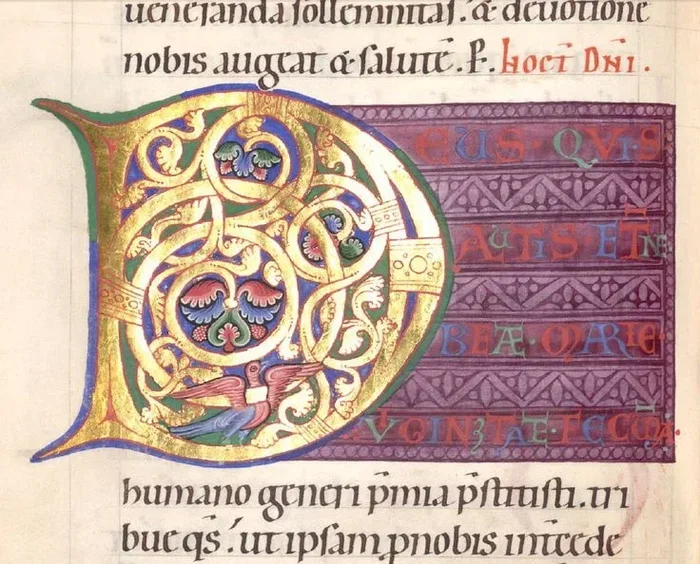
Blackletter styles were actually used in medieval manuscripts throughout Europe. They remained the dominant printed typeface in Germany until the 20th century. Today, they are experiencing a major comeback in graphic design, streetwear branding, and personal expression through ornate lettering.
Calligraphy and Script Styles
If you prefer something more flowing and elegant, calligraphy font and script styles are excellent choices. These designs feature smooth, connected strokes that mimic traditional handwriting. They work beautifully for wedding invitations, formal certificates, and artistic projects.
A good script font generator gives you options ranging from casual cursive to formal copperplate styles. The key is choosing a style that matches the tone of your project. For something personal and warm, go with a flowing script. For something formal and prestigious, choose a more structured calligraphy style.
Old English and Fantasy Fonts
Old English font styles take inspiration from historical documents, royal decrees, and ancient manuscripts. These fonts often feature elaborate serifs and heavily decorated letters. They are perfect for projects that need a sense of tradition, authority, or timelessness.
Fantasy fonts go a step further by incorporating magical and mythical elements. Think dragon-shaped letters, rune-inspired characters, and ornate borders. These styles are incredibly popular in video game design, book covers, and themed events. When choosing a fantasy font, make sure it remains readable at smaller sizes, especially for body text.
Best Practices for Using Medieval Fonts
Matching Fonts to Your Project
Not every medieval font style works for every project. Choosing the right one makes a big difference in how your final design feels. Here are some quick tips to help you match fonts to projects:
- Tattoos: Choose bold gothic font or blackletter font styles that are clean and easy to read on skin.
- Social media: Use lighter script or calligraphy styles that add flair without overwhelming your message.
- Wedding stationery: Go for elegant calligraphy or Old English styles that feel romantic and timeless.
- Game design: Fantasy and ornate styles work best for titles and headers, while simpler fonts work for body text.
- Branding: Choose a style that reflects your brand personality. A brewery might use bold blackletter, while a boutique might use flowing script.
Keeping Your Design Readable
One of the most common mistakes people make is using overly decorative decorative text for long passages of text. While a medieval font generator can produce beautiful results, those styles are best used for short phrases, headings, and titles. For body text, stick with clean, simple fonts that are easy to read.
Another tip is to always test your text at the size it will actually be used. A font that looks amazing at large sizes can become illegible when shrunk down. If you are designing for print, make sure to proof your copy and paste font on the actual material before committing to a final version.
Why Choose a Free Medieval Font Generator?
Cost Benefits
The most obvious advantage of using a free medieval font generator is the cost. Many professional font packs and design software can cost hundreds of dollars. Some premium font services charge monthly subscriptions just for access to a library of styles. A free online generator gives you instant access to dozens of beautiful medieval alphabet styles at zero cost.
To put this in perspective, a quality house generator installation can cost thousands of dollars. Compare that to a free font tool that delivers stunning results in seconds. The value is undeniable, especially for hobbyists, students, and small business owners working with tight budgets.
Comparison: Free vs Paid Generators
Not all text generator tools are created equal. Here is a quick comparison of what you can expect from free versus paid options:
| Feature | Free Generator | Paid Generator |
|---|---|---|
| Cost | Zero dollars | Monthly or one-time fee |
| Number of Styles | Dozens of styles | Hundreds of styles |
| Customization Options | Basic size and color | Advanced styling controls |
| Ease of Use | Very easy, browser-based | May require software |
| Quality of Output | High for most uses | Professional-grade |
| Installation Required | No | Often yes |
For most personal and creative projects, a free generator more than meets your needs. You can always upgrade to a paid tool if you find yourself needing more advanced features. But for getting started, the free options are fantastic.
Remember, choosing the right font style is a lot like choosing the right generator for your home. You need to match the tool to your specific needs. Just as you would not overspend on a generator you do not need, you do not need to pay for fancy tools when a free medieval font generator does the job perfectly.
Conclusion
A medieval font generator is one of the simplest and most enjoyable tools you can add to your creative toolkit. Whether you are a beginner exploring historical typography for the first time or a seasoned designer looking for quick fancy font options, these tools deliver incredible results with zero effort. The wide variety of styles, from bold gothic font designs to elegant calligraphy font scripts, means there is something perfect for every project.
The best part is that you do not need any special skills, expensive software, or technical knowledge. Just type your text, pick a style, and watch your words transform into beautiful ornate lettering. With free access to dozens of ancient font styles, there has never been a better time to explore the world of medieval typography. Start experimenting today and let your creativity shine.
Frequently Asked Questions
Is a medieval font generator really free to use?
Yes, most medieval font generators available online are completely free to use. You do not need to create an account or pay any fees. Simply visit the website, type your text, and generate beautiful fonts instantly. Some sites may offer premium features for a fee, but the core text generator tool functionality is always free.
Can I use medieval fonts for commercial projects?
This depends on the specific generator and the font styles it offers. Many free font tools allow commercial use of their generated text, but some may have restrictions. Always check the terms of service before using generated fonts for business purposes or product sales. When in doubt, reach out to the tool’s creator for clarification.
Do I need to install anything to use a medieval font generator?
No installation is required at all. A vintage font generator works entirely in your web browser. You just need an internet connection and a device with a modern browser. This is one of the biggest advantages of these tools compared to traditional font installation methods that require downloading and setting up fonts on your computer.
Why does my generated text look different on different devices?
Generated text uses Unicode characters, which are supported by most modern devices and platforms. However, some older devices or specific apps may not render all Unicode characters correctly. If your medieval alphabet looks different on another device, try selecting a different style within the generator. Most tools offer multiple variations to ensure broad compatibility.
Can I combine different medieval font styles in one project?
Absolutely! Mixing styles can create visually interesting designs. For example, you might use a bold blackletter font for a heading and a lighter script font for a subtitle. Just make sure the combination remains readable and does not feel cluttered. Contrast is your friend when pairing different font style options together.
Are medieval fonts suitable for professional use?
Medieval fonts can work well in professional settings when used appropriately. They are great for headlines, logos, and branding elements that benefit from a historic or artisanal feel. However, for body text in professional documents, it is best to stick with clean, readable fonts. Use medieval font styles strategically to add personality without sacrificing clarity.