Discord Text Generator Create Stylish Messages Instantly
A discord text generator lets you transform plain messages into stylish, eye-catching chat text in seconds. Whether you want fancy fonts, cool symbols, or decorative styles for your Discord profile or server, these free tools make it incredibly easy. This guide covers everything you need to know about choosing and using the best discord text generator tools available today.
If you spend time on Discord, you know how important it is to stand out. Your messages, profile, and status all say something about you. A discord text generator helps you do exactly that. It turns boring, plain text into something bold, stylish, and totally unique. Whether you are spicing up your profile bio or making a statement in a group chat, these tools give you instant creative power.
You do not need to be a designer or a tech expert to use them. In fact, most of these tools are so simple that anyone can start making cool Discord messages in under a minute. This guide walks you through everything you need to know. We will cover how these tools work, the best options available, and practical tips to make your Discord presence shine. Let us dive in.
Key Takeaways
- Easy to Use: A discord text generator requires zero technical skills — just type and copy.
- Free Tools Available: Most stylish text generators for Discord are completely free online.
- Boosts Your Profile: Stylish messages help your Discord profile and chats stand out.
- Multiple Styles: You can choose from fancy fonts, bold, italic, cursive, and Unicode text styles.
- Works Everywhere: Discord text styles work in usernames, bios, status messages, and chat channels.
- No Installation Needed: These tools run directly in your browser — no downloads required.
📑 Table of Contents
- What Is a Discord Text Generator?
- How Does a Discord Text Generator Work?
- Benefits of Using a Discord Text Generator
- Best Discord Text Generator Tools You Can Try
- Tips for Creating Stylish Discord Messages
- Discord Text Generator vs Manual Formatting
- Common Mistakes to Avoid
- How to Make Your Discord Text Generator Experience Better
- Final Thoughts
What Is a Discord Text Generator?
A discord text generator is an online tool that changes regular text into decorative, stylish versions. You type in a normal word or phrase, and the tool transforms it into something visually different. The result might be bold, italic, cursive, or filled with special Unicode symbols.
These generators use something called Unicode characters. Unicode is a standard that computers use to display text. It includes thousands of special symbols and letters from different languages and fonts. A good text generator picks from these characters to create styles that Discord supports.
The best part? You do not need to install anything. You simply visit a website, type your text, pick a style, and copy the result. Then paste it into Discord. It works in usernames, bio sections, status messages, and anywhere else you can type in Discord.
Who Can Benefit from a Discord Text Generator?
Lots of people use these tools. Here are some common users:
- Gamers who want their Discord names and messages to look cool.
- Content creators building a unique brand on Discord servers.
- Community managers who want to make announcements stand out.
- Friends and groups who like fun, decorative chat styles.
- Artists and designers looking for quick text styling without design software.
No matter who you are, a discord text generator can add a fun, personal touch to your chatting experience.
How Does a Discord Text Generator Work?
Understanding how these tools work is simple. When you type a word into a discord text generator, the tool converts each letter into a Unicode equivalent. For example, the letter “A” might become a fancy cursive “𝒜” or a bold “𝗔”. The tool then gives you the full converted text ready to copy.
Think of it like how a generator converts fuel into electricity — a text generator converts plain letters into styled versions. Both take something basic and transform it into something more powerful. The process happens instantly, right in your browser.
Here is a quick look at the steps:
- You type your normal text into the input box.
- The tool processes each character and finds its Unicode equivalent.
- You scroll through the style options and pick one you like.
- You click the copy button.
- You paste the styled text into Discord.
That is it. No coding, no downloads, no accounts needed. Most generators work the same way, which makes them super accessible for everyone.
Why Unicode Matters for Discord Styling
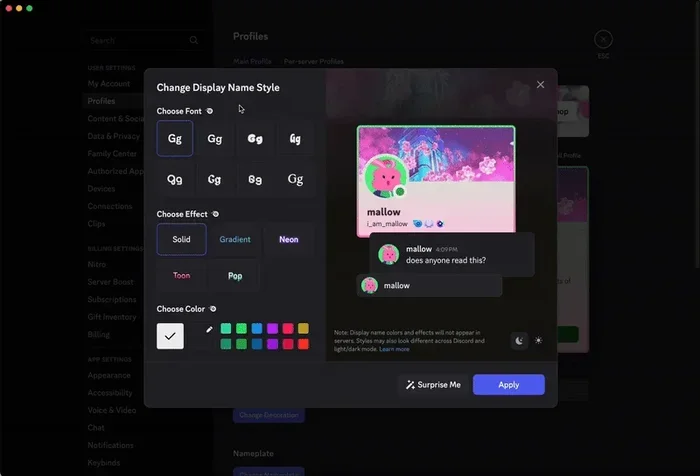
Discord supports Unicode text. This means you can use special characters in your messages, username, and bio. Unicode gives you access to thousands of symbols, letters, and fonts. A good discord text generator taps into this full library to give you the widest range of styles.
Some styles you might see include:
- Bold and italic text
- Bold italic combinations
- Cursive or script-style letters
- Fraktur (German-style) fonts
- Circled or squared letters
- Sans-serif and serif variations
- Small caps and subscript styles
Each of these styles uses different Unicode blocks. The best generators offer many of them in one place, so you can pick the look you want without searching elsewhere.
Benefits of Using a Discord Text Generator
Using a discord text generator comes with several real advantages. Let us break them down.
1. Instant Style Upgrades
You can go from plain text to fancy text in seconds. No need to search for font downloads or learn design software. Just type, generate, copy, and paste. The speed of these tools is one of their biggest draws.
2. Free and Easy to Access
Most of these tools cost nothing. You do not need to create an account or pay a subscription. Just open the website and start generating. This makes them perfect for anyone who wants to try out new styles without any commitment.
3. Works Across All Discord Platforms
Whether you use Discord on your phone, tablet, or computer, styled text works the same way. The Unicode characters display correctly across all devices and platforms. So your stylish messages look great everywhere.
4. Makes Your Profile Stand Out
Your Discord profile says a lot about you. A styled username or bio catches the eye. It shows that you put thought into your online presence. A discord text generator gives you the tools to make that first impression count.
5. Safe and No Installation Required
You do not need to download any software. This means no risk of malware or viruses. You also do not need to give any personal information to use these tools. They run entirely in your browser, keeping you safe and private.
Best Discord Text Generator Tools You Can Try
There are many tools out there, but some stand out from the rest. Here are some of the best options for creating stylish Discord messages.
StyleBot
StyleBot is a popular choice for Discord users. It offers a wide range of text styles, including bold, italic, and decorative fonts. The interface is clean and easy to use. You type your text, pick a style, and copy the result directly into Discord.
FancyTextGenerator
This tool gives you access to dozens of fancy text styles. It includes cursive, gothic, and script fonts that look great in Discord bios and status messages. The best part is that it lets you preview your text before copying it.
DiscordFontGenerator
As the name suggests, this tool focuses specifically on fonts that work well in Discord. It offers a good mix of bold, italic, and decorative styles. The tool is fast and generates styled text almost instantly.
Unicode Text Converter
This is a more versatile tool that goes beyond just Discord. You can use it to create styled text for any platform. It supports a wide range of Unicode styles, giving you maximum creative freedom.
When choosing a tool, look for one that offers a variety of styles, loads quickly, and does not require you to sign up. The best generators keep things simple and fun.
Quick Tips for Choosing the Right Tool
- Pick a tool that offers many style options.
- Make sure the styles work in Discord usernames and bios.
- Choose a generator that loads fast and does not lag.
- Avoid tools that ask for personal information.
- Test a few tools to find the one you like best.
Tips for Creating Stylish Discord Messages
A discord text generator is a great tool, but knowing how to use it well makes all the difference. Here are some tips to help you get the best results.
Keep It Readable
Stylish text looks great, but it should still be easy to read. Avoid using too many different styles in one message. Stick to one or two styles that complement each other. If your friends have to squint to read your message, you have gone too far.
Match the Style to the Mood
Think about the vibe you want to create. A cursive font might work well for a casual bio, but it could be hard to read in a fast-moving chat. Bold text works great for announcements or emphasis. Choose styles that fit the situation.
Use Styling Sparingly for Maximum Impact
Less is often more. A single stylish message stands out more than a wall of decorative text. Use your generator to highlight key moments, announcements, or important messages. This keeps your style feeling special rather than overwhelming.
Test Styles Before Sending
Always preview your styled text before sending it. Some Unicode characters might not display correctly on all devices. Copy your text into a notepad first to make sure it looks right. This small step saves you from awkward formatting issues.
Keep Your Username Consistent
If you use a styled username, keep it consistent across platforms. This helps people recognize you easily. A discord text generator can help you create a username that is both unique and memorable.
Experiment and Have Fun
The best part about these tools is that they are fun. Do not be afraid to experiment with different styles. Try out new looks and see what works for you. Discord is a creative space, and your text should reflect that.
Discord Text Generator vs Manual Formatting
You might wonder why you need a generator at all. After all, Discord has built-in formatting options like bold, italic, and strikethrough. Those are great for chat messages, but they do not work everywhere. You cannot use Discord markdown in your username or bio.
A discord text generator fills this gap. It gives you styled text that works in places where Discord’s native formatting does not. Here is a quick comparison:
| Feature | Discord Native Formatting | Discord Text Generator |
|---|---|---|
| Works in chat messages | Yes | Yes |
| Works in usernames | No | Yes |
| Works in bio sections | No | Yes |
| Works in status messages | No | Yes |
| Style variety | Limited (bold, italic, etc.) | Wide range of fonts and styles |
| Requires formatting codes | Yes | No |
| Works on mobile | Yes | Yes |
As you can see, a text generator gives you much more flexibility. It opens up styling options that Discord’s native tools simply cannot match.
If you are curious about how other generator tools compare, you might want to check out how how much a home generator costs to understand the broader world of generator tools. Similarly, if you are exploring different types of generators, learning how to start a generator can give you a broader perspective on generator technology.
Common Mistakes to Avoid
Using a discord text generator is simple, but there are a few mistakes to watch out for.
- Using too many styles at once. This makes your messages hard to read and can annoy other users.
- Ignoring readability. If nobody can read your text, the style does not matter.
- Copying text that breaks Discord. Some Unicode characters are not supported by Discord and may show up as blank boxes or question marks.
- Using generators that ask for login details. Always use trusted tools that do not require your Discord password.
- Overusing styled text. Even the coolest font gets old if every single message uses it.
Avoiding these mistakes keeps your Discord experience positive and ensures your styled text always looks its best.
How to Make Your Discord Text Generator Experience Better
A few small tweaks can make a big difference. First, bookmark your favorite generator website so you can access it quickly. Second, keep a notepad with your go-to styled usernames and bios so you do not have to regenerate them every time. Third, try different generators to find the one with styles you love the most.
You can also combine a text generator with Discord’s built-in features. Use bold markdown for emphasis and styled Unicode text for your name or bio. This layered approach gives you the best of both worlds.
Remember, the goal is to make your Discord presence feel like you. A discord text generator is just a tool to help you express yourself. Use it to add personality, not to replace genuine connection with your friends and community.
Final Thoughts
A discord text generator is one of the easiest ways to upgrade your Discord experience. It is free, fast, and requires zero technical skills. Whether you want a stylish username, a fancy bio, or eye-catching chat messages, these tools deliver results in seconds.
The key is to use them wisely. Keep your text readable, match your style to the mood, and have fun experimenting. With the right generator and a little creativity, your Discord profile will stand out from the crowd.
Now that you know how these tools work and what to look for, it is time to try one for yourself. Pick a generator, type in your name or message, and watch the magic happen. Your stylish Discord presence is just a few clicks away.
Frequently Asked Questions
Can I use a discord text generator for my username?
Yes, most discord text generators create styled text that works in Discord usernames. Just copy the generated text and paste it into your username field. Make sure Discord accepts the Unicode characters you choose.
Are discord text generators safe to use?
Yes, reputable generators are completely safe. They run in your browser and do not require you to download anything or share personal information. Always stick to well-known tools and avoid any site that asks for your Discord password.
Do discord text generators cost money?
Most discord text generators are free to use. You do not need to pay for basic features. Some advanced tools might offer premium options, but the free versions cover everything most users need.
Will styled text work on all devices?
Styled Unicode text generally works on all devices where Discord is supported. However, some very rare Unicode characters might not display correctly on older phones or tablets. Always preview your text before using it.
Can I use a discord text generator for server announcements?
Absolutely. Styled text can make your announcements more eye-catching. Just keep it readable and use styling sparingly so it enhances your message rather than distracting from it.
How many styles can I choose from?
This depends on the generator you use. Most tools offer between 10 and 30 different styles, including bold, italic, cursive, gothic, and many Unicode variations. The best generators give you a wide selection to match your personal style.
=== CONCLUSION ===
A discord text generator is a simple yet powerful tool that can transform the way you look on Discord. From stylish usernames to eye-catching chat messages, these free online tools give you creative control in seconds. You do not need to be a tech expert or a designer to use them. Just pick a tool, choose a style, and let your personality shine through your text.
Remember to keep your messages readable, use styling thoughtfully, and always have fun with it. The best Discord presence is one that feels authentic and uniquely yours. Start experimenting with a discord text generator today, and watch your chat game level up instantly.