Free AI Video Generator That Creates Videos From Text
A free AI video generator from text lets you create professional videos without filming, editing, or expensive software. These tools use artificial intelligence to turn your written ideas into engaging visual content in minutes. You do not need any technical skills or a big budget to get started. This guide covers how they work, the best free options, and practical tips to make great videos from scratch.
Creating videos used to cost a lot of money and take tons of time. You needed cameras, lighting, actors, and editing software. Now, a free AI video generator from text changes everything. You type what you want, and the AI builds a video for you. It sounds like science fiction, but it is real, and it is available right now.
Whether you are a content creator, a small business owner, or someone who wants to share ideas online, text-to-video AI tools make the process simple. You do not need fancy equipment or years of experience. Just write a few sentences, and the AI video generator does the rest. In this article, we will explore how these tools work, which ones are free, and how you can start making videos today.
The world of AI video creation has exploded in recent years. Tools that once cost thousands of dollars are now available for free or at very low cost. This shift has opened doors for everyone. Bloggers, marketers, teachers, and hobbyists can all create quality video content with just a few clicks. Let us dive into how this technology works and what you need to know.
Key Takeaways
- AI video generators from text are free and easy to use: You type a prompt, and the tool creates a video automatically.
- No editing skills are needed: The AI handles scripting, visuals, voiceover, and timing for you.
- Multiple free tools exist: Several platforms offer free tiers with decent features for beginners.
- Text-to-video AI saves time and money: You skip hiring actors, renting equipment, and hiring editors.
- Quality is improving fast: AI video generation technology is getting better every year with more realistic outputs.
- You can use them for many purposes: Social media, marketing, education, and personal projects all benefit from these tools.
📑 Table of Contents
- How Does a Free AI Video Generator From Text Work?
- Top Free AI Video Generators You Can Try Today
- Benefits of Using AI to Create Videos From Text
- Tips for Writing Great Prompts for AI Video Generators
- Common Mistakes to Avoid When Using AI Video Generators
- How to Choose the Right Free AI Video Generator for You
- Final Thoughts on Free AI Video Generators
How Does a Free AI Video Generator From Text Work?
Understanding how AI video generation works helps you use these tools better. The process is simpler than you might think. Here is a basic breakdown of how it all comes together.
The Text-to-Video Process
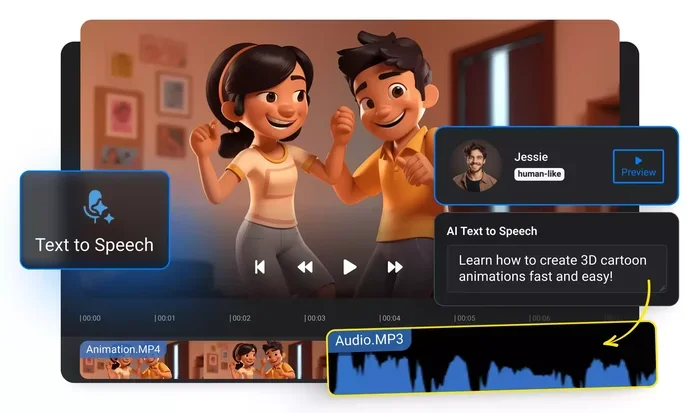
When you type a prompt into a text-to-video AI tool, several things happen behind the scenes. First, the AI reads your text and understands the meaning. It identifies key ideas, emotions, and scenes. Then, it matches your words with visual elements like images, animations, or video clips. Next, it adds music, voiceover, and transitions to create a smooth final product.
Think of it like having a full video production team inside a computer. The AI writes the script, picks the visuals, adds the audio, and edits everything together. All of this happens in seconds or minutes, depending on the video length.
What Powers These AI Video Tools?
These tools use artificial intelligence and machine learning to understand language and create visuals. Large language models analyze your text for meaning. Then, generative AI models create or select images and video frames that match your words. Some platforms also use natural language processing to add voiceover narration that sounds natural and human.
The AI video technology behind these tools has improved dramatically. Early versions produced choppy, low-quality results. Today, the best platforms generate smooth, professional-looking videos. The how does a generator work question is easier to answer now because the technology is more transparent and accessible to everyday users.
Top Free AI Video Generators You Can Try Today
Many platforms offer free AI video maker tools. Some give you a limited free tier, while others are completely free. Here are some of the best options available right now.
Features to Look For in a Free Plan
Not all free AI video tools are the same. Before you pick one, check for these features:
- Video length limits: Free plans often restrict how long your video can be.
- Watermarks: Some free tools add a logo or watermark to your videos.
- Export quality: Free plans may limit resolution or file format options.
- Voiceover options: Check if the tool offers multiple voices and languages.
- Template library: Pre-made templates save time and help you create better videos faster.
- Usage limits: Some platforms limit how many videos you can create per month.
Popular Free Options for Text-to-Video Creation
Several platforms stand out for their free offerings. Some let you create short videos for social media, while others handle longer-form content. The best choice depends on what you want to create and how much control you want over the final product.
Many of these tools work similarly. You type your text or paste a script, choose a style, and the AI video creator builds the video. You can then edit, adjust, and export the final result. The process is fast, intuitive, and requires zero technical knowledge.
Benefits of Using AI to Create Videos From Text
Switching to AI-powered video creation brings many advantages. Whether you are a beginner or a seasoned creator, these benefits make the technology worth exploring.
Speed and Efficiency
The biggest advantage is speed. A free AI video generator from text can produce a finished video in minutes. Traditional video production takes days or weeks. You write a script, and the AI video production tool handles everything else. This speed is perfect for content creators who need to publish regularly.
Cost Savings
Hiring a video editor, renting equipment, and buying software all add up. With AI video tools, you skip all of that. The how much is a generator for a 1 question often comes up when people compare costs. The answer is simple: many AI video generators cost nothing at all for basic use.
No Technical Skills Required
You do not need to know how to edit video or use complex software. The AI video editor inside these platforms handles all the technical work. You focus on your message, and the AI handles the rest. This makes video creation accessible to everyone, regardless of experience level.
Consistency and Scalability
Once you find a workflow you like, you can create videos consistently. Automated video creation lets you produce multiple videos quickly. This is especially helpful for businesses that need regular content or educators who want to create lesson videos.
Tips for Writing Great Prompts for AI Video Generators
The quality of your video depends heavily on the text you provide. Writing a good prompt is the key to getting great results. Here are some practical tips to help you write better prompts.
Be Specific and Clear
Vague prompts produce vague videos. Instead of writing “make a video about dogs,” try “a golden retriever puppy playing in a sunny park with soft background music.” The more specific you are, the better the AI video generator can match your vision.
Include Visual Descriptions
Describe what you want to see. Mention colors, settings, moods, and actions. The text-to-video converter uses these details to select or create matching visuals. The richer your description, the more engaging the final video will be.
Keep It Concise
Most online video generator tools work best with focused prompts. Try to keep your text under 500 words for shorter videos. If you need a longer video, break it into sections and create each one separately.
Add Emotion and Tone
Tell the AI how you want the video to feel. Use words like “uplifting,” “calm,” “exciting,” or “professional.” This helps the AI video maker choose the right music, pacing, and visual style.
Quick Tips for Better Results
- Use short, descriptive sentences for each scene.
- Mention the desired mood or atmosphere.
- Include details about the setting and characters.
- Specify the type of music or voiceover style you want.
- Experiment with different prompts to see what works best.
Common Mistakes to Avoid When Using AI Video Generators
Even though these tools are easy to use, some common mistakes can hurt your results. Avoiding these pitfalls will help you create better videos.
Using Too Much Text
Overloading the AI video generator with too much text leads to cluttered, confusing videos. Keep your prompts focused and concise. If you have a lot to say, break it into multiple shorter videos.
Ignoring the Free Plan Limits
Many free tools have restrictions on video length, export quality, or monthly usage. Not knowing these limits can lead to frustration. Always check the plan details before you start creating.
Skipping the Editing Step
Even the best AI video creation tools benefit from a quick review. Watch your video before publishing. Make small adjustments if needed. A few minutes of editing can make a big difference in the final quality.
Expecting Perfect Results Every Time
AI video technology is impressive, but it is not perfect yet. Sometimes the visuals may not match your vision exactly. Treat the first output as a starting point and refine it as needed. Over time, you will learn what works best with each tool.
How to Choose the Right Free AI Video Generator for You
With so many options available, picking the right one can feel overwhelming. Here are some factors to consider when choosing your free AI video maker.
Consider Your Use Case
Are you making videos for social media, education, marketing, or fun? Different tools excel at different things. Some are better for short, punchy social media clips. Others handle longer explainer videos or presentations better. Think about what you want to create first, then choose a tool that fits.
Check the Output Quality
Not all AI video generators produce the same quality. Some create realistic, high-resolution videos, while others produce more basic or stylized content. Try a few free tools and compare the results. Look at the visual quality, voiceover naturalness, and overall polish.
Evaluate Ease of Use
The best free AI video generator from text should be simple to use. If you spend more time figuring out the tool than creating videos, it is not the right choice for you. Look for platforms with intuitive interfaces and clear instructions.
Compare Free Plan Features
Make a quick list of what matters most to you. Is it video length? Export quality? Voiceover options? No watermarks? Compare the free plans of different tools side by side. This helps you find the best fit without spending any money.
Final Thoughts on Free AI Video Generators
AI video generators from text have changed the game for content creators everywhere. They make video creation fast, affordable, and accessible to anyone with an internet connection. You do not need a camera, a microphone, or editing experience. Just write your ideas, and the AI video tool brings them to life.
The technology behind text-to-video AI continues to improve. Each year, the results get more realistic, the tools get easier to use, and the free options get more generous. Whether you are a beginner exploring video content for the first time or an experienced creator looking to save time, a free AI video generator is a powerful resource worth trying.
Start with one of the free platforms mentioned in this article. Experiment with different prompts and styles. You will be surprised at what you can create with just a few words and a little creativity. The future of video production is here, and it is free.
Frequently Asked Questions
What is the best free AI video generator from text?
Several free AI video generators stand out, including platforms like InVideo AI, Pictory, and Lumen5. Each offers a free tier with different features and limits. The best choice depends on your specific needs, such as video length, quality, and intended use.
Can I really make a video from text for free?
Yes, many AI video creation platforms offer free plans that let you generate videos from text prompts at no cost. These free tiers may include watermarks, length limits, or lower export quality, but they are excellent for getting started without any investment.
How accurate is AI text-to-video generation?
AI video technology has improved significantly in recent years. The visuals, voiceovers, and pacing are now quite good, though results vary based on the prompt quality and the platform you use. Complex or highly specific requests may need some manual adjustments.
Do I need any technical skills to use these tools?
No, one of the biggest advantages of a free AI video generator from text is how easy it is to use. These platforms are designed for beginners and do not require any video editing experience. You simply type what you want, and the AI handles the rest.
Are there any hidden costs with free AI video generators?
Most free AI video maker tools are transparent about their limitations. Common restrictions include watermarks, limited video exports per month, and lower resolution options. Upgrading to a paid plan removes these limits, but the free version is genuinely useful for basic needs.
What types of videos can I create with AI from text?
You can create a wide range of videos including social media clips, explainer videos, educational content, product demos, and short stories. The text-to-video AI tools are versatile and can adapt to many different content styles and formats.