Writing is both an art and a discipline. Whether you are a student, blogger, novelist, content marketer, or professional writer, the words you use, their structure, and their number can make a huge difference in how your content is received. A word counter is an essential tool for writers. It’s not just a way to calculate how many words are in your document—it’s a productivity enhancer, a clarity tool, and a guide that can make your writing process smoother and more effective.
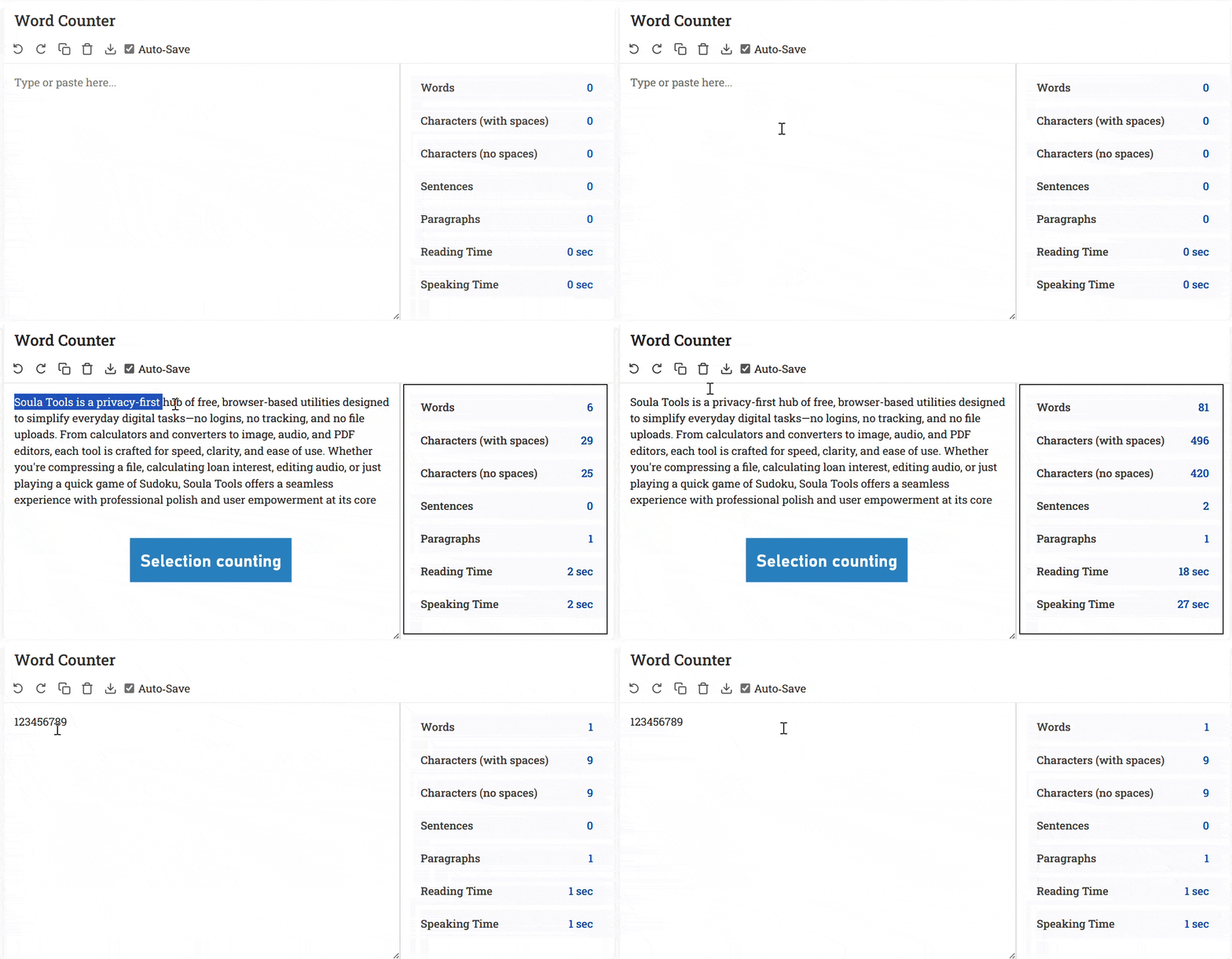
In this article, we’ll explore 15 reasons why a word counter is essential for writers, each explained in detail with sub-points, examples, and practical tips. By the end of this guide, you’ll understand how tools like SoulaTools Word Counter can dramatically improve your writing workflow.
1. Helps Meet Word Limits
Word limits are common in almost all forms of writing, from academic essays to blog posts and social media captions. Adhering to these limits ensures your content is both readable and effective.
- Avoid penalties or rejections: Many assignments, exams, or publications have strict word limits. Exceeding or falling short can negatively impact grades, readership, or credibility.
- Content balance: A word counter ensures that every section contributes meaningfully without being excessively long or short.
- Real-time tracking: With live word counts, you can monitor progress and make adjustments on the fly.
Example: If a blog post requires 2,000 words, you can track each section individually—introduction, body, and conclusion—to make sure no part is too long or too short. A word counter helps maintain a balanced structure and meet exact requirements without guesswork.
2. Improves Writing Efficiency
Efficient writing communicates ideas clearly and concisely, avoiding unnecessary words or filler content.
- Identify redundancy: Long paragraphs or repeated phrases can dilute your message. Word counters show the real length, prompting you to revise.
- Encourage concise expression: Awareness of word count encourages writers to choose the most effective words.
- Maintain clarity: Tracking words ensures sentences are clear and to the point.
Example: A 300-word paragraph may convey the same meaning in 180 words when you remove redundancies. Using a word counter helps identify such opportunities.
3. Aids in Time Management
Time management is critical for writers, especially those working under deadlines.
- Daily word goals: Setting a target, such as 1,500 words per day, helps pace your work.
- Project estimation: Knowing how much content remains allows you to allocate sufficient time for writing and editing.
- Track progress: A word counter shows immediate progress, boosting productivity and accountability.
Example: Writing a 1,500-word article in three hours becomes manageable if you track your word count every 500 words, helping you stay on schedule.
4. Encourages Better Structure
A word counter can help you balance paragraphs and sections, ensuring your content is well-structured and readable.
- Balanced paragraphs: Prevent excessively long or short sections.
- Logical flow: Ensure each idea gets adequate attention without overloading the reader.
- Improved coherence: Helps maintain a rhythm that guides readers through your content smoothly.
Example: A 700-word paragraph can be split into three smaller paragraphs of 200–250 words each for better readability.
5. Helps in SEO Optimization
Word count is important for search engine optimization because search engines prefer comprehensive and in-depth content.
- Optimal length: Articles between 1,500–3,000 words often perform better in search rankings.
- Keyword distribution: A higher word count allows natural integration of keywords without stuffing.
- Authority perception: Longer, detailed content is perceived as more valuable and authoritative.
Example: A 2,500-word blog post on “Word Counter tools” with structured headings and examples will likely rank higher than a short 500-word post.
6. Assists in Meeting Academic Requirements
Academic writing often comes with precise word count requirements.
- Minimum word count: Ensures all key points are addressed.
- Maximum word count: Avoids excessive padding, keeping your work focused.
- Consistency: Helps distribute content evenly across sections like introduction, methodology, results, and discussion.
Example: A 3,000-word research paper can be monitored using a word counter to make sure the introduction is around 300–400 words, methodology 600–700, results 1,000, and conclusion 500–600.
7. Monitors Content for Professional Writing
Professional writing requires precision and conciseness.
- Business documents: Avoid overly long reports or emails that may confuse readers.
- Client proposals: Maintain professional tone and structure.
- Audience focus: Ensure content is digestible without losing important information.
Example: A 500-word executive summary may be reduced to 350 words using a word counter while keeping all key points intact.
8. Supports Creative Writing
Creative writers benefit greatly from consistent word tracking.
- Daily targets: Encourages consistency and discipline, e.g., writing 1,000 words per day.
- Overcoming writer’s block: Real-time tracking motivates writers to continue.
- Goal achievement: Helps track progress for large projects like novels.
Example: A novelist aiming for 50,000 words in a month can monitor daily word counts to stay on track.
9. Enhances the Editing Process
Editing is crucial for refining clarity, structure, and readability.
- Identify long sections: Helps break down paragraphs that are too dense.
- Balance pacing: Ensures short and long sections are distributed evenly.
- Polish clarity: Remove filler words and improve sentence flow.
Example: If one paragraph has 500 words and another 150, a word counter helps identify imbalance and guides revisions.
10. Facilitates Social Media Posting
Social media platforms have strict word and character limits.
- Platform compliance: Ensure posts fit Twitter, Instagram, LinkedIn, or Facebook limits.
- Concise messaging: Deliver your point within constraints.
- Avoid truncation: Prevent important information from being cut off.
Example: A 280-character tweet must convey the message precisely; a word counter ensures it fits without losing clarity.
11. Helps Track Progress in Writing Challenges
Writing challenges encourage consistent writing.
- Motivation: Tracking word count boosts morale.
- Accountability: Daily goals keep writers disciplined.
- Measurable success: Quantifies progress toward completing challenges.
Example: NaNoWriMo participants can use word counters to track progress toward 50,000 words.
12. Improves Content Planning
Planning content becomes strategic when length is monitored.
- Series planning: Plan multiple articles with appropriate lengths.
- Diversity: Mix long-form and short-form content for engagement.
- Audience targeting: Adjust content length based on reader preferences.
Example: A blog might have 1,000-word tutorials, 500-word updates, and 2,500-word guides.
13. Helps Maintain Consistency Across Multiple Projects
Consistency ensures quality and productivity.
- Daily monitoring: Track output across multiple projects.
- Balanced effort: Ensure each project receives adequate attention.
- Long-term progress: Measure cumulative output over time.
Example: A freelancer writing for three clients can maintain consistent output using word counters for each.
14. Encourages Discipline and Accountability
Word counters foster writing discipline.
- Set clear goals: Daily or weekly word targets improve structure.
- Track performance: Immediate feedback motivates accountability.
- Build writing habit: Consistent use develops sustainable routines.
Example: A blogger aiming for 10,000 words per week can track daily contributions to maintain consistency.
15. Provides Real-Time Feedback
Real-time word count feedback helps maintain flow and efficiency.
- Instant adjustments: Expand or condense content while drafting.
- Avoid overestimation: Prevent under- or over-shooting content length.
- Boost productivity: Focus on writing rather than manual counting.
Example: Drafting an article 500 words under target prompts immediate elaboration before moving on.
How to Use Our Word Counter Tool
The SoulaTools Word Counter is designed for simplicity and power. Here’s a detailed guide on how to get the most out of it:
- Step 1: Open the Tool and Add Your Text
Navigate to the Word Counter page. You can either start typing directly into the text box or paste your content from another source like Microsoft Word, Google Docs, or an email. The tool is ready to go as soon as the page loads. - Step 2: Get Instant Analysis
As you type or paste, the tool provides a live analysis of your text. You don’t need to click any buttons to get your results. The dashboard instantly displays:- Word & Character Count: See the total number of words and characters (both with and without spaces). This is perfect for meeting strict limits for essays, tweets, or meta descriptions.
- Sentences & Paragraphs: Monitor your content’s structure to ensure it’s easy to read.
- Reading & Speaking Time: Get an estimate of how long it will take to read or speak your text, which is invaluable for preparing speeches, presentations, or video scripts.
- Step 3: Use Advanced Features
Beyond basic counting, you can use several helpful functions:- Analyze a Selection: Highlight any part of your text to see the word count for just that section. This is great for checking the length of individual paragraphs or sentences.
- Manage Your Text: Use the Copy, Clear, Undo, and Redo buttons for quick editing.
- Save Your Work: The Download button lets you save your text as a
.txtfile. Additionally, the Auto-Save feature ensures your work is saved in your browser, so you can close the tab and return later without losing your progress.

Conclusion
A word counter is more than just a numerical tool. It is a companion for writers, helping meet word limits, improve efficiency, support creative writing, assist in editing, enhance SEO, and foster discipline. Whether you are a student, blogger, professional, or novelist, using a tool like SoulaTools Word Counter allows you to track progress, structure content effectively, and improve your writing quality. By integrating a word counter into your daily workflow, you can write smarter, faster, and more confidently.