What Is One Key On Milwaukee Tools And Why It Matters
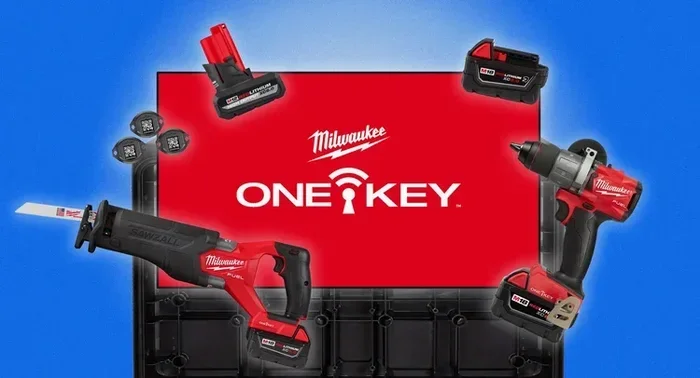
Milwaukee One-Key is a smart tool ecosystem that lets you customize, track, and manage your Milwaukee power tools through a digital platform. It uses Bluetooth connectivity to give each tool a unique digital identity, allowing users to adjust settings, monitor performance, and keep tabs on their entire tool collection. Whether you are a contractor or a DIY enthusiast, understanding how One-Key works can seriously upgrade your workflow.
Milwaukee Tool has been a household name among professionals for decades. Their red tools are built tough and designed to handle the hardest jobs on the planet. But in recent years, Milwaukee has taken a giant leap forward with something called the One-Key system. If you have ever wondered what is one key on Milwaukee tools, you are in the right place. This guide breaks it all down in simple, straightforward terms.
The One-Key platform is more than just a fancy app. It is a complete ecosystem that transforms ordinary power tools into smart tools. With Bluetooth connectivity, digital tool identity, and a user-friendly interface, One-Key changes the way professionals and hobbyists interact with their equipment. Let us dive deep into what makes this system so special and why it has become a game-changer in the world of power tools.
Key Takeaways
- One-Key is Milwaukee’s smart tool platform: It connects your tools to a digital ecosystem for customization and tracking.
- Bluetooth-enabled customization: You can adjust torque, speed, and other settings directly from your phone.
- Tool tracking and inventory management: Never lose track of your gear again with real-time location and status updates.
- Works with a wide range of Milwaukee tools: From drills to saws, the One-Key platform supports many M18 and M12 tools.
- Boosts job site efficiency: Faster tool setup and better equipment management save time on every project.
- Free to use: The One-Key app and core features cost nothing extra for Milwaukee tool owners.
📑 Table of Contents
What Is One Key on Milwaukee Tools?
At its core, Milwaukee One-Key is a smart tool management system. Every Milwaukee One-Key compatible tool comes with a built-in digital identity. This identity is stored in the cloud and connected to the One-Key app on your smartphone. The result? A tool that you can customize, track, and manage like never before.
Think of it this way. In the past, your drill was just a drill. You pulled the trigger, it spun, and you got work done. But with One-Key, that same drill now has a digital brain. It can remember your preferred settings, report its location, and even alert you if something is wrong. This is the power of smart tool technology in your hands.
The system works through Bluetooth Low Energy (BLE) connectivity. When you bring your phone close to a One-Key enabled tool, the app detects it automatically. From there, you can access a range of features that make your workday smoother and more efficient. The best part? Setting it up takes only a few minutes, and the app is free to download.
How the One-Key Platform Works
The One-Key platform operates through three main components. First, there is the tool itself. Each compatible Milwaukee tool has a small Bluetooth chip embedded inside. This chip communicates wirelessly with your phone. Second, there is the One-Key app, available for both iOS and Android. This is your control center. Third, there is the cloud infrastructure that stores all your tool data securely.
When you open the app, it scans for nearby One-Key tools. Once it finds one, it displays all the relevant information. You can see the tool model, serial number, usage hours, and customization options. The app also lets you update firmware, which ensures your tool always has the latest features and improvements.
One of the most impressive aspects of this system is that it works in real time. You do not need to be connected to Wi-Fi to use basic features. The Bluetooth connection handles most day-to-day interactions. However, cloud sync happens automatically when you are online, so your data is always backed up and accessible from any device.
Key Features of Milwaukee One-Key
Now that you understand the basics, let us look at the specific features that make One-Key stand out. Each feature is designed to solve a real problem that professionals face on the job.
Tool Customization
The customization feature is arguably the most popular aspect of One-Key. With the app, you can fine-tune how your tool behaves. For example, you can adjust the torque settings on your impact driver to match the specific task at hand. Need lower torque for delicate screws? Just dial it down in the app. Working with heavy-duty lag bolts? Crank it up.
You can also save custom profiles for different tools. This means your favorite settings are always ready to go. No more fumbling with dials and switches every time you pick up a tool. Just select your profile from the app, and the tool adjusts itself automatically. This feature alone can save you significant time over the course of a long workday.
Customization extends beyond just torque. Depending on the tool, you can also adjust speed settings, LED brightness, and even tool-to-tool communication settings. Some tools support multiple saved profiles, so you can switch between different configurations with ease.
Tool Tracking and Inventory
Losing tools on a job site is every contractor’s nightmare. One-Key addresses this problem directly with its tool tracking feature. Each tool registered in the app has a digital profile that includes its current status and location. If you have multiple tools on a job site, you can quickly see which ones are present and which might be missing.
The tracking feature also includes usage monitoring. You can see how many hours each tool has been in use, which helps with maintenance scheduling. For example, if your Milwaukee M18 drill has been running for 200 hours, the app can remind you to check the brushes or perform other routine maintenance. This proactive approach helps extend the life of your tools.
For teams and crews, the inventory feature is a lifesaver. You can organize tools by project, crew member, or job site. This makes it easy to manage equipment across multiple locations. It also helps with accountability, since you can see exactly who checked out which tool and when it was returned.
Digital Tool Identity
Every One-Key tool has a unique digital identity stored in the cloud. This identity includes important information such as the model number, purchase date, warranty status, and maintenance history. If you ever need to make a warranty claim or order replacement parts, this information is right at your fingertips.
The digital identity also helps with tool authentication. In a world where counterfeit power tools are a real concern, having a verified digital identity gives you peace of mind. You know exactly what you are getting, and you can prove ownership if needed. This is especially valuable for contractors who invest heavily in their tool collections.
Firmware Updates
Milwaukee regularly releases firmware updates that improve tool performance and add new features. With One-Key, updating your tools is as simple as updating your phone. The app notifies you when an update is available, and the process takes just a few minutes. This means your tools keep getting better over time, even after you have purchased them.
Firmware updates can improve motor efficiency, add new customization options, and fix known issues. Some updates even unlock new features that were not available when you first bought the tool. This ongoing support ensures that your investment in Milwaukee power tools continues to deliver value for years to come.
Why One-Key Matters for Professionals
The One-Key system is not just a cool tech gimmick. It solves real problems that professionals face every day on the job. Let us look at why this system matters and how it can benefit your work.
Saving Time on the Job
Time is money, especially in the construction and trades industries. One-Key helps you save time in several ways. Custom profiles mean you spend less time adjusting tool settings. Tool tracking means you spend less time looking for missing equipment. Firmware updates mean fewer trips to the dealer for maintenance.
When you add up all these time savings, they can make a significant difference in your productivity. A contractor who saves even 15 minutes per day on tool setup and management is gaining hours of productive work over the course of a month. Over a year, that adds up to a lot of extra billable hours or, at the very least, a lot less frustration.
For teams, the efficiency gains are even more pronounced. When every crew member has their tools customized and ready to go, the entire job site runs more smoothly. There are fewer delays, less downtime, and better overall workflow. This is where tool management really pays off.
Protecting Your Investment
Milwaukee tools are not cheap. A quality drill or impact driver can cost several hundred dollars. Protecting that investment should be a priority for any professional. One-Key helps in multiple ways.
First, the tracking and inventory features reduce the risk of lost or stolen tools. When every tool is registered and monitored, it is much harder for something to disappear without anyone noticing. Second, the usage monitoring helps you stay on top of maintenance, which prevents premature wear and tear. Third, the digital identity makes warranty claims and service requests faster and easier.
If you have ever compared options like the biggest Dewalt combo kit versus a Milwaukee setup, you know that tool investment is significant. One-Key helps ensure that your Milwaukee investment delivers long-term value through better care and management.
Enhancing Safety and Precision
Customizable torque and speed settings are not just about convenience. They are also about safety and precision. When you can dial in the exact settings for a specific task, you reduce the risk of overdriving screws, stripping threads, or damaging materials. This is especially important in finish carpentry, electrical work, and other precision trades.
The One-Key system also allows you to share tool profiles across your team. This means that every worker can use the same optimized settings for a given task, ensuring consistency and quality across the entire crew. When everyone is working with the right settings, the results are better and the risk of mistakes is lower.
How to Get Started with One-Key
Getting started with Milwaukee One-Key is straightforward. Here is a quick step-by-step guide to help you set up your tools and start enjoying the benefits right away.
Step 1: Download the App. Visit the App Store or Google Play and search for Milwaukee One-Key. The app is free and compatible with most modern smartphones. Make sure your phone supports Bluetooth Low Energy for the best experience.
Step 2: Create an Account. Open the app and create your free account. You will need to provide some basic information, and you can set up your profile as a contractor, technician, or DIY user. This helps the app tailor its features to your specific needs.
Step 3: Register Your Tools. Turn on your One-Key compatible Milwaukee tool and bring it close to your phone. The app will detect the tool automatically. Follow the on-screen prompts to register it and assign it to your profile. Repeat this process for each tool you want to add.
Step 4: Customize and Explore. Once your tools are registered, start exploring the customization options. Adjust torque settings, save profiles, and set up usage reminders. Take some time to familiarize yourself with all the features available in the app.
Step 5: Keep Your Tools Updated. Check the app regularly for firmware updates. These updates often include performance improvements and new features. Keeping your tools updated ensures you always have the best experience possible.
If you are managing a larger collection of tools, consider exploring process workflow tools and work order management tools that can integrate with your One-Key setup. These complementary systems help you manage the broader picture of your tool inventory and project workflows.
One-Key Compatible Tools
Milwaukee has been expanding its One-Key compatible lineup over the years. The system works with a wide range of tools across the M18 and M12 tool platforms. Here is a quick overview of what is currently supported.
On the M18 platform, you can find One-Key compatibility in drills, impact drivers, saws, grinders, and more. The M12 platform also supports One-Key in select models, including smaller tools like drivers and lights. Milwaukee continues to add new tools to the One-Key ecosystem with each product release.
When shopping for new Milwaukee tools, look for the One-Key logo on the packaging or product listing. If you already own Milwaukee M18 or M12 tools, check the Milwaukee website or the One-Key app to see if your existing tools are compatible. Some older models may require a firmware update to access all One-Key features.
The One-Key system also works seamlessly with Milwaukee combo kits. Whether you are looking at a basic kit or comparing options like the Milwaukee M18 work light model in combo kit, you can integrate One-Key compatible tools into your collection for a fully connected experience.
Common Mistakes to Avoid with One-Key
While One-Key is a powerful system, there are a few common mistakes that users should be aware of. Avoiding these pitfalls will help you get the most out of the platform.
Not registering all your tools. Some users only register the tools they use most frequently. But every tool you register benefits from tracking and customization. Make it a habit to register new tools as soon as you add them to your collection.
Ignoring firmware updates. Firmware updates bring new features and improvements. Skipping them means you are missing out on enhancements that could improve your tool performance and user experience.
Not using custom profiles. The customization feature is one of the biggest benefits of One-Key. If you do not take advantage of saved profiles, you are leaving time-saving features on the table.
Forgetting to check battery status. One-Key tools rely on Bluetooth connectivity. If your battery is dead, the app cannot communicate with the tool. Always check battery levels before heading to the job site.
Assuming all Milwaukee tools are compatible. Not every Milwaukee tool supports One-Key. Before purchasing, verify compatibility to avoid disappointment. The product listing and packaging will clearly indicate One-Key support.
Final Thoughts
The Milwaukee One-Key system represents a major step forward in power tool technology. It takes tools that professionals already trust and adds a layer of intelligence that makes them even more valuable. From customization to tracking to firmware updates, One-Key addresses real needs that contractors and tradespeople face every day.
If you are still on the fence about whether One-Key is worth it, consider this. The app is free. The core features cost nothing extra. And the time savings alone can pay for itself many times over. For anyone who relies on Milwaukee tools for their livelihood, One-Key is not just a nice-to-have. It is a practical tool that makes your work easier, safer, and more efficient.
The world of smart tools is evolving rapidly, and Milwaukee is leading the charge with One-Key. Whether you are a seasoned professional or just getting started, taking the time to explore what One-Key has to offer is time well spent. Your tools will thank you, and so will your bottom line.
Frequently Asked Questions
What Milwaukee tools work with One-Key?
One-Key is compatible with a wide range of Milwaukee M18 and M12 tools, including drills, impact drivers, saws, grinders, and lights. Check the Milwaukee website or the One-Key app to verify compatibility for specific models, as the lineup continues to grow with new product releases.
Is the One-Key app free to use?
Yes, the One-Key app is completely free to download and use. All core features, including tool customization, tracking, and firmware updates, come at no extra cost. You only need a compatible Milwaukee tool and a smartphone with Bluetooth Low Energy support.
Can I use One-Key without an internet connection?
Yes, most One-Key features work over Bluetooth without needing Wi-Fi or cellular data. However, cloud sync and some advanced features require an internet connection. For basic customization and tool detection, you do not need to be online.
How do I update my One-Key tool’s firmware?
Open the One-Key app and bring your tool close to your phone. The app will detect available firmware updates automatically. Simply follow the on-screen prompts to download and install the update. It usually takes just a few minutes and can improve tool performance and add new features.
Can I share tool profiles with my crew?
Yes, One-Key allows you to share tool profiles and settings across team members. This is especially useful for crews where multiple workers use the same tools. Consistent profiles help ensure quality and efficiency across the entire job site.
What happens if I lose my One-Key tool?
If you have registered your tool in the One-Key app, you can use the tracking feature to help locate it. The digital identity also helps with warranty claims and recovery efforts. Keeping all your tools registered and up to date gives you the best chance of recovering a lost or stolen tool.