The Best Pixel Font Generator for Retro Design Projects
A pixel font generator lets you create retro-style typography for games, websites, and design projects in minutes. Whether you need an 8-bit font for a retro game or a vintage-style typeface for a brand, these tools make it simple. In this guide, we break down the top pixel font generators, how they work, and tips for choosing the best one for your project. You will learn what to look for, common mistakes to avoid, and expert tips to level up your retro designs.
Retro design is everywhere right now. From indie video games to trendy coffee shop logos, the pixel aesthetic has a special charm that modern, clean fonts simply cannot replicate. If you have ever wanted to add that nostalgic, blocky look to your project, a pixel font generator is the tool you need.
But with so many options out there, how do you pick the right one? Some generators are free, some cost money, and some are way more complicated than they need to be. This guide walks you through the best pixel font generators available, explains how they work, and gives you practical tips to get the most out of them.
By the end of this article, you will know exactly which tool fits your project, how to use it effectively, and how to avoid the common pitfalls that trip up beginners. Let us dive in.
Key Takeaways
- Pixel font generators save time: They let you create custom retro fonts without drawing every pixel by hand.
- Retro design is trending: 8-bit and bitmap fonts are popular in games, branding, and web design.
- Free and paid options exist: You can find great tools at every budget level.
- Export formats matter: Look for generators that support PNG, SVG, and web fonts.
- Customization is key: The best tools let you adjust spacing, size, and character sets.
- Ease of use counts: A good generator should be beginner-friendly with a clean interface.
📑 Table of Contents
What Is a Pixel Font Generator?
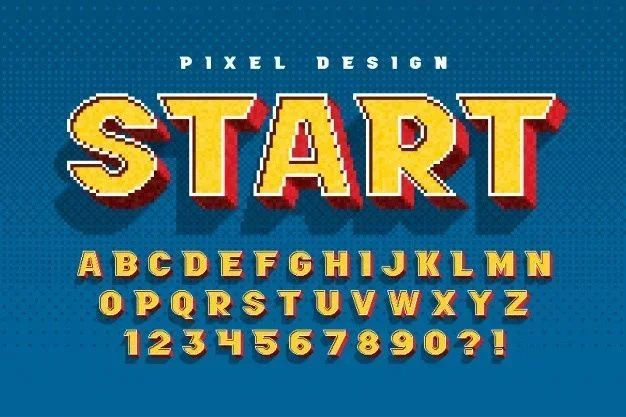
A pixel font generator is a tool that creates retro-style fonts made up of small square pixels. Unlike traditional fonts with smooth curves and fine details, pixel fonts look blocky and chunky. Each letter is built on a tiny grid, giving it that classic 8-bit or 16-bit video game feel.
These generators work by letting you design each character on a pixel grid. You place squares to form letters, numbers, and symbols. Some tools do this for you automatically using preset styles. Others give you full control over every single pixel.
The result is a font that looks like it belongs in a retro game or a vintage computer interface. Think of old-school arcade titles, DOS prompts, or the text screens on classic consoles like the NES or Game Boy. That is the aesthetic a pixel font captures.
Why Are Pixel Fonts So Popular?
Retro design has made a huge comeback. Here is why pixel fonts are trending:
- Nostalgia: Many designers and gamers grew up with 8-bit games. Pixel fonts trigger fond memories.
- Readability: At small sizes, pixel fonts stay crisp and legible, unlike some decorative fonts that become blurry.
- Unique style: A pixel font instantly gives your project a distinct, handcrafted look.
- Versatility: They work for game UI, app design, posters, t-shirts, and more.
- Low file size: Pixel fonts are lightweight, which makes them great for websites and games.
How Does a Pixel Font Generator Work?
Understanding how a pixel font generator works helps you use it more effectively. The process is simpler than you might think.
Most generators use a grid-based system. Each letter sits on a small grid, usually 8×8, 16×16, or 32×32 pixels. You fill in squares to build each character. The tool then compiles these characters into a usable font file.
Here is a basic breakdown of how it works:
- You choose a grid size for your font.
- You design each character by placing pixels on the grid.
- The tool maps each character to a keyboard key.
- You export the font as a file (like TTF, OTF, or PNG).
- You install or embed the font in your project.
Some generators use algorithms to create fonts automatically. You pick a style, and the tool generates all the characters for you. Others give you a blank grid and let you design from scratch. Both approaches have their place depending on your needs.
If you are curious about how similar tools work behind the scenes, understanding the mechanics of a how does a generator work concept can give you a broader appreciation for these creative tools and their underlying processes.
Key Features to Look For
Not all pixel font generators are created equal. Here are the features that matter most:
- Grid size options: Look for tools that let you choose between different grid resolutions.
- Character set: Make sure the generator supports uppercase, lowercase, numbers, and common symbols.
- Export formats: The best tools export to TTF, OTF, PNG, and SVG formats.
- Preview mode: You should be able to see how your font looks in real time.
- Kerning and spacing: Adjustable spacing makes your font look professional.
- Undo and redo: These controls save you from mistakes and speed up your workflow.
Top Pixel Font Generators Reviewed
Let us look at the best pixel font generators you can use right now. Each one has strengths, so pick the one that fits your project best.
1. Pixel Font Generator by 0x72
This is one of the most popular free tools online. It gives you a clean grid interface where you can draw each character pixel by pixel. The export options include PNG and a simple bitmap font format. It is perfect for beginners who want quick results without a steep learning curve.
The interface is minimal and easy to understand. You do not need any design experience to create a usable font. It supports a basic character set, which is enough for most retro design projects.
2. Littera
Littera is a web-based pixel font creator that offers more advanced features. It supports multiple font formats including TTF and OTF. You can design each glyph on a customizable grid and adjust kerning and spacing with precision.
One standout feature is the real-time preview. You can type any sentence and see exactly how your font looks before exporting. This saves a lot of time and helps you catch mistakes early. Littera also offers a free tier, which is great for casual projects.
3. Bitmap Font Generator
This tool is a favorite among game developers. It specializes in creating bitmap fonts for use in game engines like Unity and Godot. You can set custom sizes and export fonts that scale perfectly at any resolution.
The setup is slightly more technical than other options, but the results are worth it. If you are building a retro-style game, this generator gives you fonts that look sharp on every screen size. It also supports custom character sets, so you can include special symbols or even icons.
4. FontStruct
FontStruct takes a different approach. Instead of a pixel grid, it uses block-shaped tiles to build fonts. The result is a blocky, geometric style that shares some DNA with pixel fonts. It is a bit more flexible than a strict pixel generator.
The community aspect is a big plus. You can browse fonts created by other users for inspiration. FontStruct exports to TrueType format, making it easy to use in any design project.
How to Choose the Right Pixel Font Generator
Choosing the right tool depends on your project. Here are some questions to ask yourself before you start:
What Is Your Project Type?
Are you making a retro game, a website, a poster, or a brand identity? Different projects need different export formats and font styles. A game developer needs bitmap fonts that scale well, while a web designer might prefer a TTF file for easy embedding.
What Is Your Skill Level?
If you are a beginner, start with a simple tool like the Pixel Font Generator by 0x72. It has a straightforward interface and minimal learning curve. If you have more experience, tools like Littera or Bitmap Font Generator offer advanced controls that let you fine-tune every detail.
Do You Need It for Free?
Many great generators are free. But if you need professional-grade features, a paid tool might be worth the investment. Consider your budget and how often you will use the tool before deciding.
What Export Formats Do You Need?
Make sure the generator supports the formats you need. PNG is great for web use. TTF and OTF work for desktop applications. SVG is ideal for scalable graphics. Check compatibility before you commit to a tool.
Tips for Creating Great Pixel Fonts
Creating a pixel font is part technical skill and part art. Here are some practical tips to help you get the best results.
Start with a Small Grid
A smaller grid, like 8×8 or 16×16, forces you to be creative with limited space. This is where the charm of pixel art really shines. Start small, and only increase the grid size if you need more detail.
Keep It Readable
Retro does not mean unreadable. Make sure your letters are easy to distinguish from each other. Avoid making letters too similar, like lowercase “l” and uppercase “I.” Test your font at different sizes to make sure it stays clear.
Use Consistent Stroke Width
One of the hallmarks of a great pixel font is consistent stroke width. Every line should be the same thickness. This keeps the font looking clean and professional.
Test Your Font in Context
Always test your font in the actual project. A font that looks great on its own might not work well in a game UI or on a website. See how it looks alongside other design elements before you finalize it.
Draw Inspiration from the Past
Look at classic games and vintage computers for inspiration. Games like Pac-Man, Space Invaders, and Super Mario Bros. all used distinctive pixel fonts. Study them and think about what makes their text memorable.
Before you begin building your design, it helps to understand the basics of how tools like a how to start a generator work in general. The same principle applies: you start with a blank canvas and build something useful from the ground up.
Common Mistakes to Avoid
Even experienced designers make mistakes when creating pixel fonts. Here are the most common ones and how to avoid them.
- Using too large a grid: This dilutes the pixel aesthetic. Keep it small for that authentic retro feel.
- Inconsistent spacing: Uneven spacing between letters makes a font look amateur. Always check kerning.
- Ignoring descenders and ascenders: Letters like “g,” “p,” “b,” and “d” need proper handling. Do not forget them.
- Overcomplicating designs: Pixel fonts thrive on simplicity. Do not add unnecessary detail.
- Skipping the test phase: Never export a font without testing it in your actual project first.
Avoiding these mistakes will save you time and frustration. It will also make your final font look significantly more polished.
Free vs. Paid Pixel Font Generators
The debate between free and paid tools comes up often. Here is a quick comparison to help you decide.
| Feature | Free Generators | Paid Generators |
|---|---|---|
| Cost | $0 | $10 to $50+ |
| Export Formats | Basic (PNG, bitmap) | Advanced (TTF, OTF, SVG) |
| Customization | Limited | Full control |
| Character Set | Basic Latin | Extended character sets |
| Support | Community forums | Priority support |
| Best For | Casual projects, beginners | Professional work, commercial use |
For most hobbyists and indie developers, a free generator is more than enough. If you are working on a commercial project that demands professional quality, a paid tool may be a better fit.
Final Thoughts
A pixel font generator is one of the most fun and rewarding tools in a designer’s toolkit. Whether you are building a retro game, designing a vintage-inspired brand, or just experimenting with a new style, these tools make it easy to create unique typography that stands out.
The key is to choose a generator that matches your skill level and project needs. Start simple, experiment often, and do not be afraid to iterate. The best pixel fonts come from designers who take the time to refine every detail.
Now that you know what to look for and how to use these tools, you are ready to create your own retro-style fonts. Pick a generator, fire it up, and start designing. Your next project is going to look amazing.
Understanding how tools work at a foundational level, much like learning how a generator works in general, gives you the confidence to push boundaries and create something truly unique.
Frequently Asked Questions
What is a pixel font generator?
A pixel font generator is a tool that creates retro-style fonts made up of small square pixels. You design each letter on a grid, and the tool compiles them into a usable font file. It is perfect for retro games, websites, and design projects.
Are pixel font generators free?
Many pixel font generators are free to use. Tools like the Pixel Font Generator by 0x72 and Littera offer free tiers with solid features. Paid options are available if you need advanced export formats and professional-grade controls.
What file formats can I export from a pixel font generator?
Most generators support PNG, TTF, OTF, and SVG formats. PNG is best for web and game use. TTF and OTF work for desktop applications. Always check the export options before choosing a tool.
Do I need design experience to use a pixel font generator?
Not at all. Most pixel font generators are beginner-friendly. You just need a basic understanding of how to place pixels on a grid. If you can use simple drawing software, you can create a pixel font.
Can I use a pixel font for commercial projects?
It depends on the generator. Some free tools require attribution for commercial use. Paid tools usually include full commercial rights. Always check the licensing terms before using a font in a commercial project.
What makes a good pixel font?
A good pixel font is readable, consistent, and has uniform stroke width. Each letter should be easy to distinguish at small sizes. Testing your font in context is the best way to ensure it looks great in your final project.