How to Use a Monster Generator for Amazing Creations
A monster generator is a powerful software tool that lets you create unique creatures and characters with just a few clicks. Whether you are a game developer, writer, or digital artist, this tool can spark your imagination and save you hours of design work. In this guide, you will learn everything from basic setup to advanced techniques for making amazing creations.
A monster generator is one of the most exciting tools you can add to your creative toolkit. It lets you build wild, imaginative creatures in seconds. No drawing skills needed. No hours spent sketching. Just type a few prompts or click a button, and watch a unique character come to life on your screen.
Whether you are building a fantasy world for a novel, designing enemies for a video game, or just looking for fun creative projects, a monster generator has you covered. It removes the blank page problem and gives you instant inspiration. The best part? You do not need to be a tech expert to use one.
In this guide, we will walk you through everything you need to know. From understanding what a monster generator is, to creating your first creature, to using advanced tricks that make your designs stand out. By the end, you will feel confident enough to create amazing monsters every single time.
Key Takeaways
- Easy to Use: A monster generator makes character creation simple and fast for beginners and pros alike.
- Endless Creativity: You can generate thousands of unique monsters without drawing a single line.
- Perfect for Many Uses: Game developers, writers, and artists all benefit from this tool.
- Customization Is Key: You can tweak every detail to make your creatures truly yours.
- Saves Time: What used to take hours now takes minutes with the right generator.
- Free and Paid Options: There are options for every budget and skill level.
📑 Table of Contents
What Is a Monster Generator?
A monster generator is a software tool that creates fictional creatures automatically. It uses algorithms, templates, or artificial intelligence to combine different body parts, traits, colors, and abilities into unique characters. Think of it as a creative engine that never runs out of ideas.
Some generators work with simple randomization. You pick a few options, and the tool mixes and matches them. Others use more advanced procedural generation to build fully detailed creatures with backstories and abilities. The result is always something fresh and unexpected.
These tools are popular in many fields. Game developers use them for character design and game assets. Writers use them for world building and storytelling. Digital artists use them for creature design and concept art. No matter your goal, a monster generator can help you get there faster.
How Does a Monster Generator Work?
At its core, a monster generator works similarly to how a generator works in general. It takes inputs, processes them through a set of rules or a model, and produces an output. In this case, the inputs are your choices, and the output is a unique monster.
Simple generators use random selection from preset lists. They might pull a body type from one list, a skin texture from another, and an ability from a third. The combination creates something new each time. More advanced generators use machine learning models trained on thousands of creature designs to produce original results.
Understanding how a monster generator works behind the scenes helps you use it better. When you know what inputs matter, you can control the output more precisely. This gives you more creative freedom while still enjoying the surprise element.
Types of Monster Generators
Not all monster generators are the same. Here are the main types you will encounter:
- Text-Based Generators: These create written descriptions of monsters. Great for writers and tabletop RPG players.
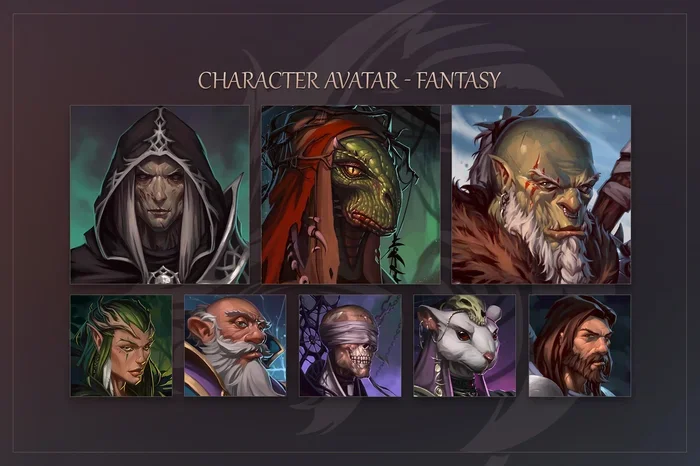
- Image-Based Generators: These create visual art of creatures using AI or procedural design. Perfect for artists and game devs.
- Hybrid Generators: These combine text and image output for a full creature profile.
- Tabletop RPG Generators: Built specifically for Dungeons and Dragons and similar games with stats and abilities.
Each type serves a different purpose. Choose the one that fits your project best. Many creators use more than one type to get the full picture of their creature.
How to Get Started with a Monster Generator
Getting started with a monster generator is easier than you might think. You do not need special skills or expensive equipment. All you need is curiosity and a willingness to experiment. Here is how to begin your journey.
Step 1: Choose Your Platform
First, decide where you want to generate your monsters. Some tools run right in your web browser. Others are downloadable software or mobile apps. Here are a few things to consider:
- Do you want free or paid options?
- Do you need text output, images, or both?
- Will you use it for personal projects or professional work?
- What device will you use it on?
Just like you need to know how to start a generator before using it for power, you need to learn how to launch and navigate your chosen monster generator tool before diving into creation. Most platforms have a simple interface with clear buttons and menus.
Step 2: Set Your Parameters
Most generators let you control certain aspects of the output. You might choose the creature type, size, element, rarity, or habitat. Setting these parameters helps guide the generator toward results you actually want.
Think of it like choosing how many watt generator do i need for a specific job. You need to match the tool to your requirements. If you want small, cute monsters, set the size parameter accordingly. If you want fearsome beasts, adjust the traits to match.
Step 3: Generate and Review
Once you set your parameters, hit the generate button. The tool will create your monster. Take a moment to review the output. Read the description. Look at the image if there is one. Ask yourself: does this spark an idea? Does it fit your project?
If the result is not quite right, do not worry. Simply generate again or adjust your parameters. The beauty of a monster generator is that you can produce endless variations until you find exactly what you want.
Step 4: Refine and Customize
After you get a result you like, take it further. Add personal details. Change the color scheme. Give the monster a name and a backstory. This is where your creativity takes over and the generator becomes a starting point, not the final product.
Creating Your First Monster
Now that you understand the basics, let us walk through creating your very first creature. This process is fun and rewarding, and you will be surprised how quickly you can go from idea to finished design.
Start with a Concept
Before you generate anything, have a loose idea in mind. Do you want a fire-breathing lizard? A floating ghostly blob? A tiny insect-like creature with crystal wings? Having a basic concept helps you choose the right parameters and evaluate the results more effectively.
Even a single word like “dark” or “tiny” or “ancient” can shape the output dramatically. The more specific your starting idea, the closer the results will be to what you envision.
Run the Generator
Enter your parameters and run the monster generator. Let the tool do its magic. You will see a creature appear on your screen. It might match your vision perfectly, or it might surprise you in a wonderful way. Both outcomes are valuable.
Here are some tips for your first run:
- Do not overthink the parameters. Let some things be random.
- Generate multiple creatures at once.
- Save the ones you like for later reference.
- Mix and match elements from different results.
Add the Finishing Touches
Once you have a creature you like, it is time to add your personal touch. Give it a name. Write a short backstory. Decide on its strengths and weaknesses. These details transform a random output into a living character with depth and personality.
This is also the stage where you can use the creature in your project. Drop it into your game, write about it in your story, or paint it in your digital art. The monster generator gave you the seed, and now you grow the tree.
Advanced Techniques for Stunning Creations
Once you are comfortable with the basics, you can level up your monster design game. Advanced techniques help you create more detailed, unique, and professional-quality creatures. These methods separate casual users from true creators.
Combine Multiple Generations
One of the most powerful tricks is to generate several creatures and combine elements from each. Take the body of one monster, the color palette of another, and the abilities of a third. This blending technique creates truly original designs that stand out.
Think of it like mixing ingredients in a recipe. No single ingredient makes the dish, but together they create something delicious. The same applies to monster design. Combining elements from different generations gives you a creature that feels layered and interesting.
Use the Generator for World Building
A monster generator is not just for individual creatures. It is also a powerful tool for building entire worlds. Generate a whole ecosystem of monsters that live in different regions of your fantasy land.
Create predators and prey relationships. Design monsters that fit different biomes. Build a food chain. This approach adds depth and realism to any creative project. Readers and players will notice the effort you put into making your world feel alive.
Create a Monster Collection
Over time, your generated monsters will form a collection. Organize them by type, element, or region. Keep notes on each creature’s abilities and personality. A well-organized collection becomes a valuable resource you can draw from for any project.
Some creators build libraries of hundreds of generated creatures. They use these as a pool of enemies, allies, or background characters in their games and stories. The more you generate, the richer your creative library becomes.
Pair the Generator with Other Tools
To get the best results, pair your monster generator with other creative tools. Use image editors to refine generated visuals. Use writing tools to develop creature lore. Use game engines to bring your monsters to life in interactive environments.
The generator is the foundation, but other tools help you build the full picture. Think of it as a creative pipeline where each tool plays a specific role. Together, they produce results far beyond what any single tool could achieve alone.
Expert Insight: Let the Generator Surprise You
Many experienced creators say the best monsters come from unexpected combinations. Do not always choose the “perfect” parameters. Sometimes the most interesting creatures come from settings you would never pick yourself. Embrace the randomness. Let the monster generator challenge your assumptions and push your creativity in new directions.
Common Mistakes to Avoid
Even with a powerful tool like a monster generator, there are some common pitfalls to watch out for. Avoiding these mistakes will help you get better results and enjoy the process more.
Mistake 1: Accepting the First Result
One of the biggest mistakes is accepting the very first output without exploring alternatives. The generator gives you one possibility out of thousands. If you do not like it, generate again. Keep going until you find something that excites you.
Mistake 2: Ignoring the Details
A creature is more than just its appearance. Its habits, diet, habitat, and personality make it feel real. Do not skip the details just because they seem small. These details are what make a monster generator output feel like a living character rather than a random collection of traits.
Mistake 3: Overcomplicating Your Parameters
It is tempting to set every possible parameter to get the “perfect” result. But too many constraints can limit your creativity. Sometimes the best monsters come from simple settings that leave room for surprise. Keep it balanced.
Mistake 4: Forgetting to Save
It sounds obvious, but many creators lose great designs because they did not save them. Make a habit of saving every creature you like, even if you are not sure you will use it right away. Your future self will thank you.
How to Choose the Right Monster Generator
Not all monster generators are created equal. Choosing the right one depends on your needs, budget, and skill level. Here are some factors to consider before you commit to a tool.
Consider Your Purpose
Are you generating monsters for a tabletop RPG? For a video game? For a novel? Different tools excel in different areas. Text-based generators work well for writers. Image-based generators suit visual artists. Hybrid tools are great for all-around creators.
The cost of a home generator varies by its intended use, and the same principle applies here. Choose a monster generator that matches your specific creative needs rather than picking the most expensive or popular option.
Check the Output Quality
Look at sample outputs before committing to a tool. Are the descriptions vivid and detailed? Are the images high quality and unique? Does the tool produce consistent results, or does it vary wildly from one generation to the next?
Quality matters, especially if you plan to use the output in professional projects. Take the time to test a few tools before settling on one.
Look for Customization Options
The best monster generators give you control over the output. You should be able to adjust body type, size, element, abilities, rarity, and more. The more customizable the tool, the more useful it will be for your specific projects.
Read User Reviews
Before choosing a tool, read what other users say. Look for feedback on ease of use, output quality, and value for money. Real user experiences can help you avoid tools that do not live up to their promises.
Quick Tips for Better Monster Designs
Here are some fast, practical tips to improve your monster creation process right away:
- Start simple. Do not overload your first creature with too many traits. Keep it clean and focused.
- Use constraints creatively. Limiting your options sometimes leads to more interesting results than having unlimited choices.
- Generate in batches. Create five to ten creatures at once and pick the best ones. This gives you options to compare.
- Add a twist. Take a standard creature type and give it one unexpected trait. A friendly dragon or a shy giant can be more memorable than a typical design.
- Keep a design journal. Write down your favorite combinations and why they work. This helps you refine your approach over time.
- Share your creations. Show your monsters to others and get feedback. Fresh perspectives can spark new ideas you would not have thought of alone.
Conclusion
A monster generator is an incredibly versatile and fun tool for anyone who loves creative projects. Whether you are a seasoned game developer or a beginner writer, this software can unlock new levels of imagination and productivity. It removes the friction from the creative process and puts the focus back on what matters: making amazing things.
By following the steps in this guide, you now know how to choose the right tool, set up your parameters, generate stunning creatures, and refine them into something truly unique. The key is to experiment, have fun, and let the generator surprise you.
So go ahead. Fire up your monster generator and start creating. Your next amazing creature is just one click away. The possibilities are truly endless, and every generation brings something new and exciting to discover.
Frequently Asked Questions
What exactly is a monster generator?
A monster generator is a software tool that automatically creates fictional creatures using algorithms, templates, or AI. It combines different traits, body parts, and abilities to produce unique monsters. You can use it for game design, creative writing, digital art, and tabletop RPGs.
Do I need artistic skills to use a monster generator?
Not at all. One of the biggest advantages of a monster generator is that it removes the need for drawing or design skills. The tool creates the creature for you. You can then refine the output or use it as-is, depending on your project needs.
Are monster generators free to use?
Many monster generators offer free versions with basic features. Some also have paid plans that unlock advanced options like higher-quality images, more customization, and larger output libraries. You can find tools for every budget, just like the cost of a home generator varies by model and features.
Can I use generated monsters for commercial projects?
This depends on the tool you use. Some generators grant full commercial rights to their outputs, while others restrict usage. Always check the licensing terms before using generated creatures in a product you plan to sell or distribute.
How do I pick the right parameters for my monster?
Start with a loose idea of what you want. Think about the creature’s size, element, habitat, and role in your story or game. Set those parameters first, then let the monster generator handle the rest. You can always adjust and regenerate until you get the perfect result.
Can I combine monsters from different generations?
Absolutely. In fact, combining elements from multiple generations is one of the best techniques for creating truly unique creatures. Take the body of one, the abilities of another, and the color palette of a third. This blending approach leads to designs that feel fresh and original every time.
=== CONCLUSION ===
A monster generator opens up a world of creative possibilities for anyone who loves building characters and creatures. From your very first click to your most advanced design, this tool gives you the power to bring your imagination to life without limits. The techniques and tips in this guide will help you get the most out of every generation.
Remember to experiment freely, save your favorites, and always look for ways to push your creativity further. The more you use your monster generator, the better your results will become. Now it is your turn to create something amazing.