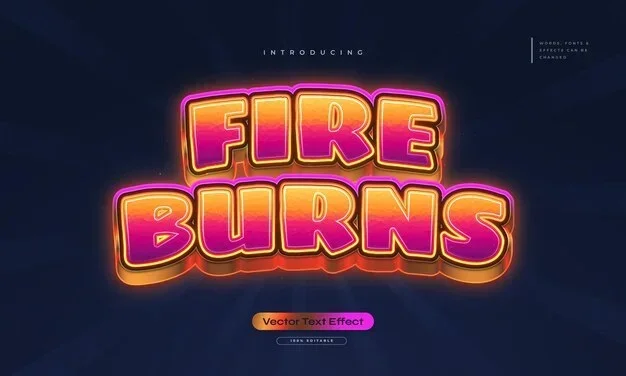
Fire Text Generator to Create Stunning Text Effects Fast
A fire text generator lets you create bold, flame-style typography in seconds without any design experience. Whether you want glowing fire text for a logo, social media post, or video thumbnail, these tools make it simple and fun. You will learn how fire text generators work, which ones to use, and tips to make your text look incredible. This guide covers everything from free online options to advanced software features. By the end, you will know exactly how to create eye-catching fire text effects that grab attention every time.
A fire text generator is a tool that creates bold, flame-style typography in seconds. You type your text, pick a style, and watch as fire effects wrap around your letters. It is one of the fastest ways to add drama and energy to any design project.
Whether you are a beginner or a seasoned designer, a fire text generator saves you hours of work. Instead of drawing flames by hand or wrestling with complex software, you get instant results. These tools use smart algorithms to simulate real fire textures, glows, and animations. The result looks professional without requiring any technical skills.
Fire text effects are everywhere online. You see them in YouTube thumbnails, Instagram posts, gaming logos, and event flyers. They grab attention immediately. A fire text generator makes it easy for anyone to create that same bold look. In this guide, we will walk you through everything you need to know.
We will cover how fire text generators work, the best tools available, and step-by-step tips for creating jaw-dropping effects. You will also learn common mistakes to avoid and how to make your fire text look its absolute best. Let us dive in.
Key Takeaways
- Fire text generators are easy to use: Most tools let you create stunning flame effects in just a few clicks, no design skills needed.
- Free and paid options exist: You can find great fire text tools online for free, or upgrade to premium software for advanced features.
- Customization is key: You can adjust colors, glow intensity, flame size, and animation to match your brand or project perfectly.
- Fire text works great for social media: Bold fire typography helps your posts stand out in crowded feeds and boosts engagement.
- Start with templates: Many generators offer pre-made fire text styles you can customize instantly.
- Export in multiple formats: Good fire text tools let you save your creation as PNG, GIF, or SVG for use anywhere.
📑 Table of Contents
What Is a Fire Text Generator?
A fire text generator is an online tool or software application that adds flame and fire effects to text. You type in any word or phrase, and the tool wraps realistic or stylized fire around each letter. Some generators add glowing embers, smoke trails, or animated flames that move across the screen.
These tools work by applying layered visual effects to your text. The base layer is your text itself. Then the tool adds a fire texture overlay, glow effects, and sometimes particle animations. The result looks like your text is literally on fire.
Fire text generators come in different shapes and sizes. Some are simple web-based tools you can use for free. Others are professional-grade software with deep customization options. The best part is that most of them are very easy to use, even if you have zero design experience.
How Does a Fire Text Generator Work?
Under the hood, a fire text generator uses a combination of techniques to create the fire effect. First, it takes your input text and renders it on a canvas. Then it applies a series of visual filters and particle systems that simulate flames.
Here is a simple breakdown of the process:
- Text Input: You type your desired words or phrase into the tool.
- Font Selection: You choose a font style that works well with fire effects. Bold, thick fonts usually look best.
- Effect Application: The tool adds fire textures, glow layers, and color gradients around the text.
- Animation (Optional): Some generators add moving flames, flickering effects, or particle animations.
- Export: You download your creation as an image file or animated GIF.
The process is similar to how a how does a generator work system converts energy into output. The tool takes your simple text input and converts it into a visually powerful result using built-in effects engines.
Why Use a Fire Text Generator?
There are many reasons to use a fire text generator for your projects. Let us look at the biggest benefits that make these tools worth your time.
Speed and Efficiency
Creating fire text effects from scratch in design software can take hours. A fire text generator does it in seconds. You type your text, pick a preset, and you are done. This speed is perfect for quick social media posts, event banners, or last-minute design needs.
Think about it this way. If you needed to start a generator manually, you would follow a few simple steps to get it running. A fire text generator works the same way. You follow a few easy steps, and you get a powerful result almost instantly.
No Design Skills Required
You do not need to be a graphic designer to create stunning fire text. These tools are built for everyone. The interfaces are simple and intuitive. Most generators use drag-and-drop or point-and-click controls. If you can use a basic website, you can use a fire text generator.
Professional-Quality Results
Modern fire text generators produce high-quality output that looks professional. The fire effects are realistic, the colors are vibrant, and the details are sharp. You can use these results for business presentations, marketing materials, or personal projects without any embarrassment.
Cost-Effective
Many fire text generators are free to use. Even the paid options are much cheaper than hiring a professional designer or buying expensive software. For just a few dollars a month, you get access to dozens of fire text styles and effects. Compare that to the cost of a how much does a generator cost for a house installation, and you will see how affordable these tools really are.
Best Fire Text Generators to Try
Not all fire text generators are created equal. Some are better for beginners, while others offer advanced features for professionals. Here are some of the best options available right now.
1. Cool Text
Cool Text is a popular free online tool that offers fire text effects among many other styles. You simply type your text, choose the fire effect, and download the image. It is clean, simple, and fast. Great for beginners who want quick results without any learning curve.
2. Flaming Text
Flaming Text has been around for a long time and remains one of the best options for fire text effects. It offers a wide range of templates and customization options. You can adjust flame colors, sizes, and glow intensity. The free version gives you plenty of features, and the paid version unlocks even more.
3. TextGiraffe
TextGiraffe provides a simple interface with several fire and flame text presets. It is perfect for creating quick social media graphics or YouTube thumbnails. The tool generates your text effect fast and lets you download it in high resolution.
4. Adobe Firefly (Advanced)
For professional designers, Adobe Firefly offers AI-powered text effects including fire styles. This is a premium tool with deep customization. It integrates with other Adobe products, making it ideal for designers who already work in the Adobe ecosystem. The AI capabilities mean you can create unique fire effects that stand out from the crowd.
5. Canva with Fire Text Plugins
Canva is a versatile design platform that supports various text effect plugins. Some of these plugins add fire text capabilities. If you already use Canva for your design work, adding a fire text plugin is an easy way to expand your creative options without learning new software.
How to Create Amazing Fire Text Effects
Now that you know what fire text generators are and which ones to use, let us talk about how to create truly amazing effects. Follow these steps and tips to get the best results every time.
Step 1: Choose the Right Font
The font you choose makes a huge difference in how your fire text looks. Bold, thick fonts work best because they give the fire effect more surface area to wrap around. Thin or delicate fonts can look weak and get lost in the flames. Here are some font tips:
- Use bold sans-serif fonts for a modern, aggressive look.
- Try serif fonts for a more classic, dramatic feel.
- Avoid overly decorative fonts that clash with the fire effect.
- Test a few different fonts before you settle on one.
Step 2: Pick Your Fire Color Scheme
Fire comes in many colors. The classic orange and yellow flames are the most popular, but you can go beyond that. Red fire looks intense and aggressive. Blue fire gives a cool, otherworldly feel. Purple fire adds a mysterious, magical vibe. Choose colors that match the mood of your project.
Step 3: Adjust the Glow and Intensity
Most fire text generators let you control the glow and intensity of the fire effect. More glow creates a softer, dreamier look. Less glow gives you sharper, more intense flames. Play around with these settings until you find the balance that works for your design.
Step 4: Add Supporting Elements
Fire text looks even better when you add supporting elements around it. Consider adding a dark background to make the flames pop. Smoke effects behind the text add depth. Sparks or embers flying around the text create extra drama. These small touches make a big difference.
Step 5: Export in the Right Format
When you are happy with your fire text, export it in the right format for your intended use. PNG files work great for static images with transparent backgrounds. GIF files are perfect if you want animated flames. SVG files are best for scaling to different sizes without losing quality. Choose the format that fits your needs.
Common Mistakes to Avoid
Even with a great fire text generator, it is easy to make mistakes that ruin your design. Here are the most common ones and how to avoid them.
Using Too Many Effects
It is tempting to pile on every fire effect the tool offers. But too many effects make your text look cluttered and messy. Stick to one or two key effects and keep it clean. Less is often more when it comes to fire text design.
Choosing the Wrong Background
A busy or bright background can make your fire text hard to read. Always use a dark, simple background that lets the flames stand out. Black, dark gray, or deep blue backgrounds work best for fire text effects.
Ignoring Readability
Your fire text should still be easy to read. If the flames are so intense that they obscure the letters, you have gone too far. Reduce the flame intensity or size until your text is clearly legible. The text is the message. The fire is just the style.
Forgetting About Resolution
Always export your fire text at the highest resolution possible. Low-resolution images look blurry and unprofessional, especially when the fire effects need fine detail. If you plan to print your design, make sure to use a high DPI setting.
Fire Text Generator Use Cases
Fire text effects are versatile and work well in many different contexts. Here are some of the most popular use cases where a fire text generator shines.
Social Media Posts
Fire text grabs attention in social media feeds. Whether you are posting on Instagram, Facebook, Twitter, or TikTok, bold fire typography makes your content stand out. Use it for announcements, quotes, promotional posts, or any content where you want to make a strong visual impact.
YouTube Thumbnails
YouTube thumbnails need to be eye-catching to get clicks. Fire text is one of the most effective ways to make your thumbnail pop. Pair dramatic fire text with a compelling image, and you will see higher click-through rates on your videos.
Gaming Content
The gaming community loves fire effects. Use a fire text generator to create usernames, clan logos, tournament banners, or stream overlays with flame-style text. It fits perfectly with the gaming aesthetic and helps your content look professional.
Event Flyers and Posters
For concerts, parties, sports events, or any exciting occasion, fire text adds energy and excitement to your promotional materials. A fire text generator makes it easy to create professional-looking flyers without hiring a designer.
Branding and Logos
Some brands use fire elements in their logo or marketing materials. A fire text generator can help you prototype fire-themed text for your brand identity. Just make sure your final logo is created with professional design software for the best quality.
Fire Text Generator vs. Manual Design
You might wonder whether a fire text generator is really better than creating fire effects manually in design software. Let us compare the two approaches.
| Feature | Fire Text Generator | Manual Design |
|---|---|---|
| Speed | Seconds to minutes | Hours to days |
| Skill Level Required | None | Advanced |
| Cost | Free or low cost | Expensive software |
| Customization | Good with presets | Unlimited |
| Realism | Very good | Can be excellent |
| Best For | Quick projects, beginners | Professional, complex designs |
For most people, a fire text generator is the better choice. It is faster, easier, and more affordable. Manual design gives you more control, but it requires significant time and skill. If you just need great fire text effects without the hassle, a generator is the way to go.
If you are curious about how the underlying technology works, think about how a regular generator converts fuel into electricity. A fire text generator converts your text input into a visually stunning output using built-in effect engines. The principle is the same, just applied to digital design instead of power generation.
Tips for Making Your Fire Text Stand Out
Want your fire text to look even more impressive? Try these pro tips that will take your designs to the next level.
- Use contrasting colors: Orange fire on a dark background creates maximum contrast and visual impact.
- Add a subtle shadow: A soft shadow behind your fire text adds depth and makes the letters pop.
- Experiment with animation: Animated fire text with flickering flames looks much more dynamic than static images.
- Keep text short: One to three words work best for fire text effects. Longer text can become hard to read.
- Pair with complementary graphics: Smoke, sparks, and heat waves enhance the fire text effect beautifully.
- Test on different devices: Make sure your fire text looks good on both desktop and mobile screens.
These simple tips can make a huge difference in the final result. Even a basic fire text generator can produce amazing effects when you apply these techniques.
Final Thoughts
A fire text generator is one of the most fun and useful design tools available today. Whether you are creating content for social media, YouTube, gaming, or business, fire text effects add energy, drama, and visual impact to your work. The best part is that anyone can use these tools, regardless of skill level.
We have covered how fire text generators work, the best tools available, step-by-step creation tips, common mistakes to avoid, and creative use cases. Now it is your turn to try it out. Pick a fire text generator, type your words, and start experimenting with different effects. You will be amazed at what you can create in just a few minutes.
Remember, the key to great fire text is balance. Use bold fonts, dark backgrounds, and the right amount of flame intensity. Avoid clutter and keep your text readable. With practice, you will create fire text effects that truly stand out and capture attention every time.
So go ahead and fire up your creativity. A fire text generator is waiting to turn your simple words into stunning visual art. Start creating today and see the difference for yourself.
Frequently Asked Questions
What is a fire text generator?
A fire text generator is a tool that adds flame and fire effects to your text. You type in your words, choose a fire style, and the tool creates a dramatic fire text effect instantly. It is an easy way to make bold, eye-catching typography without any design skills.
Are fire text generators free to use?
Many fire text generators offer free versions with basic features. Some tools are completely free, while others have a free tier with premium upgrades available. You can find great options online without spending any money at all.
Can I use fire text effects for commercial projects?
Yes, most fire text generators allow commercial use of the images you create. However, you should always check the specific tool’s terms of service before using fire text in commercial materials to make sure you have the right permissions.
Do I need any design skills to use a fire text generator?
No design skills are needed at all. Fire text generators are designed to be simple and intuitive. If you can type words and click buttons, you can create stunning fire text effects in minutes. The tools handle all the complex work for you.
What file formats can I export fire text in?
Most fire text generators let you export your creation as PNG, JPG, GIF, or SVG files. PNG is best for static images with transparent backgrounds. GIF works well for animated fire effects. SVG is ideal for scalable graphics that stay sharp at any size.
Can I customize the fire colors and effects?
Absolutely. Most fire text generators offer customization options for colors, glow intensity, flame size, and animation speed. You can adjust these settings until the fire text matches your exact vision and brand style perfectly.