Discover What ITSM Tools Are and Why They Matter So Much
ITSM tools are software platforms that help teams manage IT services from start to finish. They cover everything from incident tracking to change management, making IT operations smoother and faster. Understanding ITSM tools is essential for any organization that wants to deliver reliable, high-quality service to its users.
ITSM tools have become essential for organizations that want to deliver top-notch IT services. Whether you run a small business or a large enterprise, these platforms help you manage everything from incidents to changes in a structured way. ITSM tools stand for Information Technology Service Management tools, and they are the backbone of modern IT operations.
At their core, ITSM tools help teams track, manage, and resolve IT issues efficiently. They replace messy spreadsheets and email chains with organized workflows. If you have ever wondered how big companies keep their IT running smoothly, the answer is usually ITSM tools. In this article, we will break down everything you need to know about these powerful platforms.
You will learn what ITSM tools do, why they matter, and how to pick the right one for your team. We will also explore key features, benefits, and common mistakes to avoid. By the end, you will have a clear picture of how ITSM tools can transform your IT service management approach.
Key Takeaways
- ITSM tools streamline IT operations: They replace manual processes with automated workflows that save time and reduce errors.
- They improve service quality: ITSM tools help teams respond faster to incidents and meet service level agreements consistently.
- Multiple types exist for different needs: From help desk software to full ITIL frameworks, there is an ITSM tool for every organization.
- Choosing the right tool matters: Factors like team size, budget, and integration needs should guide your decision.
- Implementation takes planning: Success with ITSM tools depends on proper onboarding, training, and ongoing optimization.
- They support disaster recovery: ITSM tools play a key role in business continuity and infrastructure resilience planning.
📑 Table of Contents
- What Are ITSM Tools?
- Why ITSM Tools Matter for Businesses
- Core Features to Look For in ITSM Tools
- Popular ITSM Tools and What They Do
- How to Choose the Right ITSM Tool
- Common Mistakes When Implementing ITSM Tools
- ITSM Tools and Infrastructure Resilience
- Benefits of Using ITSM Tools
- Getting Started with ITSM Tools
- The Future of ITSM Tools
- Final Thoughts
What Are ITSM Tools?
ITSM tools are software solutions designed to help organizations manage their IT services throughout the entire lifecycle. These platforms cover everything from tracking user requests to resolving major outages. Think of them as the command center for your IT team.
The term ITSM stands for IT Service Management. It is a framework that focuses on delivering value to customers through effective IT services. ITSM tools put this framework into practice by providing the digital infrastructure needed to support it.
How ITSM Tools Work
ITSM tools work by centralizing all IT-related activities in one place. When a user reports a problem, the tool creates a ticket. The ticket then moves through a workflow until the issue is resolved. This process is tracked, measured, and reported on automatically.
Most ITSM tools follow the ITIL framework. ITIL stands for Information Technology Infrastructure Library. It provides best practices for IT service management. Many ITSM tools are built around ITIL processes like incident management, problem management, and change management.
Key Components of ITSM Tools
Every ITSM tool has several core components that make it work:
- Ticketing system: This is where all incidents and requests are logged and tracked.
- Workflow engine: This automates how tickets move through different stages.
- Knowledge base: This stores articles and solutions that help agents resolve issues faster.
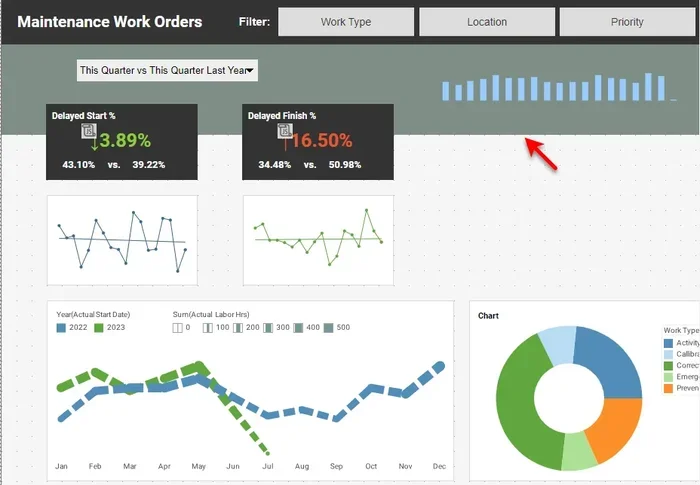
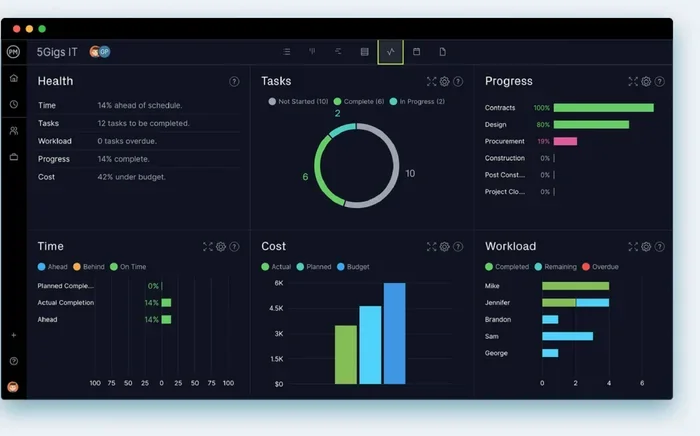
- Reporting dashboard: This provides real-time data on performance and trends.
- Service catalog: This lists all the services that the IT team offers to users.
Why ITSM Tools Matter for Businesses
ITSM tools are not just nice-to-have software. They are critical for businesses that rely on technology to operate. Without proper IT service management, organizations face longer downtime, frustrated users, and lost productivity.
Improved Incident Response
One of the biggest benefits of ITSM tools is faster incident response. When an outage occurs, every minute counts. These tools automatically route tickets to the right team members. They also prioritize issues based on severity. This means critical problems get fixed quickly, while minor requests are handled efficiently.
Better Compliance and Reporting
Many industries have strict regulations around IT operations. ITSM tools help organizations stay compliant by maintaining detailed audit trails. Every action is logged, so you always have a record of what happened and when. This makes reporting to regulators much easier.
Enhanced User Satisfaction
When IT issues get resolved faster, users are happier. ITSM tools improve the overall user experience by making it easy to submit requests and track progress. Many platforms also offer self-service portals, which let users find answers on their own without waiting for help.
Core Features to Look For in ITSM Tools
Not all ITSM tools are created equal. When evaluating options, look for these essential features that make a real difference in day-to-day operations.
Ticket Management
A strong ticketing system is the foundation of any ITSM tool. It should allow agents to create, assign, and track tickets effortlessly. Look for features like automatic ticket routing, SLA tracking, and escalation rules. These capabilities ensure that no issue falls through the cracks.
Workflow Automation
Workflow automation saves teams hours of manual work. With ITSM tools that offer automation, routine tasks are handled automatically. For example, a low-priority ticket might be auto-assigned to a junior agent. A high-severity incident could trigger an immediate alert to the senior team.
Knowledge Management
A good knowledge base is a game-changer for any IT team. ITSM tools with knowledge management let agents store and search solutions quickly. This reduces resolution time and empowers users to solve problems themselves through self-service options.
Reporting and Analytics
Data-driven decisions are key to improving IT operations. Look for ITSM tools that offer robust reporting dashboards. You should be able to track metrics like first-call resolution rate, average handle time, and ticket volume trends. These insights help you continuously improve your service.
Integration Capabilities
Your ITSM tool should play well with other software. Look for integrations with monitoring tools, communication platforms, and asset management systems. Seamless integration creates a unified IT ecosystem that reduces manual data entry and improves accuracy.
Popular ITSM Tools and What They Do
The market for ITSM tools is growing rapidly. Many platforms cater to different needs and budgets. Here are some of the most popular options and what they offer.
ServiceNow
ServiceNow is one of the leading ITSM tools on the market. It offers a comprehensive platform that covers ITIL processes end to end. ServiceNow is known for its powerful workflow automation and enterprise-grade features. It works well for large organizations with complex IT environments.
Jira Service Management
Jira Service Management is a popular choice for teams already using the Atlassian ecosystem. It provides strong incident and problem management capabilities. The platform is highly customizable and offers a user-friendly interface. It is a great option for mid-sized teams looking for flexible ITSM tools.
Freshservice
Freshservice is a cloud-based ITSM tool that is easy to set up and use. It offers features like automated ticketing, asset management, and a self-service portal. Freshservice is ideal for small to medium-sized businesses that want professional IT service management without a steep learning curve.
Zendesk
Zendesk started as a help desk platform and has evolved into a full ITSM tool. It excels at customer-facing support and offers strong reporting features. Zendesk is a solid choice for organizations that need both internal IT support and external customer service capabilities.
How to Choose the Right ITSM Tool
Selecting the right ITSM tool can feel overwhelming. There are many options, and each has its strengths. Here is a practical guide to help you make the best decision for your organization.
Assess Your Team Size and Needs
Start by evaluating your team size and the volume of requests you handle. A small team might do well with a simple help desk tool. A large enterprise needs a robust platform with advanced automation and reporting. Understanding your needs is the first step in choosing the right ITSM tools.
Consider Your Budget
Budget plays a big role in your decision. Some ITSM tools offer free tiers for small teams. Others require significant investment. Make sure to factor in implementation costs, training, and ongoing maintenance when calculating total cost of ownership.
Evaluate Ease of Use
Even the most powerful ITSM tool will fail if your team does not adopt it. Look for platforms with intuitive interfaces and good onboarding support. The easier it is to use, the faster your team will see results.
Check Integration Options
Your ITSM tool should integrate with your existing tech stack. Check whether it connects to your monitoring tools, communication platforms, and other essential software. Good integration reduces duplication and keeps your workflows seamless.
Think About Scalability
Choose ITSM tools that can grow with your organization. As your team expands or your IT environment becomes more complex, your tool should be able to keep up. Look for platforms that offer flexible pricing and scalable features.
Common Mistakes When Implementing ITSM Tools
Implementing ITSM tools is not just about picking the right software. Many organizations make avoidable mistakes that lead to poor adoption and wasted investment. Here are the most common pitfalls to watch out for.
Skipping the Planning Phase
One of the biggest mistakes is jumping straight into implementation without proper planning. You need to define your goals, map out your workflows, and identify key stakeholders before you start. Rushing this phase often leads to a mismatched tool and frustrated users.
Overcomplicating Workflows
It is tempting to build overly complex workflows from the start. Keep your initial ITSM tool setup simple. You can always add complexity later as your team becomes more comfortable. Starting simple helps ensure higher adoption rates and faster wins.
Neglecting Training
Even the best ITSM tools will underperform if your team does not know how to use them. Invest in proper training for all users. Create documentation and offer ongoing support to help your team get the most out of the platform.
Ignoring Data Quality
Your ITSM tool is only as good as the data you put into it. Make sure your team enters accurate and consistent information. Poor data quality leads to misleading reports and bad decision-making.
ITSM Tools and Infrastructure Resilience
ITSM tools play an important role in keeping your entire IT infrastructure resilient. They do not just manage software issues, they also help coordinate responses to hardware failures, power outages, and other physical disruptions. When your infrastructure faces challenges, your ITSM tools help your team respond quickly and effectively.
For organizations that rely on backup power systems, ITSM tools can track the status and maintenance schedules of generators and UPS systems. Understanding your physical infrastructure is just as important as managing your digital services. For instance, when planning your backup systems, it helps to understand the difference between a generator and an inverter, since each serves a different purpose in keeping your systems running. You can explore more about this in a guide on what separates a generator from an inverter to make sure your setup stays reliable.
Additionally, when sizing your infrastructure for reliability, you need to consider the right capacity for your backup power systems. Just as you would carefully choose the right equipment for your facility, you should also choose the right ITSM tools for your team. If you are looking into power capacity planning, you can find guidance on what size whole-house generator you need to keep your systems running during outages. Similarly, understanding what powers a Generac generator helps you choose the right backup solution for your IT environment.
The key takeaway is that ITSM tools support the broader goal of infrastructure resilience. They ensure that your IT team is prepared for both digital and physical disruptions. By integrating your service management with your infrastructure planning, you create a more robust and reliable operation.
Benefits of Using ITSM Tools
Now that you understand what ITSM tools are and how they work, let us look at the tangible benefits they bring to organizations of all sizes.
Faster Resolution Times
ITSM tools dramatically reduce the time it takes to resolve IT issues. Automated routing, priority-based assignment, and knowledge base access all contribute to faster resolutions. Teams using ITSM tools consistently report shorter average handle times and improved first-call resolution rates.
Improved Collaboration
These platforms bring your entire IT team together in one shared workspace. Agents can collaborate on complex tickets, share notes, and escalate issues seamlessly. This level of collaboration leads to better outcomes and a more cohesive team dynamic.
Greater Visibility and Control
With ITSM tools, managers have real-time visibility into operations. They can see which tickets are stuck, which agents are overloaded, and where bottlenecks exist. This control allows for proactive management and continuous improvement of IT services.
Cost Savings
By automating routine tasks and improving efficiency, ITSM tools help organizations save money. Fewer repeated tickets, faster resolutions, and better resource allocation all contribute to lower operational costs over time.
Scalable Growth
As your organization grows, your IT needs will evolve. ITSM tools scale with you, accommodating more users, more services, and more complex workflows. This scalability ensures that your IT service management keeps pace with your business.
Getting Started with ITSM Tools
If you are ready to implement ITSM tools in your organization, here is a practical roadmap to get you started.
Step 1: Define Your Goals
Start by identifying what you want to achieve with ITSM tools. Do you want to reduce incident resolution time? Improve user satisfaction? Ensure better compliance? Clear goals will guide your selection and implementation process.
Step 2: Evaluate Your Current Processes
Before adopting any ITSM tool, map out your existing IT processes. Identify pain points, bottlenecks, and areas for improvement. This assessment will help you choose a tool that addresses your specific needs.
Step 3: Shortlist and Demo Tools
Research ITSM tools that align with your goals and budget. Request demos from your top choices. Involve your team in the evaluation process to ensure the tool meets their needs as well.
Step 4: Plan Your Implementation
Create a detailed implementation plan that includes timelines, milestones, and responsibilities. A well-planned rollout reduces disruption and increases the chances of success with your ITSM tools.
Step 5: Train Your Team
Invest in comprehensive training for all users. Make sure everyone understands how to use the ITSM tool effectively. Ongoing training and support will help maintain high adoption rates over time.
Step 6: Monitor and Optimize
After rollout, continuously monitor your ITSM tool performance. Use the reporting features to identify areas for improvement. Regular optimization ensures that your tool continues to deliver value as your needs evolve.
The Future of ITSM Tools
The world of ITSM tools is constantly evolving. New technologies are shaping the future of IT service management in exciting ways.
AI and Machine Learning
Artificial intelligence is making ITSM tools smarter and more efficient. AI-powered features can automatically categorize tickets, suggest solutions, and predict potential outages. Machine learning algorithms analyze historical data to improve routing and resolution over time.
Cloud-First Solutions
More organizations are moving to cloud-based ITSM tools. Cloud platforms offer greater flexibility, lower upfront costs, and easier maintenance. This trend is expected to continue as businesses prioritize agility and remote accessibility.
Integration with AIOps
AIOps, or Artificial Intelligence for IT Operations, is becoming a key trend. ITSM tools that integrate with AIOps platforms can provide deeper insights and more proactive management. This combination helps teams stay ahead of issues before they impact users.
Focus on Employee Experience
The future of ITSM tools is increasingly focused on employee experience. Modern platforms prioritize user-friendly interfaces, self-service options, and mobile access. Organizations that invest in these features see higher adoption rates and better overall satisfaction.
Final Thoughts
ITSM tools are no longer optional for organizations that want to thrive in a technology-driven world. They provide the structure, automation, and visibility needed to deliver excellent IT services consistently. From incident management to change tracking, these platforms cover every aspect of IT operations.
Choosing the right ITSM tools requires careful consideration of your team size, budget, and goals. Avoid common implementation pitfalls by planning thoroughly and investing in training. Start simple, optimize over time, and always keep your users at the center of your strategy.
The benefits of ITSM tools are clear: faster resolution times, better collaboration, improved compliance, and cost savings. Whether you are a small team or a large enterprise, the right ITSM tool can transform the way you manage IT services. Take the time to evaluate your options, and you will be well on your way to building a more efficient and resilient IT operation.
Frequently Asked Questions
What are ITSM tools used for?
ITSM tools are used to manage IT services across their entire lifecycle. They handle incident tracking, problem management, change management, and service request fulfillment. These platforms help IT teams deliver reliable, high-quality service to their organizations.
How do ITSM tools differ from help desk software?
Help desk software is typically focused on user support and ticket resolution. ITSM tools are broader and follow frameworks like ITIL. They cover the full scope of IT service management, including strategic planning, compliance, and continuous improvement.
Are ITSM tools only for large enterprises?
No, ITSM tools are available for organizations of all sizes. Many platforms offer affordable plans for small and mid-sized businesses. The key is to choose a tool that matches your team size and complexity of operations.
What is the ITIL framework in relation to ITSM tools?
ITIL is a set of best practices for IT service management. Many ITSM tools are built around ITIL processes such as incident management, problem management, and change management. The framework provides the methodology, while the tools provide the technology to execute it.
How long does it take to implement ITSM tools?
Implementation time varies based on the complexity of the tool and your organization. Simple setups can be ready in a few weeks. Larger enterprise deployments may take several months. Proper planning and training are key to a smooth implementation.
Can ITSM tools integrate with other business software?
Yes, most modern ITSM tools offer integration capabilities. They can connect with monitoring tools, communication platforms, CRM systems, and asset management software. These integrations create a unified ecosystem that improves efficiency and reduces manual work.