Create a Custom 2048 Tiles Generator for Your Website
A 2048 tiles generator lets you build your own version of the popular tile puzzle game directly on your website. With a custom 2048 tiles generator, you control the design, colors, tile values, and game rules. This guide walks you through everything you need to know to create a fully working 2048 game from scratch, including the tools, code structure, and customization options. By the end, you will have a ready-to-use 2048 tiles generator that you can deploy on any site.
Have you ever played the 2048 game and thought, “I could build this”? Well, you can. A 2048 tiles generator is a tool or piece of code that creates the sliding tile puzzle game we all love. It runs right in your web browser and can be added to any website with just a few lines of code.
Building your own 2048 tiles generator is a fun project. It lets you add a game to your site that keeps visitors engaged. Whether you are a beginner learning web development or a pro looking for a quick add-on, this guide has you covered. We will walk through every step, from planning to launch.
In this article, you will learn what a 2048 tiles generator is, why it is worth building, and exactly how to do it. We will cover the tools you need, the code structure, and tips for customizing your game. By the end, you will have a fully working 2048 game ready for your website.
Key Takeaways
- Easy to Build: A 2048 tiles generator is simple to create using basic HTML, CSS, and JavaScript.
- Full Customization: You can change tile designs, colors, grid sizes, and scoring rules to match your brand.
- No Libraries Needed: You can build a working 2048 game without relying on heavy frameworks.
- Responsive Design Matters: Make sure your 2048 game looks great on mobile and desktop.
- Quick Deployment: Once built, your custom 2048 tiles generator can go live in minutes.
- Great for Learning: Building a 2048 game teaches core web development skills.
- Fun and Engaging: Tile puzzle games keep visitors on your site longer.
📑 Table of Contents
- What Is a 2048 Tiles Generator?
- Why Build a Custom 2048 Tiles Generator?
- Tools and Technologies You Need
- Step-by-Step Guide to Building Your 2048 Tiles Generator
- Customizing Your 2048 Tiles Generator
- Launching and Maintaining Your 2048 Game
- Common Mistakes to Avoid
- Expert Tips for the Best 2048 Game
- Conclusion
What Is a 2048 Tiles Generator?
A 2048 tiles generator is a small program that builds the 2048 tile puzzle game. The original 2048 game was created in 2014 by Gabriele Cirulli. It quickly became one of the most played tile merging games on the internet. The goal is simple: slide tiles on a grid, merge matching numbers, and try to reach the 2048 tile.
A 2048 tiles generator takes this concept and turns it into code you can use. It handles the grid layout, tile movement, score tracking, and win conditions. Think of it as a game engine for the 2048 puzzle. You can use a 2048 clone or build one from scratch. Both approaches work well depending on your skill level.
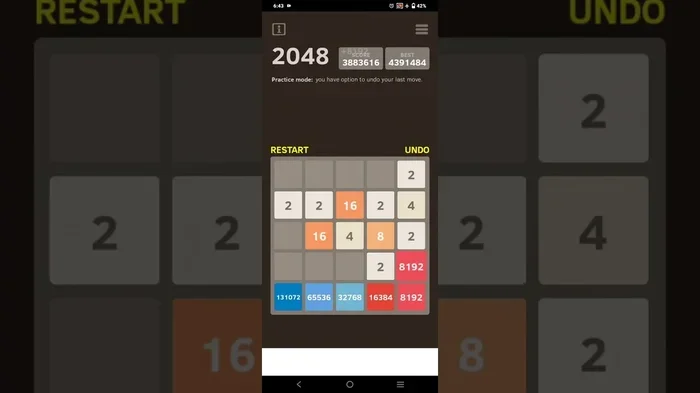
The beauty of a 2048 tiles generator is its simplicity. The game uses a 4×4 grid by default. Tiles with numbers like 2, 4, 8, and 16 slide around when you swipe or use arrow keys. When two tiles with the same number touch, they merge into one tile with the combined value. This core mechanic is what makes the 2048 tile puzzle so addictive.
How the 2048 Game Works
The 2048 game is a tile-based game built on a few simple rules. Here is how a typical 2048 tiles generator handles the gameplay:
- Grid Setup: The generator creates a 4×4 grid of empty tiles at the start.
- Random Tile Spawn: After each move, a new tile (usually a 2 or 4) appears in a random empty spot.
- Tile Movement: Players swipe or press arrow keys to move all tiles in one direction.
- Tile Merging: When two tiles with the same value collide, they merge into a single tile with double the value.
- Score Tracking: The generator keeps track of the player’s score as tiles merge.
- Game Over: The game ends when the grid is full and no more moves are possible.
These rules are easy to code. That is why so many developers start with a 2048 clone as their first web game project. The sliding tile logic is straightforward, and the visual design is clean and minimal.
Why Build a Custom 2048 Tiles Generator?
You might wonder why you should build your own 2048 tiles generator instead of just using a free one online. There are several great reasons. A custom 2048 game gives you full control over how it looks and feels. You can match the colors, fonts, and layout to your website’s style.
A ready-made 2048 online game might not fit your brand. It could have colors or logos that clash with your site. With your own 2048 tiles generator, every pixel is yours. You decide the tile design, the background, the font size, and even the grid size.
Here are some key reasons to build a custom 2048 game:
- Brand Matching: Use your brand colors and fonts to keep the game on-theme.
- Unique Experience: Visitors are more likely to play a game that feels original.
- No External Dependencies: You own the code. No third-party scripts or ads.
- Learning Opportunity: Building a 2048 game teaches HTML, CSS, and JavaScript fundamentals.
- Mobile Friendly: You can make the game responsive for touch screens from the start.
- Custom Rules: Want a 5×5 grid or different tile values? You can change anything.
Another great reason is that a tile puzzle game like 2048 keeps people on your site longer. Visitors who play games tend to explore more pages. This can improve your site engagement metrics. A well-placed 2048 game can also serve as a fun break content piece that makes your site more memorable.
Tools and Technologies You Need
Building a 2048 tiles generator does not require expensive software or advanced skills. You only need a few basic tools that are free and widely used. If you know a little HTML, CSS, and JavaScript, you are already set.
Essential Tools for Your 2048 Game
Here is what you need to get started with your 2048 generator project:
- Text Editor: VS Code, Sublime Text, or even Notepad works fine. A good editor highlights your code and catches errors.
- Web Browser: Chrome, Firefox, or Edge. You will test your game here. All modern browsers support the HTML5 and JavaScript features you need.
- Basic Knowledge: Understanding of HTML for structure, CSS for styling, and JavaScript for game logic.
- Local Server (Optional): Tools like Live Server in VS Code let you preview your game instantly as you code.
You do not need any frameworks or libraries to build a 2048 tiles generator. The game logic is simple enough to write in plain JavaScript. This makes the project lightweight and fast. There are no heavy dependencies to slow things down.
Some developers prefer to use a 2048 game engine or library for faster results. Libraries like Phaser or PixiJS can help, but they add complexity. For a simple tile-based game, plain JavaScript is all you need. Keep it simple and clean.
Optional Tools That Help
While not required, these tools can make building your 2048 tiles generator even easier:
- CodePen or JSFiddle: Great for testing small code snippets quickly.
- Figma or Canva: Use these to design your tile graphics before coding.
- Git and GitHub: Track your changes and share your project with others.
- Lighthouse (Chrome DevTools): Test the performance and accessibility of your game once it is live.
With just a text editor and a browser, you can build a working 2048 game in a single afternoon. The barrier to entry is very low, which is part of why this project is so popular among beginners.
Step-by-Step Guide to Building Your 2048 Tiles Generator
Now let us get into the fun part. This section walks you through building a basic 2048 tiles generator from scratch. We will break it down into clear steps so you can follow along easily.
Step 1: Set Up the HTML Structure
Start by creating the basic HTML file. This is the skeleton of your 2048 game. You need a container for the game board and a section for the score.
Here is a simple HTML structure to get you started:
Create an HTML file called index.html. Inside it, add a div with the id “game-container.” This will hold the grid. Add another div for the score display. Link your CSS and JavaScript files at the bottom of the body tag so the page loads faster.
Step 2: Style the Game Board with CSS
Next, style the grid using CSS. The 2048 game uses a 4×4 grid of tiles. Each tile needs a background color, rounded corners, and a centered number. Use CSS grid or flexbox to arrange the tiles neatly.
Set the game container to a fixed width, like 400 pixels. Make each tile cell about 90 pixels wide with a small gap between them. Use different background colors for different tile values. For example, a tile with “2” can be light yellow, while a tile with “2048” can be a bold orange. This color scheme makes the game visually appealing.
Make sure your CSS is responsive. Use media queries to shrink the grid on smaller screens. A responsive 2048 game works well on phones and tablets, not just desktop computers.
Step 3: Write the JavaScript Game Logic
This is the heart of your 2048 tiles generator. The JavaScript code handles tile movement, merging, and scoring. Here is a breakdown of what your script needs to do:
- Initialize the Grid: Create a 4×4 array filled with zeros. This represents the empty game board.
- Spawn Tiles: Add a random 2 or 4 to an empty cell at the start of the game and after every move.
- Handle Input: Listen for arrow key presses or swipe gestures. Move all tiles in the selected direction.
- Merge Tiles: Check for adjacent tiles with the same value and combine them. Add the merged value to the score.
- Check for Win: If a tile reaches the value 2048, display a win message.
- Check for Game Over: If the grid is full and no merges are possible, end the game.
The tile swipe logic is the trickiest part. You need to slide tiles in the chosen direction, merge them, and then spawn a new tile. Break this into small functions. Test each function separately before combining them.
For the swipe support on mobile devices, use touch event listeners. Detect the swipe direction and trigger the same tile movement logic as arrow keys. This makes your 2048 game playable on any device.
Step 4: Add Score Tracking and Game Status
Display the current score at the top of the game board. Update it every time tiles merge. You can also add a “best score” feature that saves the highest score using the browser’s local storage.
Add a game over screen that appears when no more moves are possible. Show the final score and a button to restart the game. A simple restart function clears the grid and spawns two new tiles.
Step 5: Test Your 2048 Game
Test your game thoroughly before launching. Try every possible move. Check that tiles merge correctly and that the score updates properly. Test on different browsers and devices to make sure everything works.
Ask friends or family to play your game. Fresh eyes often catch bugs you might have missed. Fix any issues you find, and then you are ready to go live.
Customizing Your 2048 Tiles Generator
Now that you have a working 2048 game, it is time to make it your own. Customization is what turns a basic 2048 clone into something unique and branded.
Change the Tile Design
One of the easiest ways to customize your 2048 tiles generator is to change the tile design. Instead of plain numbered tiles, you can use icons, images, or custom graphics. For example, you could use food icons for each tile level or brand-themed graphics that match your website.
Use CSS to add background images or gradients to each tile. You can also add box shadows and hover effects to make the tiles feel more dynamic. A polished tile design makes a big difference in how professional your game looks.
Adjust the Grid Size
The standard 2048 game uses a 4×4 grid. But your custom 2048 tiles generator can use any size. Try a 3×3 grid for a simpler game or a 5×5 grid for more challenge. Just remember that larger grids need more code to handle tile movement and merging.
Add Special Tiles and Power-Ups
Take your 2048 game to the next level by adding special tiles. For example, you could add a “bomb” tile that clears a row or a “shield” tile that prevents a game over for one move. These custom features make your game more exciting and unique.
You can also add different game modes. A time challenge mode where players try to reach 2048 as fast as possible. Or a relaxed mode with unlimited undos. The possibilities are endless with your own 2048 tiles generator.
Match Your Website Theme
Make sure your 2048 game fits the look and feel of your website. Use your site’s color palette and fonts in the game. If your website is dark themed, make the game background dark too. This creates a seamless experience for visitors.
Keep the game board centered and easy to find on the page. Place it above the fold so visitors see it immediately. A well-integrated 2048 game becomes a natural part of the site rather than an afterthought.
Launching and Maintaining Your 2048 Game
Once your 2048 tiles generator is built and tested, it is time to put it on your website. The deployment process is simple. Upload your HTML, CSS, and JavaScript files to your web server. If you use a hosting platform, you can drag and drop the files directly.
Make sure your game loads quickly. Optimize your code by minifying the JavaScript and CSS files. Compress any images you use for the tiles. A fast-loading game keeps visitors engaged and improves your site speed scores.
After launch, keep an eye on how visitors interact with your 2048 game. Use analytics tools to track how many people play it and how long they stay. If you notice the game is popular, consider adding new features or seasonal themes to keep it fresh.
Regular maintenance keeps your 2048 tiles generator running smoothly. Fix any bugs that users report. Update the design if your website gets a redesign. A well-maintained game adds long-term value to your site.
Just like how a home generator keeps your house powered during outages, your 2048 tiles generator keeps visitors entertained and coming back. The small investment of building time pays off in increased engagement and visitor satisfaction.
Connecting Your Game to Your Website
Embedding your 2048 game on your site is straightforward. You can either link directly to the game page or embed it using an iframe. An iframe lets you display the game within an existing page without redirecting visitors.
Make sure the iframe is responsive. Set the width to 100% and adjust the height based on the device. Test the embedded game on both desktop and mobile to ensure it works smoothly. A seamless connection between your site and the game creates the best user experience.
Common Mistakes to Avoid
Building a 2048 tiles generator is straightforward, but a few common mistakes can trip you up. Here is what to watch out for:
- Skipping Mobile Testing: Many developers build the game on desktop and forget to test on mobile. Always test touch controls.
- Overcomplicating the Code: Keep your JavaScript clean and modular. Do not write long, tangled functions.
- Ignoring Performance: Heavy CSS animations or large images can slow down your game. Keep it lightweight.
- Forgetting Game States: Make sure you handle win, lose, and restart states properly.
- Not Saving Progress: Use local storage to save the best score so players feel rewarded.
Avoiding these mistakes saves you time and frustration. A clean, well-tested 2048 game will perform reliably for all your visitors.
Expert Tips for the Best 2048 Game
Here are some expert tips to make your 2048 tiles generator stand out from the crowd:
- Add Sound Effects: A subtle click sound when tiles merge makes the game feel more satisfying.
- Use CSS Transitions: Smooth animations when tiles slide and merge improve the user experience.
- Add a Leaderboard: Let visitors compete for the high score. This adds a social element to your game.
- Keep It Simple: The original 2048 game works because it is simple. Do not add too many features at once.
- Optimize for Speed: A game that loads in under one second keeps visitors from leaving.
These small touches make a big difference. Visitors remember games that feel polished and fun. Your custom 2048 tiles generator can become a beloved feature of your website.
Conclusion
Building a custom 2048 tiles generator is a rewarding project that anyone can do. It combines creativity with technical skills and results in a fun, engaging addition to any website. You now know what a 2048 tiles generator is, how it works, and exactly how to build one from scratch.
Start with the basic HTML, CSS, and JavaScript structure. Style your game board to match your brand. Add the core game logic for tile movement and merging. Customize the design, test thoroughly, and launch. Your 2048 game will bring visitors back again and again.
The best part is that your 2048 tiles generator is entirely yours. You can update it, expand it, and make it better over time. Whether you are a beginner or an experienced developer, this project adds real value to your website. So grab your text editor, start coding, and bring your 2048 game to life today.
Frequently Asked Questions
What is a 2048 tiles generator?
A 2048 tiles generator is a tool or code that creates the popular sliding tile puzzle game called 2048. It builds the game grid, handles tile movement and merging, tracks the score, and manages game states like win and game over. You can use a 2048 tiles generator to add a fun, interactive game to any website.
Do I need to know how to code to build a 2048 tiles generator?
Yes, basic knowledge of HTML, CSS, and JavaScript is helpful. The good news is that building a 2048 game is one of the best beginner projects. The code is straightforward and well-documented. If you are new to programming, this is a great way to learn web development fundamentals while creating something fun.
Can I customize the look of my 2048 game?
Absolutely. With your own 2048 tiles generator, you control every visual aspect. You can change the tile colors, fonts, background, grid size, and even add custom graphics. This means your game can match your website’s brand and style perfectly, making it feel like a native part of your site.
Is the 2048 game mobile-friendly?
Yes, a well-built 2048 tiles generator works great on mobile devices. You can add touch swipe support so players can slide tiles with their fingers. Using responsive CSS ensures the game scales properly on phones and tablets. Most people play 2048 on their phones, so mobile support is essential.
How long does it take to build a 2048 tiles generator?
A basic 2048 tiles generator can be built in a few hours if you are comfortable with HTML, CSS, and JavaScript. More advanced features like sound effects, animations, and custom game modes may take a bit longer. The project is manageable for beginners and a fun weekend coding challenge.
Can I use a 2048 tiles generator on any website platform?
Yes. Since a 2048 tiles generator is built with standard web technologies, it works on any platform that supports HTML and JavaScript. Whether you use WordPress, Shopify, Wix, or a custom-built site, you can embed or link to your 2048 game. Simply upload the files or add an embed code to your page.